- March 19, 2026
- Categories: Digital Marketing
How a GA4 Audit Improves Marketing Performance
In today’s digital world, can you make marketing choices if your data is poor?
A weak system in Google Analytics 4 (GA4) or similar tools can lead to bad data. This also results in wrong choices and wasted marketing money.
The Government Digital Service (GDS) utilised GA4 to track page views for nearly 2 years. As a result, they shifted more than 1,500 analytics users across government to GA4.
Unlike Universal Analytics, Google’s new tools deliver better reporting and more recent tracking.
Even a tool with many features works well only if the setup is correct.
This is where Google’s analytics platform audit helps. It ensures your setup is complete and free of mistakes. Most importantly, it checks that everything matches your marketing objectives.
It reviews your analytics system configuration and checks its:
- Data quality
- Structure
- Tracking
An audit allows you to utilise tracking tool insights to upgrade your marketing with confidence. Explore this guide to learn how it can improve your marketing results.
In this blog, you will learn:
- What is Google Analytics 4 audit
- Why it matters for marketing growth
- How does it confirm accurate data for better decisions
- How it improves campaign monitoring and measurement
- How it improves conversion tracking
- What are its benefits for your business
What Is a GA4 Audit?
Google Analytics 4 is the modern version of Google’s analytics platform. It is designed to record visitor behaviour on apps and websites. This analytics platform offers more features than Universal Analytics (UA).
It delivers improved reporting, works across platforms and gives comprehensive user data.
Like any analytics tool, Google’s analytics system must be set up accurately to get the full benefits. That’s why an analytics platform audit is needed.
This audit is a watchful check of your data tracking setup. It makes sure your data is accurate and fits your business goals. It looks at user access, traffic history, conversions and events.
Google’s analytics audit helps businesses find and fix tracking issues. It makes sure the system works at its best.
Review GA4 Configuration and Property Setup
A GA4 audit should begin with an evaluation of the main settings. This step checks that your tracking platform assets and data streams are set up accurately.
Each app or website sends data to Google’s data tracking system through streams. During the audit, check that the correct streams are working and connected to the reporting platform.
Make sure your property settings are right. Poor settings can make your data wrong or incomplete.
Many sites use Google Tag Manager (GTM) to handle tags. The audit checks that GTM is connected and tags fire correctly. If set up properly, your analytics system data is accurate and secure.
Check Data Control Settings
Don’t expect Google’s data tracking platform to hold all user data forever. By default, data is only saved temporarily.
Verify your data control settings during the audit. Free data tracking system accounts cannot save your data for more than 14 months.
You can lose your important data if your accounts have very short term settings. A quick check makes sure your team can access updates over time.
Review User Permissions and Access
Over time, more people get access to your Google Analytics 4 account through the GA4 login. Many may no longer work on the project. The tracking tool audit checks who has access and what they can do.
Only the right team members should have permission to access accounts and old users should be removed. This keeps your data secure and prevents unwanted modifications.
How a GA4 Audit Improves Marketing Performance?
GA4 is a strong analytics tool. But it only works well if it is set up right and has correct data. A Google’s analytics platform audit makes sure the data is complete and up to standard.
This helps fix issues and improve marketing results.
Marketing depends on data insights. Poor or missing data can harm campaigns and waste chances.
An audit fixes these issues by making sure tracking matches your business goals.
Explore practical ways to grow your business with marketing hacks.
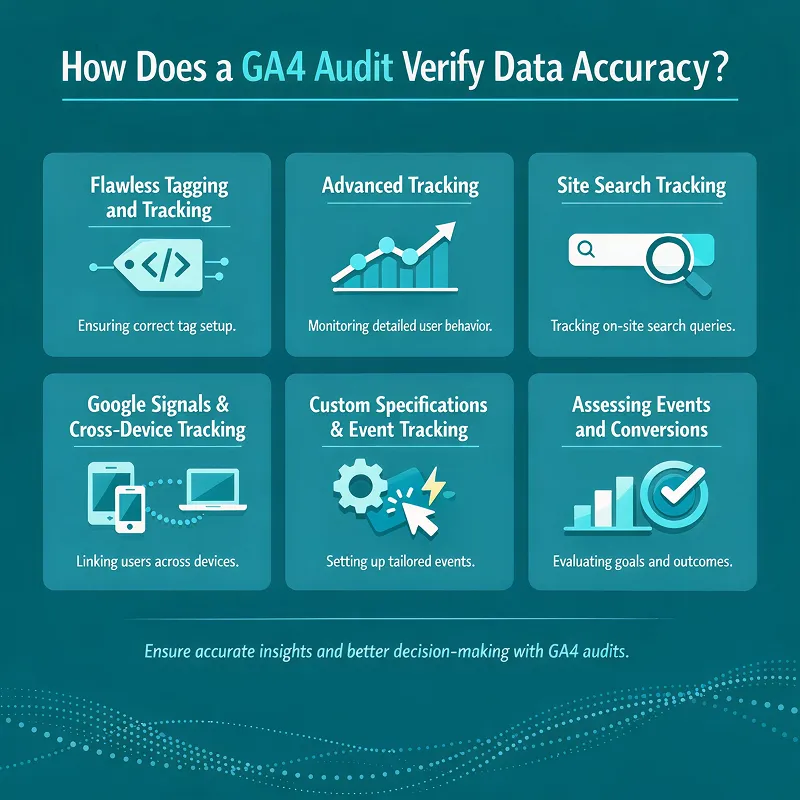
How Does a GA4 Audit Verify Data Accuracy?
Accurate data is key to any marketing campaign. If your data is wrong or missing, even good plans may fail.
An audit checks that analytics system data is accurate and trustworthy. It affects your ability to make smart marketing choices. The following points explain how a data tracking system improves data accuracy:
1. Flawless Tagging and Tracking
A tracking audit checks that all web pages have the right analytics tags. Missing or broken tags give wrong or incomplete data. You can’t see user actions, like product views or form fills, if they aren’t tracked.
An audit uses GTM to check that tracking codes are active.
This guarantees all important events are tracked accurately.
2. Advanced Tracking
Google’s tracking tool tracks important activities, such as videos, scrolls, page views and clicks. A GA4 audit checks that all this tracking runs smoothly.
It shows how visitors interact with your content. Use this data to improve marketing and your site.
3. Site Search Tracking
See how users use the search bar on your website. The data tracking system audit confirms whether website tracking is working. It helps you understand what users look for when they visit your website.
These insights show which content users like but struggle to find.
It helps improve your website, SEO and create strong content.
4. Google Signals and Cross-Device Tracking
Google Signals lets Google Analytics 4 follow visitors across devices. See how users move from desktop, tablet or phone.
The analytical platform audit checks whether Google Signals is active and set up correctly.
If you use it correctly, this feature will give you a clear understanding of user behaviour. It also assists with audience building and remarketing.
However, firms should examine whether this feature follows privacy rules in their location.
5. Custom Specifications and Event Tracking
With custom settings and events, a web analytics tool lets businesses track user activity. They collect this data from add-to-cart actions, product views, sign-ups or form submissions.
An analytics platform audit examines the health of these custom parameters. It helps align tracking with business goals and Key Performance Indicators (KPIs). Audits fix issues when incorrect data is identified.
6. Assessing Events and Conversions
Only setting up events is not enough. They also need testing to verify they work. A measurement tool audit reviews the key events that happen when someone visits your website and takes action.
These activities can include sales, sign ups, file downloads and form submissions.
This data tracking system has a tool called DebugView that helps you check events in real time. It tells you which activity fires when you use your site.
This step helps you find events that happen twice, broken tags and missing events. Fixing these makes sure your conversions are tracked accurately. To understand this process in more detail, you can learn how GA4 event tracking works.
Google’s analytics platform audit focuses on:
- Correct tagging
- Advanced measurement
- Custom event tracking
How Is GA4 Audit Helpful in Campaign Tracking and Attribution?
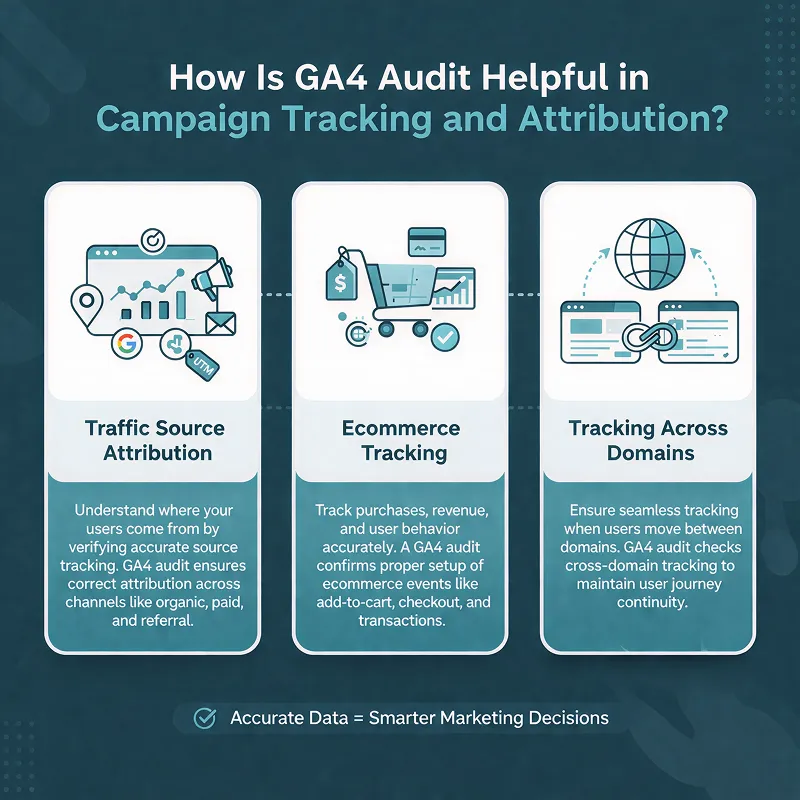
It is important to know which marketing channel brings the most conversions. A web analytics tool audit is useful to enhance campaign tracking and attribution.
It makes sure traffic is attributed to the correct sources and the right metrics are tracked.
Here is how this works:
1. Traffic Source Attribution
Google Analytics 4 shows where your website traffic comes from, such as social media, search or paid ads. But incomplete UTM tags or wrong tracking can make this data wrong.
The tracking platform audit checks that UTM tags are applied consistently to all campaign links.
It allows for correct attribution across all marketing channels. This makes sure you can see the real value of each channel and adjust marketing spend accordingly.
2. Ecommerce Tracking
Correct ecommerce tracking is necessary for businesses that have online stores. This is because understanding sales performance is essential.
The data analytics platform audit reviews ecommerce events such as:
- Purchases
- Add-to-cart actions
- Product views
Businesses can improve the shopping experience, manage pricing and adjust product offerings using accurate e‑commerce data. This can lead to increased revenue and sales.
Knowing what ecommerce SEO is and why it matters helps online stores get more traffic and sales
3. Tracking Across Domains
Businesses with multiple domains, like a website and a blog, can use tracking across domains. It links user sessions across all domains.
Without this analytics system feature, visitors may show up as new users when they move between domains. This leads to inaccurate session attribution.
The audit confirms that cross domain tracking is set up properly. In this way, a precise and complete user journey can be viewed.
A tracking audit makes campaign tracking better. It checks traffic sources, records ecommerce events and tracks users across sites. This helps marketing teams see which channels work and boost campaigns.
Create a GA4 Audit Checklist
An analytic system audit should follow a clear list of tasks to be completed. The purpose of this checklist is to ensure that no important step is missed.
This checklist includes the following points:
- Data control settings are set
- User access is accurate
- Traffic origins are tracked
- Tags fire through GTM
- Events and conversions are working
- Data streams work
Common GA4 Audit Mistakes to Avoid
Even if you plan an audit well, it can have small issues. You should avoid these common mistakes. Some of them are given below:Not Checking Events After Updates
When any update occurs on the site, tracking tags can break. After changes go live, events should always be tested.Ignoring DebugView
You can quickly check if events fire using DebugView. If it is skipped, tracking errors may not be shown.Using Only Default Settings
Google Analytics 4 settings should match your business objectives. If you use default options, all the required actions may not be tracked.Skipping Regular Audits
Auditing only once is not enough. With regular checks, you can keep your data correct as the site grows.Case Study: How GA4 Helped Evelyn Partners Improve Analytics
Evelyn Partners is a prime UK wealth and professional services group. They initiated new websites for Evelyn Partners and Bestinvest. They also published a new mobile app for Bestinvest.
Data was spread over many systems, like Tealium and Google Tag Manager. These platforms were required to be simpler and brought together.
The team worked with people from marketing, UX, product and analytics. They found key data for main journeys, such as registrations, account opens, deposits and shifting. They also looked over Tealium and Google Analytics to ensure the data was correct.
A simple plan was made to establish GA4 correctly for the web and app. This included:
- Making a data layer for all important paths
- Establishing Google’s analytics tool in TealiumIQ and connecting it to marketing tools
- Making dashboards and reports in Google Looker Studio and tracking tool Explorations
- Providing data tracking system training to interior teams
- Ensure cookies and privacy regulations are followed.
- A proper reporting platform framework for web and app
- Capability to track objectives and sales steps
- Clear understanding of marketing channel results
- Dashboards showing main numbers for teams
- Insights to boost customer paths and experiences
Final Words
A GA4 audit provides businesses with clear, precise data to make great marketing choices. It checks that tracking is working and insights are showing the right user behaviour.
It also examines:
- Ecommerce tracking
- Campaign attribution
- Cross domain user journeys are not just about fixing mistakes; it also helps improve your marketing with confidence. Accurate data helps businesses find opportunities, improve campaigns and grow quickly.
An analytics system audit is important for marketing success today.
Xoom Plus knows the importance of correct analytics and helps businesses set up Google Analytics 4 for future growth.
Get in touch with us today to make the best of your data and improve your marketing.
A GA4 audit gives you accurate data and helps you make smarter marketing decisions. It checks tracking, conversions and campaigns so you can act with confidence.
Regular audits ensure your analytics keep up with your strategy and show what works best.
Contact us today to make the most of your data and boost your marketing performance.
FAQs
What is GA4 in marketing?
GA4 or Google Analytics 4, is Google’s latest analytics platform used in marketing to track and analyse user behaviour across websites and apps. It helps marketers understand how visitors interact with content, measure conversions and evaluate campaign performance.
With features like enhanced measurement, cross-device tracking and event-based reporting, GA4 provides accurate insights that support smarter marketing decisions and optimised strategies.
How to do a GA4 audit?
Follow these steps to complete a GA4 audit:
- Check Data Streams and Property Settings
- Audit User Permissions and Access
- Test Key Events and Conversions
- Review Event Parameters
- Check Traffic Source Accuracy
- Review Attribution Settings
- Create Your GA4 Audit Checklist
- Track Changes and Maintain Documentation
Is GA4 easy to learn?
Learning Google Analytics 4 can feel difficult, but it doesn’t have to be that way. With the right guidance and resources, you can go from being a complete beginner to a confident GA4 user. You should start with simple, clear learning methods and gradually build your knowledge as you go.
What does a GA4 audit service include and how can it improve my marketing performance?
A GA4 audit service reviews your Google Analytics 4 setup in detail, checking configuration, tracking codes, events, conversions and user permissions. It ensures accurate data collection and proper campaign attribution, helping your marketing team make smarter decisions, optimise conversions and improve overall campaign performance.
How does a GA4 audit tool help identify tracking issues on my website?
A GA4 audit tool analyses your GA4 property automatically, highlighting missing events, broken tags, misconfigurations and cross-domain tracking errors. Using it ensures that your data is accurate, reliable and aligned with your business goals, allowing you to optimise marketing strategies confidently.