- December 15, 2025
- Categories: Graphic Design Solutions
Common Graphic Design Mistakes to Avoid
You can come up with the most brilliant, exquisite idea in the world, but your execution is going to get ruined with even one design error. It can be as small as the wrong font or a poor layout. Graphic design mistakes don’t just make your post, poster, or infographic look bad. They cost you the trust of your clients, even to the point of costing you sales. These graphic design mistakes are surprisingly easy to make, whether you’re a newbie marketer, small business owner, or experienced designer. In this blog, we’ll break down the most common graphic design fails so that you can avoid this pitfall once and for all.
Top 10 Common Graphic Design Mistakes
Here are common graphic design mistakes to avoid and pay attention to:1. Using Too Many Fonts
Using fancy or simple fonts is not a problem in itself. These fonts give your design personality. The issue is when you use too many fonts at once. It gives your design a messy look, and your content is hard to follow. This happens because each font has its own style. When you mix them carelessly, it confuses your audience. Your poster with five different fonts is going to look disorganised, even if you put your best content in there. The best approach would be to use one font for headings and another for the text body. If you really feel like using another, you can use it for accents. To create variation without clutter, use bold, italics, uppercase, and size variety. This won’t create clutter.Example mistake
Suppose you have a leaflet. It is using Comic Sans for the title, Times New Roman for the body, and Impact for emphasis. Now, this leaflet appears messy and amateurish. A good fix to this issue would be choosing two fonts that gel well with each other. For instance, Montserrat (modern and bold) for titles and Georgia (classic and readable) for text are a good combination. You have to ensure your font matches the tone of your message.2. Poor Visual Hierarchy
Visual hierarchy is one of the graphic design mistakes to avoid. It means a clear depiction of what’s most important on the page. When everything seems the same, people are unsure where to begin reading. Your design looks confusing this way, and people may not be able to find important information. They may even miss a headline or a call to action. You can create a good hierarchy by using different sizes and colours. Another thing you can vary is spacing. Changing boldness and placement can also help you distinguish what is important to read on this page.Example mistake
If your “Buy now” button is small and grey colored, and tucked under an image, the audience can easily miss it while scrolling or viewing. To fix this, make your headline bigger and bolder than your text body. Around your other important elements, add space. Make sure CTAs stand out with bright colour or a button shape. Your elements should guide the eye of the audience where you want it to go. It should flow like a story.
Learn how Graphic Design Differs from UI UX Design.
3. Ignoring White Space
The empty space surrounding your content is known as white space or negative space. Ignoring it one of the major graphic design mistakes. Some designers think they have to fill all of this space with images and design. This creates visual stress for the eye. Nothing shines out, and everything feels crammed without white space. This usually happens due to a misconception. Designers may think of white space as wasted space. Though, this is not true. This space is something that gives breathing room to your design. Your content looks clean and polished thanks to it. It is easier to read as well.Example Mistake
Suppose you have a crammed product flyer. There is no space between photographs, logos, and text. They are tightly packed. To fix this, give space in the headings. Similarly, add space in graphics and borders. This will make important things stand out. Research indicates that the addition of white space can increase user comprehension of text by as much as 20%.4. Overusing Effects and Filters
Playing with effects like drop shadows, bevels, outlines, and filters can be fun. However, using them a lot can make your design appear outdated or even silly. This leads to a common graphic design mistake. They used to be a popular trend in the early 2000s. Now their use can make your design feel overdone. This does not imply that you cannot use them at all. Their use should have a clear purpose. Either you can add a subtle depth or enhance readability. What they should never do is decorate the design.Example Mistake
Although it may appear dazzling, a business card with bright, rainbow-coloured writing and thick shadows is difficult to read and lacks professionalism. To fix this graphic design mistake, only use soft shadows to lift an element off the background subtly. You can also add a light filter to create a mood. Unless the brand explicitly requests a loud or vintage design, stick to a modern, clean approach.5. Wrong Colour Choices
Colour has great power; it supports your message and creates the right atmosphere. But if you combine them incorrectly, your design may become hard to read. It will also give a wrong impression to users and become common graphic design mistakes. Some colours don’t provide enough contrast, while others form a contrast so sharp that there is strain on your eyes. The brand’s colours should be recognisable to all, including those with visual impairments. This is why accessibility and contrast are so important.Example mistake
If you use a light yellow text on a white background, it would look soft, but it is impossible to read. To fix this graphic design mistake, use colour combinations that look good together. You can use blue with white or dark green with beige. Check contrast with free tools like WebAIM’s Contrast Checker. Observe the WCAG accessibility guidelines, which state that normal text should contrast with the background at least 4.5:1. Moreover, always remember that colours hold a meaning. Soft blues are calming and reliable, whereas bright red might convey danger or haste. Make your decision based on the feeling you wish to evoke.6. Designing for the Wrong Medium
All designs do not exist in the same world. Each has distinct technical requirements. Some are designed for screens, while others are for printing. RGB colour mode is used in digital designs, which typically need 72 DPI resolution. In contrast, print requires a much higher resolution, 300 DPI or more, and uses CMYK colour mode. If you use the wrong mode, you are at risk of ruining the final output’s resolution. Printed colours may look dull or blurry as a result. This will lead to fatal graphic design mistakes. Therefore, you must check your design specs before working.Example mistake
You design a 72 DPI, RGB business card. It appears crisp and colourful on screen, but the text appears pixelated and the colours change suddenly when printed. To fix this, always use CMYK before printing and set your resolution to at least 300DPI.7. Inconsistent Branding
Whether someone sees your business card, website, or advertisement, they should be able to recognise your branding right away. Using multiple fonts, colours, or logos on different platforms disrupts consistency and leaves your audience perplexed. Building trust is another benefit of branding. Your brand style guide should, thus, be followed in every design you create to ensure that your images have a consistent, clear voice. Else, you will fall under this category of graphic design mistakes.Example mistake
Here is an example of such graphic design mistakes. Your packaging uses modern serif font and a black-and-white logo, but your Instagram is all pink and bubbly. This inconsistency causes your identity to weaken. So, in all your text, use the same font styles, colour scheme, and logo version.8. Neglecting Readability
Design must speak to you clearly. If your message makes the user struggle to read, they’ll leave immediately. The reasons can be plenty. Your font might be too small, or your contrast might be too poor. This is especially more visible in mobile screens, where space is already limited. These are all graphic design mistakes. Even from a distance, your design should be readable and comfortable for the reader to follow.Example mistake
If you make your font grey and it is written over a white background, it looks great on the monitor screen. However, the same text becomes unreadable on the phone. To fix this, carry out your trials on multiple devices. This will help you make sure that your contrast meets eligibility standards.9. Using Low-Quality or Pixelated Images
Images can elevate a design or ruin it altogether. If you use low-resolution images, they will look unprofessional and harm your credibility. The same is the case with warped images. You have to take extra care of this when printing. This is because every little detail is visible on print. This is among the graphic design mistakes that even veteran designers make. Using high-resolution files and vector files for logos and graphics can help you avoid this issue. You can scale images then without blurring.Example mistake
You screenshot a tiny image from Google and then use it on a printed flyer/ You’ll get a grainy, pixelated image as a result. Your entire design will seem rushed when you do this. To avoid this, use royalty-free or original high-resolution images that are appropriate for your medium; for logos, use SVGs or PDFs.10. Skipping Proofreading
Design is more than images. The text you add matters as well. If there are typos, misspellings or grammar errors, your reputation will be damaged immediately. People can spot the smallest of errors, and once they do, there is no going back. You must avoid these graphic design mistakes. You should review your text very carefully. Ask someone else to proofread for you as well before you print or publish your design.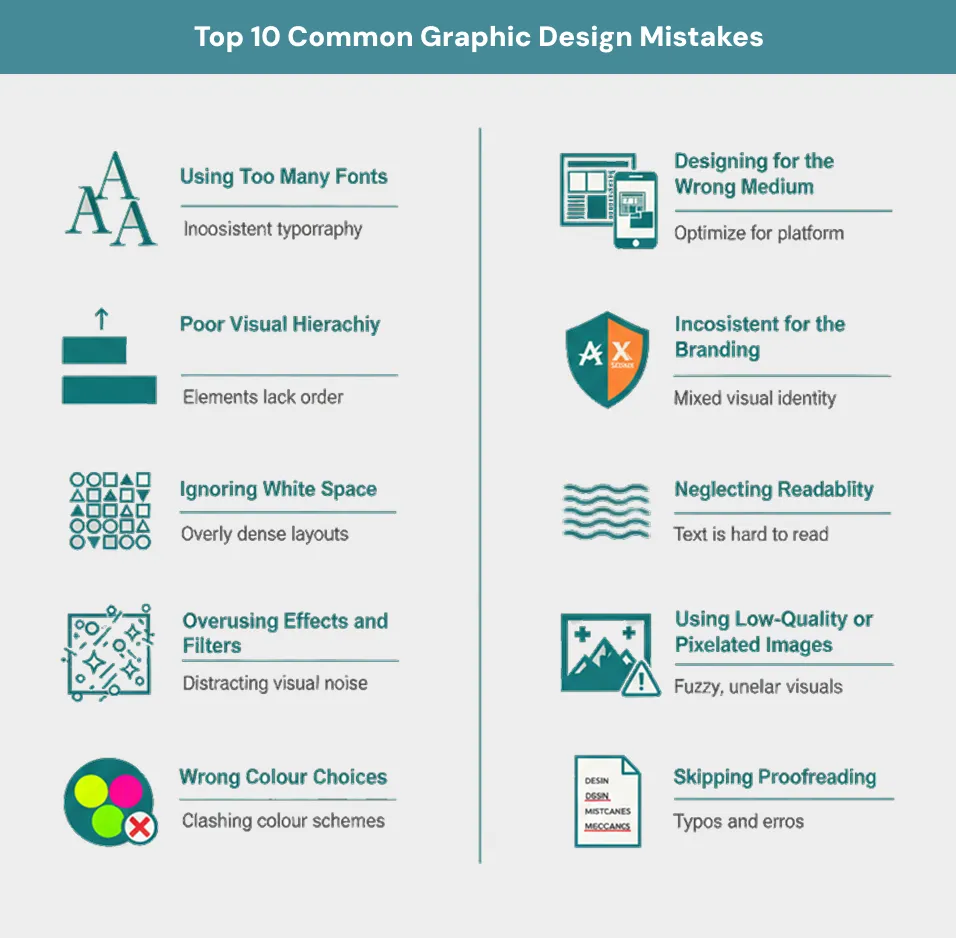
Advanced Graphic Design Mistakes
Below are some graphic design fails that even the pros can be a part of:1. Not Understanding the Client Brief
Even the most seasoned graphic designers delve into the process prematurely. They do not follow the client’s goal, audience or the undertone they are going for. Your work in this case will still be beautiful, yet it will miss the mark. To avoid this situation, always clarify expectations and ask questions. Before opening the design software, you must be completely aligned with the objectives. You will save yourself a bunch of revisions and lots of wasted time.2. Plagiarising or Copycatting
Inspiration is a great thing, necessary even in most cases. But if you blatantly copy, whether intentionally or unintentionally, you’ll have to face repercussions. There will be legal issues in addition to reputational damages. To avoid this situation, borrow ideas instead of exact designs. Reinterpret designs according to your brand’s unique identity. Mimicry might get you the short -term appeal, but long-term value can only be achieved by individuality.3. Forgetting Accessibility (A11y) Guidelines
Designers should consider everyone. This includes people with visual and cognitive impairments. Your design won’t reach them if you overlook text contrast and a small touch target. Your scope will also be limited if you don’t add alt text. Therefore, you must follow accessibility guidelines such as those of WCAG. Accessibility design improves the experience for all users, not just the ones with impairments.4. Relying Too Heavily on Trends
Trends come and go quickly. While they are there, they make your design feel recent. But if you keep overusing them, it can make your work feel generic or outdated. The right way to hop on trends is using them as inspiration instead of foundation. Your priority should always be the brand’s identity and message. Timeless design can remain at the top at all times. Their performance keeps on going even when the market keeps changing.5. Too Much Symmetry or None at All
When there is too much symmetry in design, it can make it feel unnatural and sterile. But if there is no symmetry, it feels visually chaotic. You have to find the sweet spot between the two so that the design can be perfectly imperfect. You can do this through symmetrical layouts or carefully planned asymmetry. This asymmetry should feel intentional and grounded. For a composition to be successful, it should rely on tension between order and visual interest.6. Overcomplicating Layouts
Overcrowding a design with too many components overwhelms readers and confuses the message. To speak to your audience in a better way, make clean, clear layouts with breathing spaces. Good design is not about how much you can add. It’s about how much you can simplify without losing meaning. Focus and clarity tend to convert better than flair and complexity.7. Failure to Optimise for Mobile
A design can look perfect on a laptop, but when you view it on mobile, it may fall apart. There can be friction due to overlapping elements. Tiny fonts and unreadable buttons can also lead to failure of mobile optimisation. To avoid this, you should always test responsiveness before launching. Mobile users deserve to get an equally smooth experience. Additionally, due to the dominance of mobile-first usage on the web, this is now required and not optional.8. Improper Export Settings (Wrong Format/Sizing)
When you export the file in the wrong resolution or file type, you can ruin even the best of designs. JPEGS can blur logos. Oversized PNGs are known to slow down loading times. It is thus pertinent that you use the right format. SVG, for instance, is ideal for web icons. PF is great for printing and so on. You should also double-check the resolution and compression settings before delivery. Sloppy exports demonstrate inexperience and can harm your professional reputation.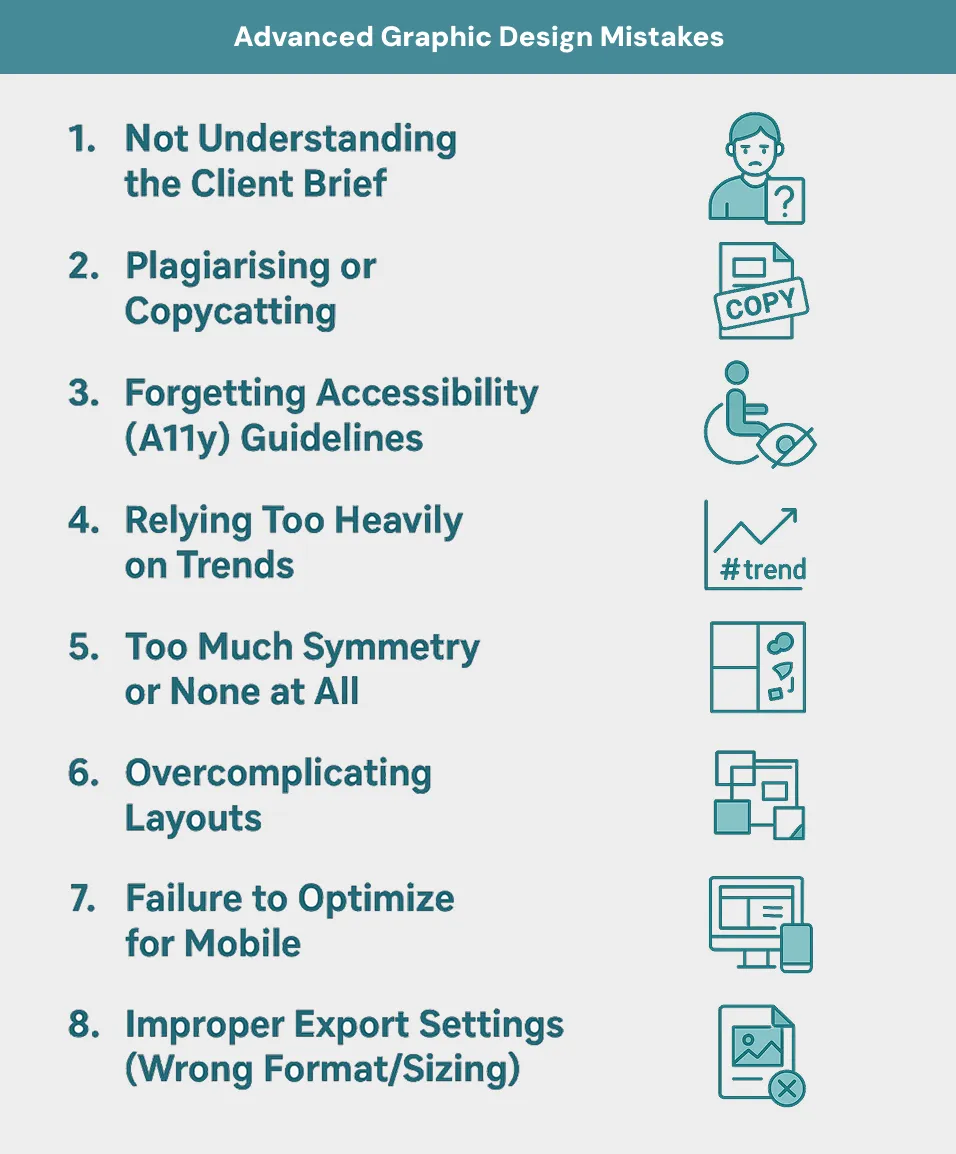
Discover the top graphic design trends for 2025. See how to stay ahead with modern creative visuals.
Why These Graphic Design Mistakes Happen
Graphic design mistakes usually happen because of process breakdowns. Lack of talent is not an issue here. When deadlines are rushed, graphic designers prioritise speed over quality. This leaves little time for proofreading and refinement. Newbies can look over spacing and hierarchies when they are hurrying. When there is no creative brief, designers have to rely on guesswork for the most part. Moreover, the entire team needs to be on the same page. Otherwise, conflicting ideas can make the message diluted. Finally, sometimes you rely too heavily on templates, it leads to graphic design mistakes.Funny Graphic Design Mistakes
Whatever the reason may be, sometimes the end result is quite funny. Occasional hilarious fails can make you an internet joke in a minute. Bad kerning is one great example. Then there are stock photos disasters in which you see doctors wear stethoscopes the other way round. Another one of the funny graphic design mistakes is fonts that scream “birthday party” in legal documents. Similarly, icons sending mixed signals can sometimes be quite funny.Conclusion
Great design does not come into being by accident. You need thoughtful decisions, attention to detail and constant improvement for this. Avoiding common graphic design mistakes can set you apart from the rest of the crowd. At Xoomplus, we ensure that your visuals are clean and consistent. Our designs are not based on trendy aesthetics. Rather, we focus on the strategy rooted in your unique brand ideology. We proof, we test, and we refine. With us, your brand always makes the right impression. To get help, contact us now.Struggling with your design looking “off”?
Let our experts help clean up your visuals and build branding that converts. We deliver professionally proofed assets, a consistent visual language, and pixel-perfect exports tailored to your business needs. Get your design audit today.
FAQs
Beginners frequently utilise too many fonts, overcrowd their designs, or start without a clear concept. These flaws result in disorganised, difficult-to-read images that lack focus and brand cohesion.
Absolutely. Poor design can degrade the user experience, decrease engagement, diminish credibility, and ultimately cost you conversions or sales.
If several elements, such as fonts, images, or colours, compete for attention at the same time, it's time to simplify. Good design guides the viewer's attention without overwhelming them.
Stick to two or three fonts maximum, usually one for headings and one for body text. Too many fonts create visual confusion and weaken your brand identity.
Use high-contrast colours, understandable letter sizes, and a lot of white space. Always test your design on multiple devices to ensure that text is legible everywhere.