


- March 3, 2026
- Categories: Web Solutions
What Are Core Web Vitals? A Guide to Website Performance
Have you ever experienced a website that felt bad because it took too long to load? Wouldn’t you prefer a site that’s fast, smooth and easy to navigate? This is where it becomes essential to understand core web vitals clearly.
In today’s digital world, users want websites that are fast, responsive and visually stable. Google created core web vitals to help fix these problems for users. These are some standards for performance to check real user experience, not only the speed of the technical page.
Thus, they are the important performance measures of Google that examine how stable, fast and responsive a site is for the visitors. Google says that a delay of 1 second in loading a page lowers conversions by up to 20%.
Website performance is now essential. It directly affects earnings, search rankings and user trust. After reading this blog, you will be able to understand:
- Why do Core Web Vitals matter
- How to utilize them to make your website faster, smoother and more user friendly
What Are Core Web Vitals?
Core Web Vitals are a set of performance metrics introduced by Google. This is the broader update of its page experience. These measures focus on how users experience a website, not just how the site looks or is designed.
The core web vitals impact on SEO is important because Google uses these metrics as a ranking factor.
They examine real user behavior to understand how a page performs during loading, interaction and visual stability. Thus, Core Web Vitals help website owners see whether their site feels stable and user friendly in real life.
Why Did Google Establish Core Web Vitals?
In the past, many websites ranked well even if they loaded slowly or had a broken structure. This created a bad experience for users. Google detected this problem and decided to fix it.
This is the reason that Google introduced Core Web Vitals. Its purpose is to measure website performance based on actual user data. These metrics help answer important questions, such as:
- Does the page remain smooth while loading
- How quickly does the main content appear
- Can users interact with the page without delays
How Important Is Core Web Vitals for Website Performance and SEO?
For the growth and rankings of a website, Core Web Vitals play an important role. The core web vitals impact on SEO can clearly be seen in how search engines evaluate user experience and page performance.
Each Core Web Vital is measured using a score, which shows how well a page performs in terms of speed, responsiveness and visual stability. These scores are based on real user data and are rated as good, needs improvement, or poor.
They have now become official Google ranking factors. This means that no matter how excellent your content is, poor scores can reduce your visibility in search results.
On the other hand, if a site runs smoothly, it not only improves user satisfaction but also helps pages rank higher.
These metrics affect more than just ranking. High speed and secure websites have many benefits, such as creating long term trust, minimizing bounce rate, engaging users and improving conversions. The core web vitals impact on SEO is therefore directly connected to overall website performance and long term digital growth.
Core web vitals impact on SEO is about business growth; it’s not just about ranking the website. Google’s first choice is to keep user experience as its highest priority.
Explore more: The Impact of Website Loading Speed on Conversions and Sales
Understanding the Three Core Web Vitals
They have three standards and each of these checks different aspects of user experience. These metrics are part of google core web vitals, which help measure how users actually experience a webpage. They are explained below:1 What Is the Largest Contentful Paint?
This measure is responsible for loading performance. Thus, Largest Contentful Paint (LCP) shows how quickly users can see the main content.
For example, how much time a large text block, a hero image or a banner takes to come on the screen. If the main content of the website is visible quickly to the user, this means that it is quick.
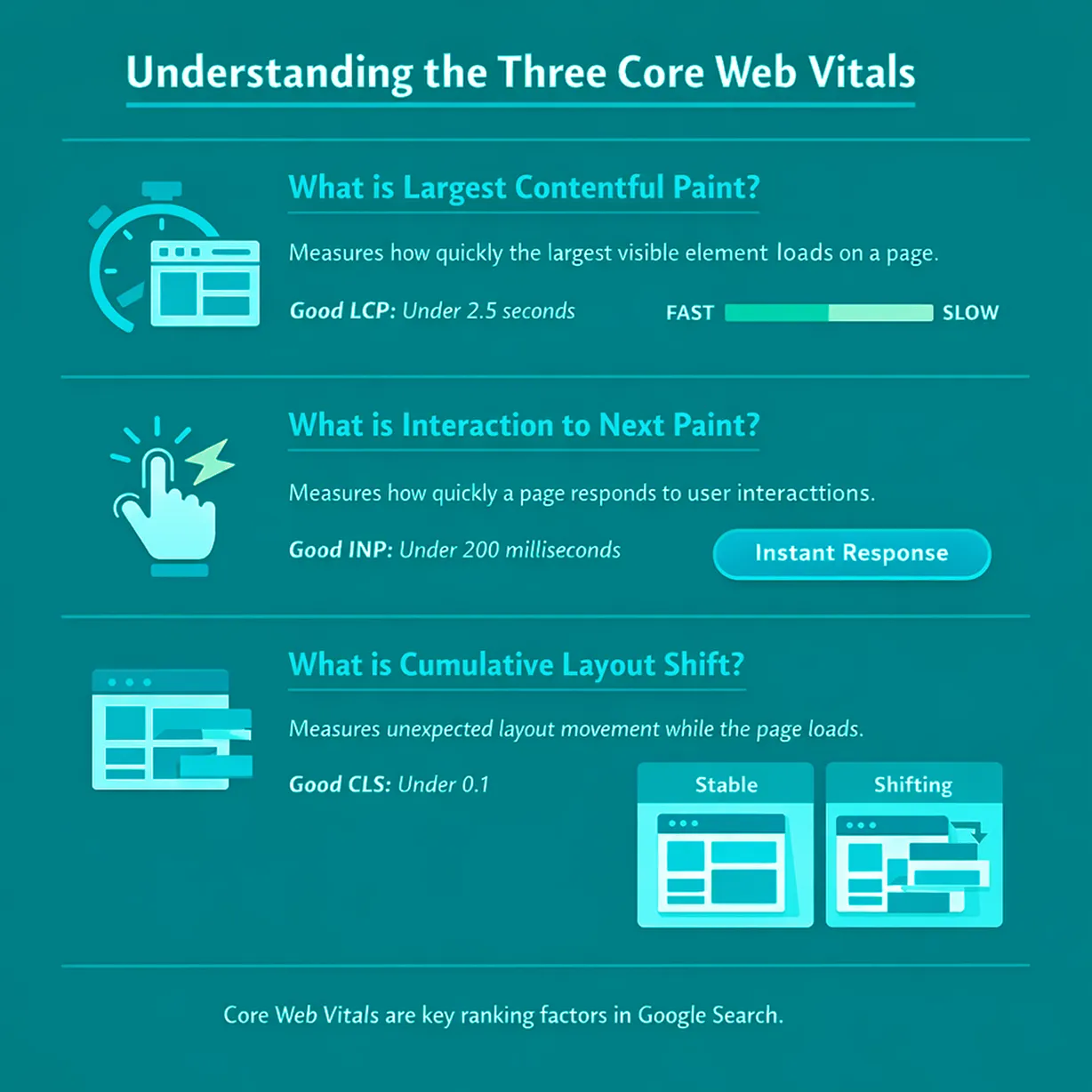
Usually, the reason for slow LCP is render blocking CSS or JavaScript, large images or slow servers. It has a big role in keeping the readers on the site; that’s why it is responsible for the first impression.
2 What Is Interaction to Next Paint?
INP or Interaction to Next Paint examines the interactivity. It manages other things, like how immediate the response of the website is when a visitor types into a form, taps a menu or clicks a button. Interactions play an important role because if they are slow, even a fast loading page can feel frustrating.
To make sure users don’t feel this wait or frustration, Google has set a clear performance standard for INP.
The recommended score from Google is under 200 milliseconds.
Interaction to Next Paint (INP) was the First Input Delay (FID). It was changed due to the reason that an accurate examination of the whole user journey was not possible with FID.
Poor INP can happen due to:
- Many third party scripts
- Long tasks blocking the main thread
- Heavy JavaScript execution
When you open a site, if a user clicks on anything and it takes too much time or nothing happens, they immediately lose trust.
3 What Is a Cumulative Layout Shift?
CLS is the short form of Cumulative Layout Shift. It examines whether the graphics seen on screen are stable or not. You might have felt bad if you ever came across a situation where, when you tried to click something on a website, the page moved and you clicked something wrong.
This level checks how much content moves unexpectedly when the page loads. CLS Good Score is 0.1 or less. The high score of CLS is due to:
- Fonts are changing after rendering
- Pictures do not have size dimensions
- Ads take time to load
How does Google Perform Core Web Vitals Test?
Google Chrome has introduced many tools and the Chrome User Experience Report (CrUX) is one of them. It is used to collect real world data from Chrome users.
Therefore, Google uses this data, which shows real user behavior, real network and real devices. So even if lab tests look fine, Google may still report issues seen by real users.
Understanding Good Scores for Core Web Vitals
Google has made three categories for these measures:- Good
- Needs Improvement
- Poor
To meet Google’s standard, at least 75% of real user visits must have “Good” scores in all of these three.
Best Tools to Test Google Core Web Vitals Accurately
If you want to measure the performance of your website, the core web vital test is the initial step. With the help of testing, you will be able to identify where improvement is required before making changes.
Many people think that it is enough to do the testing only once. With the help of regular monitoring, you can catch the delays and make sure that your site’s performance is better.
The following tools are the most effective ones:
Google PageSpeed Insights
It can detect both field data (real users) and lab data (simulated tests). This tool provides recommendations for LCP, INP and CLS in detail.Lighthouse
In the Chrome DevTools, you can find this free tool easily. It checks the clarity and performance of the page and these vitals.Web Vitals Extension
This is a Chrome add on that keeps an eye on these measures instantaneously whenever you browse. It is very handy for checking interaction and detecting INP issues.Google Search Console
With the help of these tools, you can keep an eye on core web vitals for your whole website and it also highlights pages that have a poor or moderate score.CrUX Dashboard and DebugBear
This tool helps us in getting history, deep analysis of real user metrics and location and device insights.Web Vitals.js and GA4 Integration
With the help of this tool, custom tracking of these vitals on many big websites is possible. When this step is done, Google uses its other tool known as Google Analytics, to keep the data for detailed reporting.
How to Improve Core Web Vitals Issues?
When you detect the core web vitals issues, the next step is to optimise them. Improving these problems is important because google core web vitals are used to measure real user experience on your website. These steps are explained in the given guide:Improve LCP and Better Loading Performance
Improving LCP and overall loading performance is important. This is because the speed at which your website’s main content appears affects how users understand your site.
A slow page can frustrate visitors, increase bounce rates and even lower your search rankings. By focusing on LCP and making your pages load faster, you make sure users see meaningful content immediately. This creates a smoother experience that keeps them engaged and satisfied.
Here are some practical steps you can take to improve LCP and speed up your website.
Optimize Images
By compressing your images, you can improve the performance of your site to a great extent. For this purpose, use up to date formats such as WebP.Efficient Caching
Let browsers keep your website’s files and use services such as Cloudflare to load pages faster.Minimize Server Response Time
This way, you can make your hosting fast, reduce large scripts and examine server logs to identify delays.Enhance INP and Refine Interactivity
The following steps help reduce delays during clicks, taps, and other user interactions.Reduce JavaScript Execution
Remove unused code, put back non critical scripts and break lengthy tasks.Lower Main Thread Work
Avoid complex graphics and transfer large computations to Web Workers.Give Priority to Critical Content
First, load the necessary content so visitors can interact. On the other hand, secondary elements keep running in the background.Fix CLS and Get Visual Stability
The following actions help keep your page layout stable as content loads.Set Size Attributes
Properly mention the width and height for pictures and videos to get rid of unexpected structure shifts.Do Not Put Content Above Existing Elements
Do not add new items above the content that is already visible unless the user has placed them, especially pop ups or ads.Apply CSS Transformations for Graphics
Keep away from properties that generate structure changes, which damage the visual content of the page. Fixing these issues also helps your site meet the performance standards defined in google core web vitals, improving both user experience and SEO performance.Core Web Vitals Common Mistakes Beginners Make
Many beginners try to improve Core Web Vitals but unconsciously make mistakes that slow down their progress. When you understand these common issues, they will help you avoid performance problems.Focus Only on One Measure
If you pay attention to only one metric, it will make the site’s performance unbalanced.Ignore Mobile Performance
Google measures Core Web Vitals mainly on mobile devices, so slow mobile performance can reduce rankings.Leave Cumulative Impacts
Even if you think that each script seems harmless, many small ones may collectively slow your website.Neglect Real User Data
Avoid replacing real world insights from CrUX or RUM, no matter how useful lab simulations are.Do Not Monitor Regularly
If you do not track your website regularly, new content or features will be harmful to it.
Reminder
Core Web Vitals are not a one time fix. Monitor them regularly.
Importance of Monitoring Core Web Vitals
Many people think that they have optimised their website and that is enough. But, it is very important to monitor it with tools like treo.sh, DebugBear and Semrush Site Audit.
To monitor your website regularly is just as important as optimizing it. Continuous tracking helps you spot issues early, measure progress and ensure your Core Web Vitals stay strong over time.
Regular monitoring gives you a clear understanding that how your website is performing. It also helps you take action before small issues become serious problems.
- Get alerts when scores fall below the limit
- Assess formerly and currently results to monitor improvements
- Examine the site’s past performance to check if it’s getting better or worse over time
- Diagnose decline fastly
Final Thoughts
With the help of Core Web Vitals knowledge, you can make your website load quickly and make it convenient to use.
To engage people with your site for more time and earn their trust, it must be as quick as possible, responsive and stable. These signs are also helpful for Google. It determines which websites are good to rank higher.
These powerful measures can make rankings better. They also support lower bounce rates and increase conversions. You can lose the site’s performance and credibility over time if you ignore them.
Xoom Plus knows how important Core Web Vitals are for a website and how their impact is on user experience and SEO. The company is available to help build and optimize websites and meet the standards of Google’s performance.
Contact us now and improve your website’s speed and user experience.
Is your website slow, unstable or losing visitors because of poor performance? Xoom Plus has helped many websites achieve better performance results.
Contact us to make your website faster and more reliable.
Faqs
To improve Core Web Vitals, a site needs to be optimized for fast loading times, minimal input delay and stable layouts. Core Web Vitals optimization means optimizing images, reducing third party scripts, implementing lazy loading and using efficient caching, all to keep users engaged.
To improve LCP, optimize large images, use fast hosting, enable caching and remove files that block loading.
On the other hand, for INP Improvement, reduce heavy JavaScript, break long tasks into smaller ones and limit third party scripts so clicks respond faster.
Top Tools for Core Web Vitals Testing and Monitoring
- Sematext
- Chrome User Experience Report (CrUX)
- Google Lighthouse
- Google Page Speed Insights
- Web Vitals Chrome Extension
- Chrome DevTools Performance Panel
- Google Search Console
Causes of Failed Core Web Vitals
- Slow Server Response Times
- JavaScript and CSS Issues
- Non optimised Images
- Too Many HTTP Requests
- Poor Mobile Optimisation
- Unstable Layouts
- Third Party Scripts
Good CLS values are 0.1 or less. Poor values are greater than 0.25. To learn more about the research and methodology behind this recommendation, see Defining the Core Web Vitals metrics thresholds.