- February 12, 2026
- Categories: Web Solutions
The Impact of Website Loading Speed on Conversions and Sales
Ever clicked on a website with a beautiful design only to wait hours for it to load? How does it feel when, despite good looks, a website just wouldn’t run? Speed is no longer just an auxiliary; it is an absolute necessity for modern website UI/UX and conversion strategies.
A website’s loading speed is the time it takes to load its content after a user clicks. It is around 2 seconds ideally. If it takes longer, it severely impacts conversion potential, retention rate and sales. This is because:
Website loading speed encompasses behavioural psychology, conversion rate optimisation, and trust engineering all in one.
In this blog, we will explain why website loading speed matters, how it affects real money, and how to fix it.
Why Does Website Loading Speed Matter?
Your website is like an online shop. Think of loading time as the entry door. When a user clicks, they quickly judge if the site feels safe, worth their time and worth staying on.
It all depends on the entry time whether they stay or not:
- A fast door means people walk in.
- A slow door means people walk away.
- Stuck door = zero sales.
Attention span or scan?
People today are impatient. They no longer read but scan.
Not rude. Just used to speed.
- TikTok videos load instantly.
- Instagram opens in seconds.
- Games load fast or get deleted.
What Is Website Loading Speed?
Simply put:
Website loading speed is how long a website takes to fully show elements after a user clicks it.
These elements are:
- Text.
- Images.
- Buttons.
- Videos.
- Menus.
Website Loading Speed Is a Conversion Lever, Not a Tech Metric
Conversion rate optimisation (CRO) is about removing friction.
Speed is the first friction users feel.
A delay will ruin sales even with the best content. Nothing matters more than speed:
- Not copy.
- Not design.
- No offers.
What Website Loading Speed Actually Includes (More Than You Think)
Most people think that loading speed is just the homepage load time. That is not true.
Website loading speed is made up of multiple moments:
- Time to First Byte (TTFB)
- First Contentful Paint (FCP).
- Largest Contentful Paint (LCP).
- Time to Interactive (TTI).
- Total Blocking Time (TBT).
Simple Breakdown of Metrics
Here is how loading speed actually works:| Metric | What It Means | Why It Matters |
|---|---|---|
| TTFB | Server response time. | Slow servers feel broken.s |
| FCP | First thing appears. | Reassures the user. |
| LCP | Main content loads. | Affects trust. |
| TTI | Page usable. | Enables action. |
| TBT | Script blocking. | Causes rage clicks. |
A good website page load speed means all of these metrics are healthy.
The Psychology of Waiting And How It Hurts Conversions
Human brains hate uncertainty. A page that takes too much time to load creates uncertainty.
People start questioning the site performance :
- “Did it work?”
- “Is it broken?”
- “Should I wait?”
Stress reduces:
- Trust.
- Attention.
- Willingness to buy.
Speed and Perceived Quality
Users don’t judge quality objectively. They judge it by their own experience. Most of that experience is how they feel when they open the site.
Fast websites feel:
- High quality.
- Premium.
- Professional.
- Cheap.
- Unsafe.
- Amateur.
Why Slow Websites Destroy Conversions
A conversion is when a user does what you want.
Examples:
- Buys something.
- Fills a form.
- Sign up.
- Clicks a button.
What Happens When a Website Is Slow?
Here’s the chain reaction:- The page loads slowly.
- Users get annoyed.
- Users doubt quality.
- User leaves.
- The sale is lost.
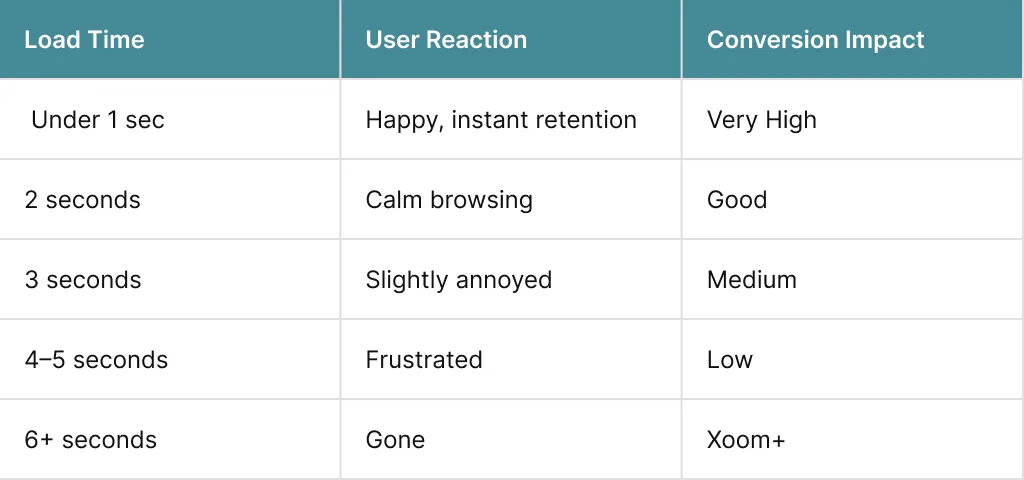
Speed equals trust.
Website Loading Speed and Micro-Conversions
Micro-conversions are small steps:- Scrolling.
- Clicking.
- Opening menus.
- Adding to the basket.
Website Loading Speed and Conversion Funnels
Let’s talk about funnels.
A funnel is a series of steps:
- Landing page.
- Product page.
- Basket.
- Checkout.
- Payment.
Funnel Leakage Example
Here is how it happens: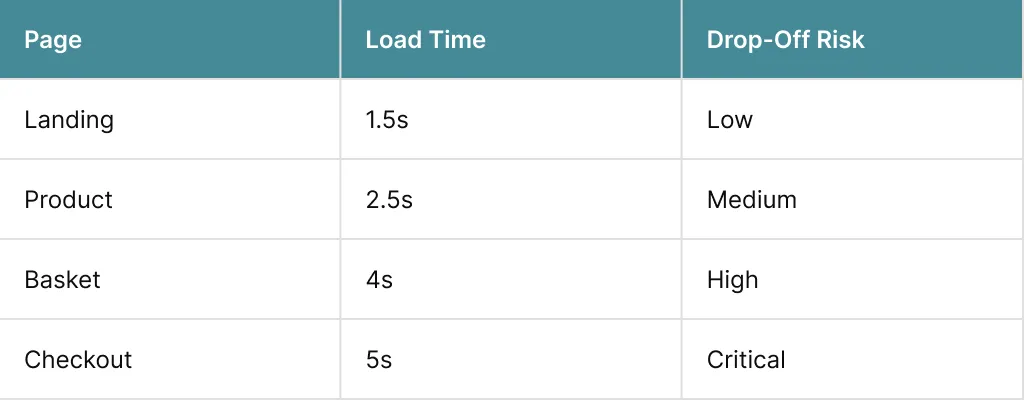
Speed issues multiply as users move forward.
Mobile Website Loading Speed Is Even More Brutal
Mobile users:- Are often distracted.
- Use weaker networks.
- Expect instant response.
If mobile website loading speed is poor, conversion loss is severe.
How Website Loading Speed Affects Sales
Sales need trust to finalise. People lose trust when the site lags.
Slow websites feel:
- Cheap
- Unsafe
- Outdated.
- Professional.
- Reliable.
- Secure.
Imagine two online shoe shops.
- Shop A loads in 1 second.
- Shop B loads in 5 seconds.
Who wins?
Shop A. Every single time.
Google’s Core Web Vitals and Sales
Google tracks speed because users care.
Key metrics:
- LCP (main content load).
- INP (interaction delay).
- CLS (layout movement).
- Lower rankings.
- Lower traffic.
- Lower conversions.
How to Test Website Loading Speed Properly
Now that we know the importance of web loading speed. You must constantly test it to make sure that it is up to the mark.
Here’s how to test website loading speed easily.
Test From Multiple Angles
You should test:- Desktop.
- Mobile.
- Different locations.
- First visit.
- Repeat visit.
Because caching and CDNs change results. Speed is constantly affected by caches.
What to Look For
In order to accurately judge the speed.
Focus on:
- LCP under 2.5s.
- TTI under 3.5s.
- Minimal blocking scripts.
Free Tools Anyone Can Use
Here are some free tools you can use to gauge website speed.- Google PageSpeed Insights.
- GTmetrix.
- Pingdom.
- Load time.
- Errors.
- What’s slowing things down?
What Slows Websites Down at a Technical Level
In order to truly optimise speed, we have to look out for what’s really slowing down your website. These issues must be resolved to get your website speed primed.1. Render-Blocking JavaScript
JavaScript can stop a page from loading. These scripts prevent pages from loading if scripts load before content:- The screen stays blank.
- User panics.
- Bounce rate rises.
2. CSS Bloat
When unnecessary code accumulates during loading, it slows down the website.
Too much CSS:
- Slows rendering.
- Increases paint time.
` You can use a purging tool like PurgeCSS to removeunused CSS and reduce CSS bloat.
3. Server Response Time
Slow server response (TTFB) means everything runs slow. It can be caused by:- Too much traffic.
- Slow network.
- Limited resources.
- Inefficient database queries.
4. Image Delivery Issues
Heavier media can slow down loading time.
Problems include:
- Oversized images.
- Wrong formats.
- No lazy loading.
How to Speed Up Website Load Time
Now that we have covered the causes of slow website load time, it is time we discuss easy and practical ways we can improve the speed of your website.1. Optimise Critical Rendering Path
Load what matters first.- Above-the-fold content first.
- Non-essential scripts later.
2. Use Modern Image Formats
Loading images is usually a big problem. Changing format and compressing them can help with speed.
Switch format:
- JPG to WebP.
- PNG to AVIF.
3. Reduce JavaScript Execution
Audit scripts:- Analytics.
- Chat tools.
- Ads.
4. Enable Caching
Caching helps by storing and preloading frequently used images and files.
Server caching:
- Reduces processing time.
- Improves repeat visits.
5. Use a CDN
Content delivery network (CDN) is a group of servers that uses caches to boost speed.
It:
- Stores your site worldwide.
- Delivers content from nearest server.
Sales feel smoother.
Improve Loading Speed of Website for CRO
Website speed directly impacts CRO.
Every second saved:
- Reduces friction.
- Improves flow.
- Increases confidence.
There are improvements you can make to increase the conversion rate:
- Faster product pages.
- Instant add-to-cart.
- Smooth checkout steps.
- Better hosting services.
Some beginner-friendly tools you can use to optimise speed are:
- WP Rocket.
- LiteSpeed Cache.
- Cloudflare.
Improve the Loading Speed of Website for E-Commerce
E-commerce relies on websites loaded with heavy content. Speed optimisation is absolutely non-negotiable for a smooth buyer’s journey. If at any step there is a speed lag or the user feels like they are spending too much time, they might leave.
If your site speed is slow, it affects:
- Product images.
- Checkout pages.
- Payment loading.
Slow checkout leads to:
- Abandoned carts.
- Lost trust.
- Rage exists.
Increase Loading Speed of Website for Ad Performance
Paid traffic can cost a lot. Slow speed can ruin even the best campaigns.
If landing pages are slow:
- CPC stays the same.
- Conversions drop.
- ROI tanks.
You can try:
- Asynchronous loading.
- Lazy loading.
- Optimise ad files’ size and format.
- Use CDN.
You can learn more about optimising Ad campaigns through our guide for Ad strategies.
Speed Up Website Loading Without Killing Functionality
A big concern when optimising speed is that it will affect the functionality of the site. Many features will not work properly if altered for speed. This is due to haphazard speed optimisation.
For safe speed up, optimise in the order of:
- Format and compress images.
- Fix hosting.
- Enable caching.
- Reduce scripts.
- Trim CSS.
- Test speed again.
Conclusion
A website loading speed affects:- Trust.
- SEO.
- User experience.
- Conversions.
- Sales.
A fast site:
- Builds trust before a word is read.
- Keeps users calm and focused.
- Reduces friction across the entire funnel.
- Improves conversions without changing copy or design.
That’s where XoomPlus comes in.
XoomPlus doesn’t just aim to speed up website loading for the sake of a score. It focuses on real-world performance improvements. Get in touch with XoomPlus and turn speed into a competitive advantage.
Your website shouldn’t lose sales while you’re busy driving traffic.
If users are bouncing, checkouts are dropping, or ads aren’t converting, website loading speed is likely holding you back. Avail our web maintenance and support services and turn speed into measurable growth.
FAQs
Why Does Website Loading Speed Affect Conversions So Much?
Because speed shapes first impressions. A slow site increases frustration and doubt, which reduces trust and stops users from taking action before they even read your content.
What Is A Good Website Page Load Speed For Conversions?
Ideally under 2 seconds. Anything above 3 seconds significantly increases bounce rates and lowers conversion potential, especially on mobile devices.
How Can I Test Website Loading Speed Accurately?
Use tools like Google PageSpeed Insights or GTmetrix and focus on real metrics such as Largest Contentful Paint, Time to Interactive, and Total Blocking Time rather than just overall scores.
How Do I Speed Up Website Load Time Without Breaking My Site?
Start with image optimisation, server-level caching, and script deferral. Avoid changing everything at once and prioritise fixes that improve above-the-fold loading first.
Does Improving Website Loading Speed Help SEO As Well?
Yes. Google uses performance signals like Core Web Vitals as ranking factors. Faster sites often rank better and keep users engaged longer.
Can Speed Optimisation Really Increase Sales?
Absolutely. Faster websites reduce friction, improve trust, and keep users moving through the funnel, which directly improves conversion rates and revenue.
Should I Focus On Desktop Or Mobile Speed First?
Mobile first. Mobile users are less patient, and Google prioritises mobile performance when ranking websites.