- May 12, 2026
- Categories: Digital Marketing
Common Google Ads Mistakes Businesses Make And How To Avoid Them
You set up a campaign. The budget is live. Clicks are coming in.
But the leads? Nowhere.
This is more common than most business owners realise. Google Ads look fine on the surface; picking some keywords, writing an ad, and setting up a daily budget. And that is exactly how the majority of campaigns are set up. The problem is not setting up the ads. It is getting them in front of the right person, at the right time, with the right message. And when an impression lands on the wrong person, that money is already gone.
Nobody counts the number of ads you run. They just remember the impression you make. – Bill Bernbach, Advertising Legend
5.1% of all ad clicks in 2024 were fraudulent, costing businesses nearly $37.7 billion globally. And that does not include money wasted on poor targeting, weak structure, and campaigns no one ever checked.
This blog walks through the most common Google Ads mistakes businesses make in 2026, what each one actually costs, and what fixes it.
Key Takeaways
- Most Google Ads budgets leak on fixable setup errors, not on the platform itself
- Negative keywords are not optional. Without them, you are paying for clicks that were never going to convert
- Broad match without control is Google’s growth, not yours. Use exact and phrase match for high-intent terms
- Conversion tracking is the foundation of every decision. No tracking means no improvement, ever
- Quality Score is a direct cost lever. A two-point improvement can cut your CPC which is Cost-Per-Click by 20 to 30% without touching a single bid
- Landing page mismatch kills conversions silently. The ad builds expectation, the page must honour it
- Location targeting defaults are set for Google’s reach, not your results. Switch to Presence only from day one
- Generic ad copy lowers CTR, drops Quality Score, and quietly inflates your cost per click every day
- Audience layering filters your spend. Two people searching the same keyword can have completely different buying intent
- Automation without human oversight is budget risk, not efficiency. Smart bidding needs real conversion data to work
- The mistakes in this blog are not edge cases. They are in most accounts that are underperforming right now
- Fixing structure, tracking, and relevance consistently delivers better results than increasing budget
Before You Dive into Mistakes, Understand What They Are Costing You
Cost per lead has been rising year on year. Since 2023, PCs have improved up to 10 to 15 percent each year across the majority of industries. This means that a single wasted click would be more expensive than 12 months ago.
And Google has quietly made it easier to waste clicks. Reach-expanding parameters are pre-selected, and for new campaigns, broad match is default while smart bidding is added before the bulk of accounts have enough data to utilize. According to Think with Google, Google Ads accounts with clear goals and well-organised campaigns get results. Without both, you keep spending your budget but you can never see targeted results.
Avoiding common Google Ads mistakes in 2026 is not just about technical setup. It is about knowing when to push back on what Google recommends.
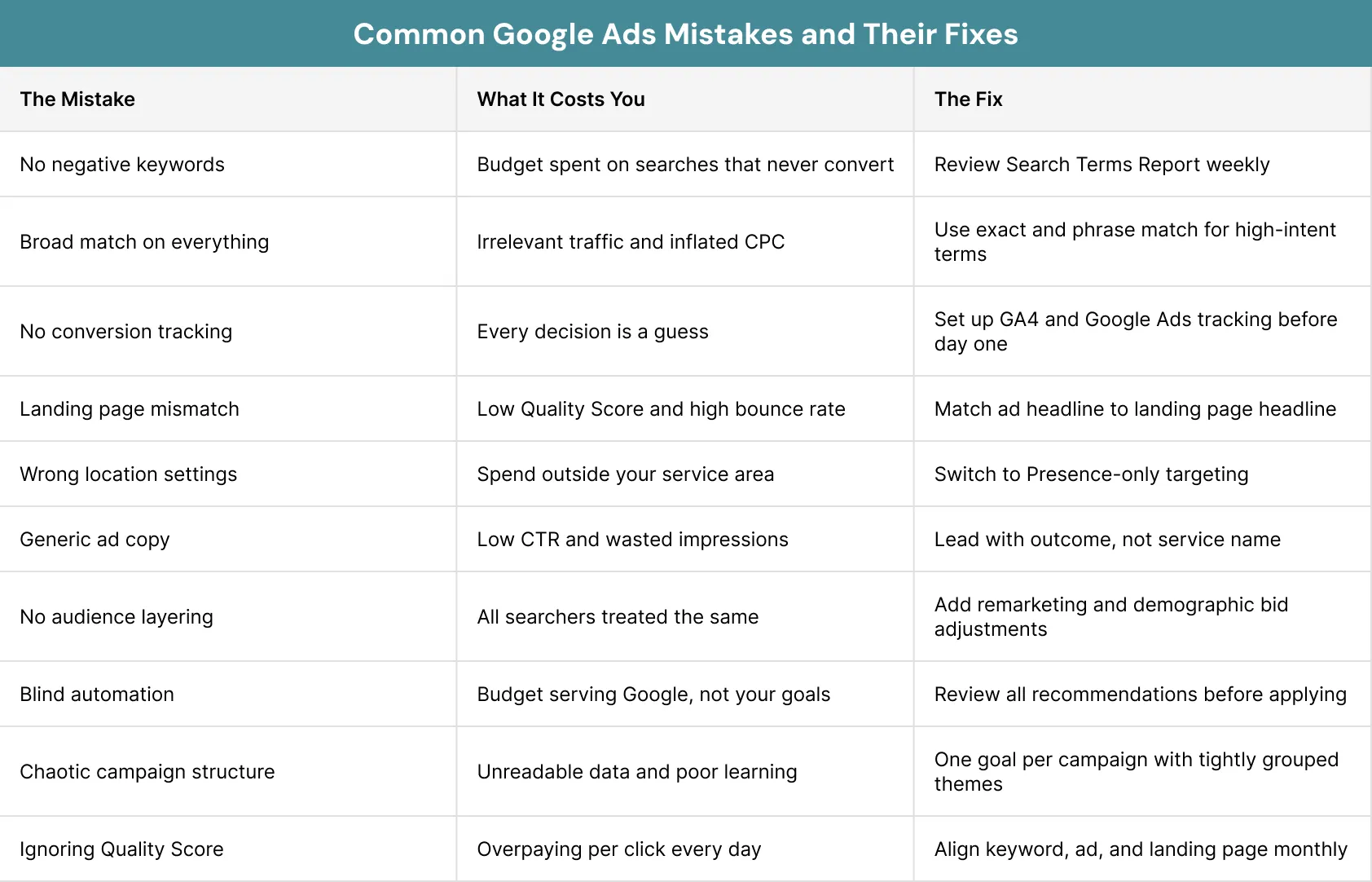
Here is where most Google Ads campaigns quietly fall apart:
Mistake 1: Not Using Negative Keywords
A plumber in Manchester sets up Google Ads. Broad match on, budget live, campaign running.
Three days later, the search terms report shows spending on ‘how to fix a leaking tap yourself’, ‘DIY pipe repair’, and ‘free plumber estimate London’. Real money. Zero chance any of them were going to pick up the phone.
This is what happens without a negative keyword list. Broad and phrase match will serve your ads to searches with no buying intent whatsoever.
Negative keywords are fundamental to keeping your campaign relevant. Because having a list of negative keywords stops your budget from being spent on searches that will never turn into customers.
You have to fix that first then tackle what comes next:
- Open the Search Terms Report every week
- Add irrelevant queries as negatives right away
- Start with: free, DIY, how to, course, tutorial, jobs, salary
- Build the list continuously because it’s never finished
PRO TIP
Accounts that control wasted spend are acknowledging negative keywords every single week, not just once when the campaign first goes live.
Mistake 2: Using Broad Match for Everything
Relying on broad match for everything is one of the common Google Ads mistakes that inflates costs quietly. Google sets new campaigns to broad match by default. The pitch is: wider reach, more traffic.
What actually happens is your budget funds Google’s expansion, not your growth.
Take an accountant targeting ‘accountant London’ on broad match. That campaign could easily serve ads for ‘finance jobs London’, ‘bookkeeper salary UK’, or ‘accounting software free trial’. None of those people are trying to hire an accountant right now.
If two or more sets of similar keywords are bidding for the same impression, they will be bidding against each other which will increase your CPC.
What to do instead:
- Use exact match for your highest-intent terms
- Use phrase match for controlled variations
- Reserve broad match only when conversion data is strong and search terms are reviewed weekly
- Never run broad match without a solid negative keyword list alongside it
Mistake 3: Running Campaigns Without Conversion Tracking
Think about driving at night with the headlights off. You can feel the road moving underneath you but you’ve got no idea what’s coming.
That’s what running Google Ads without conversion tracking looks like.
You can see clicks. You can watch the budget drop. What you can’t see: which keyword actually brought in an enquiry, which campaign touched a sale, which ad spent £400 on people who clicked and left without doing anything.
Every meaningful optimisation in Google Ads relies on conversion data and without it, smart bidding is essentially guessing which chases clicks instead of conversions and every pound spent goes to waste.
Here is how to do it right:
- Make sure to link GA4 to Google Ads prior to launching the first campaign
- Track form submissions, calls, and purchases separately
- Apply consistent attribution settings across the whole account
- Mixing attribution models across campaigns distorts your data just as badly as having no tracking
REMEMBER:
Before launching, ask yourself; if a lead comes in today, will you know which keyword, ad, or campaign brought it in? If the answer is no, set up conversion tracking first.
Mistake 4: Sending Traffic to the Wrong Landing Page
The ad promises: ‘Free HR Software Consultation for Growing Teams’.
Someone clicks. They land on a homepage with six tabs, a stock photo banner, and not a single mention of HR software.
Eight seconds later, they’re gone. That click cost £4.
The ad built an expectation. The page didn’t honour it. And Google noticed.
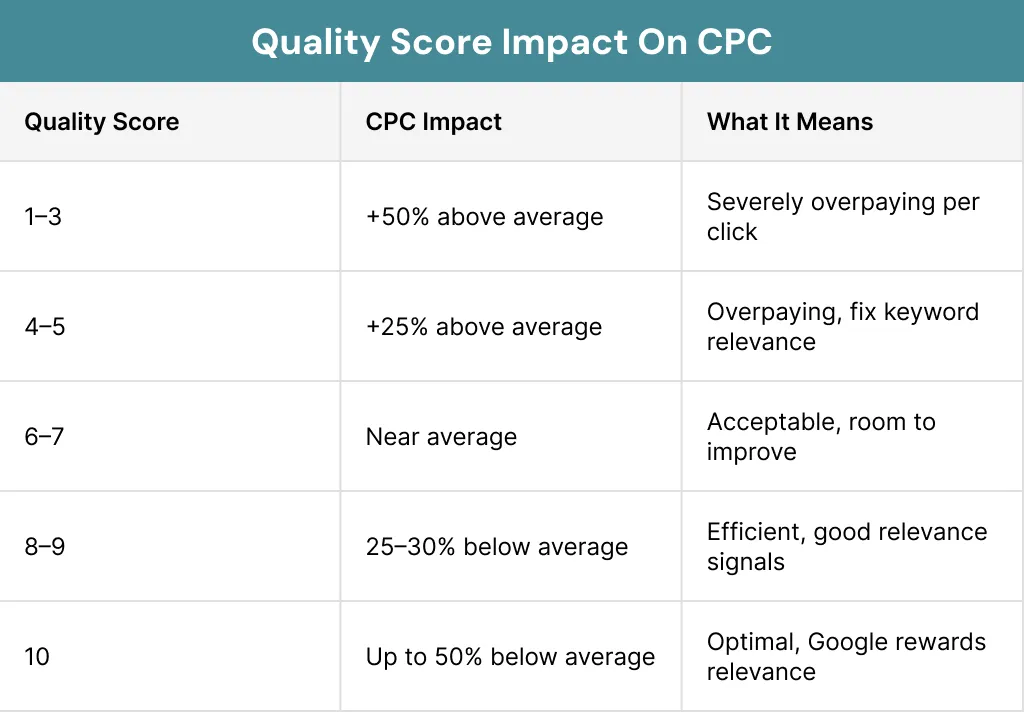
Quality Score is the ranking of the compatibility of your keyword, ad, and the landing page out of 10. A score of 100 or less indicates that you are paying a higher cost per click than another competitor who is more relevant although both the bids are the same price. This is one of the typical Google Ads errors that leaves Quality Score with the greatest impact.
Get these right before scaling:
- Match the ad headline to the landing page headline exactly
- One clear CTA with no navigation pulling visitors away
- Use PageSpeed Insights to catch load issues before you scale
- Changing Quality Score from 4 to 7 reduces CPC by 20 to 30 percent without affecting bids.
Mistake 5: Getting Location, Targeting Wrong
A Sheffield-based firm sets its location to ‘Sheffield’. Campaign goes live. Two weeks in, the location report shows spend from Birmingham, Leeds, and Liverpool. People who Googled ‘accountant Sheffield’ out of curiosity, with no intention of hiring anyone there.
Google’s default is ‘Presence or interest’. That means ads can show to anyone interested in your area, not just people actually in it.
It’s one of those common Google Ads mistakes to avoid that hides in plain sight.
Fix it here:
- Switch location targeting to ‘Presence: People in or regularly in your targeted locations’
- Check the User Location Report every month
- Exclude locations with spend but no conversions
- For national campaigns, use location data to find your highest-converting cities and put more budget there
WORTH KNOWING
Switching from ‘Presence or interest’ to ‘Presence only’ often cuts wasted geographic spend by 20 to 35 percent with no budget change.
Mistake 6: Writing Generic Ad Copy That Nobody Clicks
Your ad is one of five on the page. All five say something like:- Professional Services
- Trusted Experts
- Call Today
Writing generic ad copy is one of the common Google Ads mistakes that quietly kills CTR and pushes costs up and it’s a completely different thing to write around.
The first thing that a searcher looks at is your headline, either it will create a click or it will lose it immediately. Write in a way that matches how your keyword is searched, if someone types ‘affordable accountant London’, your copy should reflect that language. If you want to understand what actually moves the needle, a guide to CTR in Google Ads breaks it down properly.
Mistake 7: Targeting Keywords but Ignoring The Audience
This is one of the common Google Ads mistakes that does not show up obviously in the data but it quietly reduces how efficiently every pound is spent.
Two people search ‘accountant for small business’ on the same afternoon.
One is a sole trader who registered last month and needs help with their first tax return. The other is a managing director with 15 staff, an existing accountant they’re not happy with, and a budget decision to make this week.
Start with these three moves:
- Layer at least one audience onto every campaign
- Add remarketing lists for past site visitors
- Review demographic performance and adjust bids based on conversion rate, not just volume
Mistake 8: Letting Automation Run Without Human Oversight
Google has automated a lot. Smart Bidding, broad match defaults, recommendations that go live without your approval.This is one of the common Google Ads mistakes and a classic google ads conversion common PPC mistake where the dashboard looks fine while the budget quietly drains. That’s not the same thing as optimising for your cost per lead.
Auto-apply expands targeting, switches match types, and increases spend without you touching anything. Smart bidding needs roughly 30 conversions per month before it knows what it’s doing. Below that, you’re paying for guesses.
Take back control:
- Turn auto-apply off completely
- Set smart bidding targets using actual historical data
- Check search terms and conversions weekly
Mistake 9: Ignoring Quality Score and Paying for It Daily
Quality Score runs from 1 to 10 and directly affects where your ad appears and what you pay per click. it directly influences both where your ad appears and what you pay per click. Ignoring it is one of the common Google Ads mistakes that costs money on every single click yet most accounts never check it.
Three things drive it one is expected CTR, then ad relevance, and last is landing page experience. A two-point improvement often cuts CPC by 20 percent without touching bids.
Treat it as a cost lever:
- Check Quality Score at keyword level every month
- Any keyword at 4 or below is overcharging you right now
- Tighten the ad group, rewrite the copy, align the landing page
The budget remained unchanged. The mistakes What Fixing These Mistakes Actually Look Like
The common Google Ads mistakes in this blog are not edge cases. Here is what addressing them looked like:
A professional services firm had four months of Google ads on a monthly budget of £1,200.
No conversion tracking. Everything on broad match. One landing page handling five completely different services.
The campaign looked active.
- Conversion tracking set up first, data showed straight away that 70% of spend was going to keywords with no recorded conversions whatsoever
- 48 negative keywords added in week one, the irrelevant spend stopped immediately without changing the budget
- Match types are thoroughly restructured, exact match on 12 high intent terms, broad match is removed from any terms, except for one closely monitored test group
- After the six weeks, the average Quality Score jumped from 4.2 to 6.8 after land pages that were rebuilt, one per service
- The result: with the same £1,200 budget, leads were converted from the monthly budget of 3 to 11 and the cost of the lead dropped from £400 to £109 per lead
Conclusion
Most businesses running Google Ads aren’t failing because the platform doesn’t work.
They’re failing because common Google Ads mistakes got baked into the setup from day one and were never addressed in a structured or tailored way.
Getting conversion tracking, keyword structure, landing page alignment, and match type control right is not complicated, it is just overlooked
If your Google Ads account has been underperforming, XoomPlus can identify exactly what is going wrong. Contact us today to sort it out before another month slips by.
Your Google Ads Budget Working as Hard as It Should?
Wasted clicks. Low Quality Scores. Budget that looks active but delivers nothing.
XoomPlus has helped businesses across the UK reduce wasted ad spend and obtain measurable results. Reach out today and start running Google Ads that actually bring in the leads your business deserves.
FAQs
What are the most common Google Ads mistakes businesses make?
The most common Google Ads mistakes businesses make include missing negative keywords, relying on broad match for everything, running campaigns without conversion tracking, landing page mismatch, and ignoring Quality Score.
How do I know if my Google Ads campaign is wasting money?
If you cannot name which keyword generated your last five enquiries, the budget is likely being wasted. The clearest signs are high CPC with low conversions, broad match on every term, and no GA4 tracking connected. Start with conversion tracking, then negative keywords, then Quality Score.
What common Google Ads mistakes should small businesses fix first?
For budgets under £1,000 per month, the most damaging common Google Ads mistakes are no conversion tracking, no negative keywords, and broad match on every keyword. These three cause the majority of wasted spend in small accounts. Fix them before touching bids, budgets, or ad copy; the improvement in cost per lead is often immediate.
How does quality score affect what I pay on Google Ads?
Quality Score rates keyword, ad, and landing page relevance from 1 to 10, directly affecting your ad position and cost per click. Improving from 4 to 7 can reduce CPC by 20 to 30 percent without changing a single bid. It is one of the most overlooked common Google Ads mistakes to avoid because the fix costs nothing extra.
Should small businesses use smart bidding in Google Ads?
Smart Bidding works well once a campaign has at least 30 conversions per month below that, it lacks signal and bids erratically on expensive terms that do not convert. Start with manual CPC and move to smart bidding once conversion volume genuinely supports it.