- June 1, 2026
- Categories: Digital Marketing
Google Performance Max Guide: How It Works and Why It Matters
If you have spent any time managing Google Ads recently, you have probably heard a lot about Google Performance Max. Some people swear by it. Others find it frustrating. Most are somewhere in between running it, getting results but not entirely sure what is happening behind the scenes.
Performance Max is now used by over 1 million advertisers globally, making it one of the fastest growing campaign types in Google Ads history.
That is exactly what this guide is for. Whether you are running ads for an ecommerce store, local business, charity or a lead generation operation, Google Performance Max is probably something you are already using. Performance Max campaigns are commonly shortened to PMAX. If you are not using Performance Max yet, you probably will be using it soon.
So let us talk about what Performance Max is, how it works, where things can go wrong with Performance Max and how to get the most out of it.
Key Takeaways
- Understanding what is Performance Max is essential as it is a goal based, AI driven campaign that runs across all Google inventory from a single setup
- The success of Performance Max campaigns depends heavily on strong inputs including conversion tracking, feed quality and creative assets
- In Performance Max Google Ads, the algorithm performs best when given clear conversion goals, enough data volume and stable bidding conditions
- A well structured Google Performance Max setup should prioritise feed optimisation, correct campaign segmentation and clean conversion tracking
- Most results from Google Ads Performance Max tips come from improving product feeds, using audience signals correctly and avoiding over segmentation
- Treat Google Performance Max as a system that learns over time, meaning premature changes can reset learning and hurt performance
- Always combine automation with human oversight to ensure Performance Max campaigns stay aligned with business goals and profitability
What Is Performance Max?
Performance Max campaigns in Google Ads are a goal based campaign type that runs across all of Google’s advertising channels from a single campaign. We are talking about search, shopping, YouTube, display, discover, Gmail and maps – all at once.
Before Google Performance Max came along, you’d need separate campaigns to run ads on each of these platforms. Now, Google’s machine learning takes care of the distribution for you. You tell Google Performance Max what you want to achieve with your ads, give them your creatives and some information about the audience of your ads. Then Google’s machine learning decides where to put your ads, who should see them and how much money to spend on each ad.
Did you know?
Performance Max can predict conversion likelihood before a user even clicks, using real-time behavioral signals across Google.
It replaced the Smart Shopping campaigns in 2022 and Google Performance Max structure changed slightly. Ad groups became asset groups and product groups became listing groups. The logic behind them is similar, but the scope is much broader.
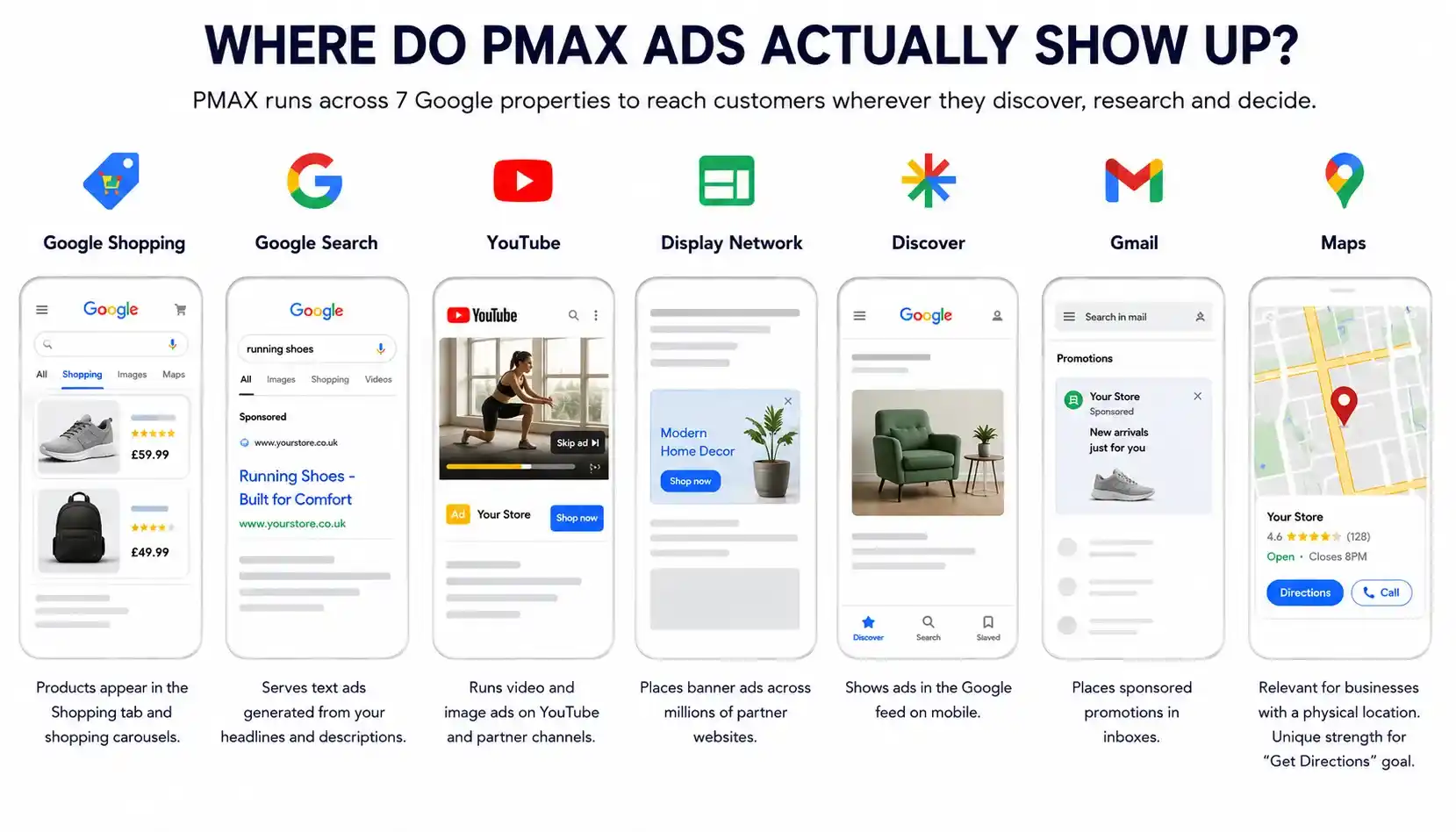
Where Do PMAX Ads Actually Show Up?
This is one of the common questions that advertisers ask about Google Performance Max and it is a fair question. The budget for Google advertisements can be spread out across seven Google properties and the reports do not always make it clear where the money is going.
Here’s a quick rundown:
1. Google Shopping
Google Shopping is where most of the money for ecommerce is usually spent. Products appear in the shopping tab and shopping carousels, Google Performance Max treats this as your highest converting channel in most cases.2. Google Search
It serves text ads generated from your headlines and descriptions. For most ecommerce accounts, it plays a secondary role.3. YouTube
Youtube runs video and image ads. If you do not upload a video, Google Performance Max will auto generate one from your images. The results are usually not great, so providing your own video is always the better option.4. Display Network
This network places banner ads across partner websites. It has the broadest reach but the lowest conversion quality.5. Discover
It shows ads in the Google feed on mobile. It particularly works better for visually appealing products.6. Gmail
Gmail places sponsored messages in inboxes. Volume tends to be low for most businesses.7. Maps
This is relevant if you have a physical location. It is actually one of PMAX’s unique strengths for local businesses. It is the only campaign type that lets you target “Get Directions” as a conversion goal.
Interesting Fact:
PMAX is the only Google Ads campaign type that can run across all Google channels from a single campaign setup.
For a healthy ecommerce PMAX campaign, aim for 60–80% of your spend going to shopping. If display or youtube is eating too much of the budget, your product feed probably needs work.
Why Does It Matter?
Here’s the honest answer: Performance Max Google Ads matters because it amplifies whatever you feed it. Good inputs get good results. Weak inputs waste the budget.
The opposite of a good idea can also be a good idea. – Rory Sutherland, Vice Chairman, Ogilvy UK, Alchemy: The Surprising Power of Ideas That Don’t Make Sense
It’s not a solution. Many advertisers put everything into one ad campaign and just let it run. They then get confused when the results start to get worse over time. The tool is really helpful but It still needs guidance on what to do.
For ecommerce businesses specifically, PMAX is a powerhouse. The percentage of advertisers using Performance Max jumped from 60% in 2024 to 71% in 2025, an 18% increase in adoption in a single year. This shows that PMAX is becoming a core part of advertising strategy rather than an optional addition
One real world example saw a transition from smart shopping to Google Performance Max, resulting in a 15% increase in ROAS, a 3% drop in CPCs and a 47% jump in revenue.
For lead generation, some advertisers have seen 55% lower cost per lead compared to standard search campaigns.
For healthcare, a sector where targeting options are heavily restricted, PMAX has helped reduce cost per acquisition by 37% while improving conversion quality.
The reach is simply unmatched. No other campaign type lets you run a proper multi channel strategy from a single campaign setup.
What Are the Three Things That Drive Performance?
When you strip everything back, three things determine whether your Google Performance Max campaign succeeds or struggles.1. Conversion Settings
Your conversion goal is the compass. Google Performance Max only operates on conversion based bidding. There is no manual bidding, no click optimisation and no view based optimisation. The goal you choose completely changes how the campaign behaves.
Too little conversion volume and smart bidding struggles. The wrong intent and traffic quality drops. A mismatched objective and performance looks unstable.
For smaller accounts, a useful trick is to start optimising towards a mid funnel action like begin checkout rather than a completed purchase. Once the campaign is stable and generating enough data, you shift towards your actual revenue goal.
2. Bid Strategy
Your bid strategy sets the direction. Maximise conversions pushes for volume. Target CPA pushes for efficiency. Target ROAS goes after revenue efficiency.
Setting an aggressive target too early is a common mistake. It can throttle spending, slow down learning and reduce volume. It makes the Google Performance Max campaign look broken when it is actually just constrained. Start with maximising conversions, aespecially for new campaigns or new accounts and layer in targets once you are seeing consistent results.
3. Assets
Creative is the real audience signal in Google Performance Max. If your assets strongly appeal to one type of customer, the algorithm will find more people like them. That is why duplicating the same assets across multiple asset groups does not create segmentation, it just creates redundancy.
The messaging should be different for different audiences. If you do not change the assets, you will not get a result.
How to Set Up a PMAX Campaign?
Before you touch a single setting in Google Performance Max, you need to learn about a campaign set up.1. Get Your Foundations Right First
There are two things you need to have sorted to make your foundation strong.
Google Merchant Center feed
If you are running ecommerce, you need to link your Merchant Center account to Google Ads. The feed is what PMAX uses to build shopping ads. Include as many attributes as possible like titles, brand, price, images, MPN/SKU, product category, product type and custom labels. Platforms like Shopify and WooCommerce can generate feeds automatically, so check if yours does too.
Conversion Tracking
Google Performance Max relies on accurate data to learn. Make sure your primary conversion event is set to the deepest point in your funnel, a completed purchase for ecommerce or a form submission for lead generation. If you have multiple purchase events set up, only mark one as ‘Primary’ to avoid double counting.
2. Choose your Campaign Objective
Once those are in place, here is how the setup works:
Sign into Performance Max Google Ads and create a new campaign. You will be asked to choose an objective for ecommerce, select ‘Sales.’ If you want full control over your settings without being nudged, choose “Create a campaign without a goal.”
Next, select Performance Max as your campaign type and connect your Merchant Center account.
3. Set your Bidding Strategy and Daily Budget
For bidding, Google Performance Max gives you two options:- Maximise Conversion Value: It lets you set a target ROAS, use this when your goals have different conversion values. Maximise Conversions lets you set a target CPA, use this when all your goals have the same value. If your account is new, start with Maximise Conversions and add targets once you are seeing steady results.
- Set your Daily Budget: Google will vary how it spends each day but will average out to your budget over the month. For example, a budget of £10 per day equates to roughly £304 per month. A sensible starting point is to set your daily budget at around three times your average cost per sale.
4. Configure Location, Language and Targeting
Under Campaign Settings, choose your target locations and languages. Pay attention to the location targeting option here. Google Performance Max defaults to ‘Presence or Interest,’ which means your ads can show to people outside your chosen location who have shown interest in it. If you only want to reach people physically in your target area, switch this to ‘Presence only.’5. Decide on Automatically Created Assets
You will also see a section in Google Performance Max called Automatically Created Assets. This is turned on by default and gives Google permission to write new ad copy from your website and change your landing pages. If you want to keep control over what your ads say and where they send people, switch this off. When in doubt, leave it off.6. Set Up your Asset Groups and Listing Groups
Finally, set up your asset groups and listing groups. If you are using a product feed, uploading creative assets is optional. You can launch a feed only campaign and Google will build shopping ads from your feed automatically. This is actually a recommended starting point for ecommerce stores, as it keeps your budget focused on shopping before expanding to other channels.Asset Specs: What Do You Actually Need?
When you do add creative assets to Google Performance Max, here are the requirements:1. Text
The text should be up to 15 headlines (around 15-30 characters each), 1-5 long headlines (max 90 characters), 2-5 descriptions (max 90 characters) and your business name (max 25 characters).2. Images
At minimum, following image settings are recommended:- One landscape image (1.91:1 ratio, recommended 1200×628)
- One square image (1:1, recommended 1200×1200)
- One logo (1:1, recommended 1200×1200)
3. Video
Video is optional, but campaigns on Google Performance Max with video see 25-40% better performance than those without. If you do not upload one, Google auto generates a video from your images. The results are usually poor with no way to opt out, so even a simple 15-30 second product video is worth the effort. Tools like Canva or Google’s free Director Mix can help you animate still images into a basic video.
One important note: if you have a Merchant Centre product feed, do not add your product images as separate image assets. They are already in the feed. Instead, add lifestyle or brand imagery as your additional assets.
How to Structure Your PMAX Campaigns?
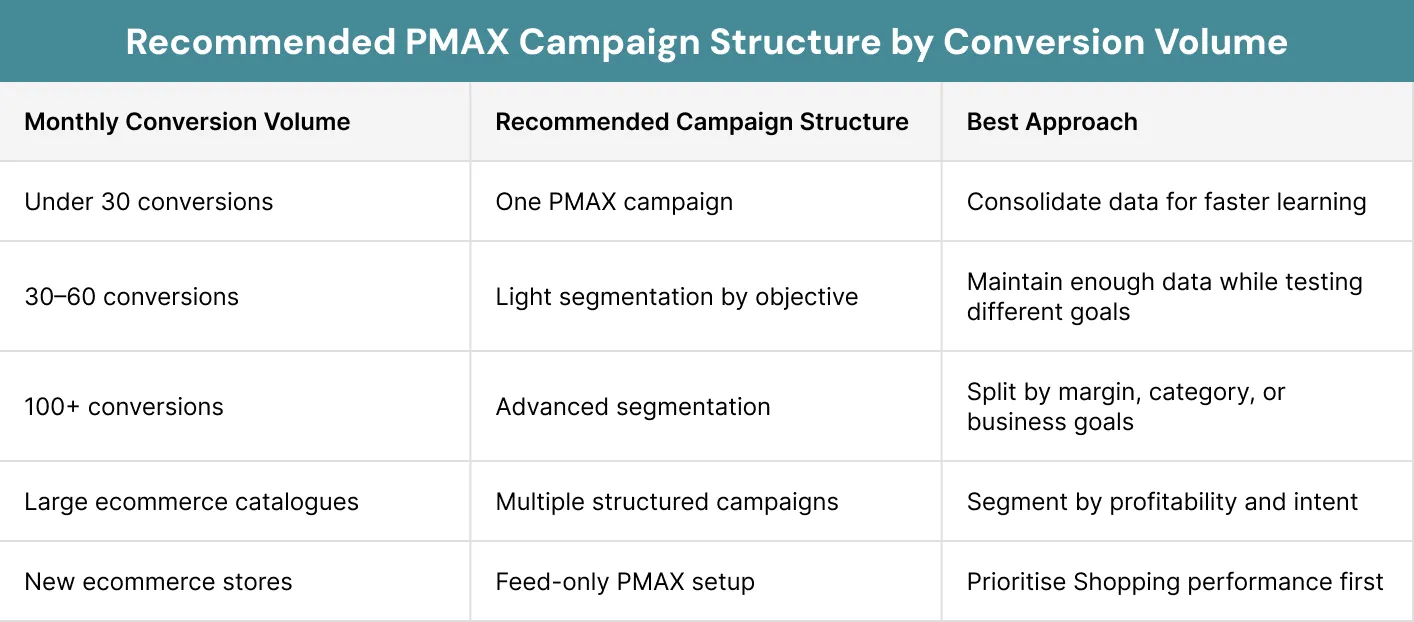
Structure is where most advertisers go wrong. The core tension is this: Google’s algorithm needs conversion data to learn and each of these Performance Max campaigns needs roughly 20-30 conversions per month to exit the learning phase. Split your budget across too many campaigns and none of them get enough data.
The rule of thumb is do not create more campaigns than your conversion volume can support.
When you do have the volume to segment your Google Performance Max campaigns, do it by business objective instead of product category. A 60% margin product and a 10% margin product cannot share the same ROAS target. The algorithm defaults to whatever converts most easily, which is usually your best sellers and everything else gets starved.
For asset groups, create a new one when your:
- Messaging changes
- Audience intent differs
- Product focus shifts
A practical tip that is worth highlighting is if you are just starting out, consider launching Google Performance Max with feed only asset groups. This strips out all creatives and limits your ads to shopping and dynamic remarketing. It sounds restrictive, but for ecommerce it forces your budget into the highest converting channel. Add creatives once shopping performance is stable.
What Are Audience Signals?
Audience signals are one of the most misunderstood features in Google Performance Max. They are not rigid targeting criteria, they are suggestions. You are telling Google ‘people like this tend to buy from us.’ The algorithm starts there and expands.
The most valuable signals for ecommerce are:
1. Customer Match Lists
It uploads your buyer emails. Google Performance Max finds similar users. This is your strongest signal by far.2. Website Visitors
It includes the product page viewers, cart abandoners and past purchasers.3. In Market Audiences
These are Google’s pre-built segments of people actively shopping in your category.4. Custom segments
These segments are built from search terms or competitor websites.
Quality beats quantity every time. One solid customer match list from real buyers outperforms a dozen broad in-market audiences.
How Long Does It Take for PMAX to Learn?
One of the most common mistakes with Google Performance Max is pulling the plug too early. Jyll Saskin Gales, a well known PPC expert, recommends using conversion volume as your stability benchmark instead of time. The goal is roughly 30 conversions in 30 days. That is when learning becomes predictable.
Quick Tip:
Don’t judge PMAX too early, it often needs 2-4 weeks and enough conversion volume before performance stabilises.
Sometimes it takes two, three or even four months for the algorithm to properly calibrate. In one real world example, a campaign showed just 2 purchases in month one and 6 in month two, looking like a failure. But overall product sales had skyrocketed, driven by PMAX touchpoints that were not being fully attributed. By month three, even the in-platform reporting showed profitability.
If 30 purchases are not realistic for your account, train the algorithm with micro conversions like add to cart or begin checkout and phase them out as purchase volume grows.
What Are the Drawbacks of Performance Max?
PMAX is really powerful. It has some real limitations that you should know about before you use it all the time.1. Limited Visibility
The biggest frustration with Google Performance Max is that you cannot easily see how the budget is split across channels. The detailed click and conversion data by placement is also not readily available. You get some insight via the insights tab, search categories and audience segments but it is not the granular reporting you get from a standard search or shopping campaign.2. Brand Cannibalism
It is a genuine risk. Google Performance Max prioritises high converting search terms and branded searches almost always perform best. If you do not exclude your own brand, PMAX will happily claim credit for converting people who were already going to buy from you. Always apply brand exclusions to your generic PMAX campaigns and run branded keywords in separate standard campaigns.3. Ad Cannibalism Across Campaigns
It is also worth watching. PMAX generally takes priority over shopping campaigns. In search, exact match keywords in standard campaigns are prioritised over PMAX but broad and phrase match keywords will often lose out.4. Broad Targeting
This type of targeting can be a problem too. Without keyword control, PMAX can sometimes bid on terms that are completely irrelevant to your business. Negative keywords (applied at account level) and brand exclusion lists help, but it is not the same degree of control you may have in a standard search campaign.Why Is Your Product Feed So Important in PMAX?
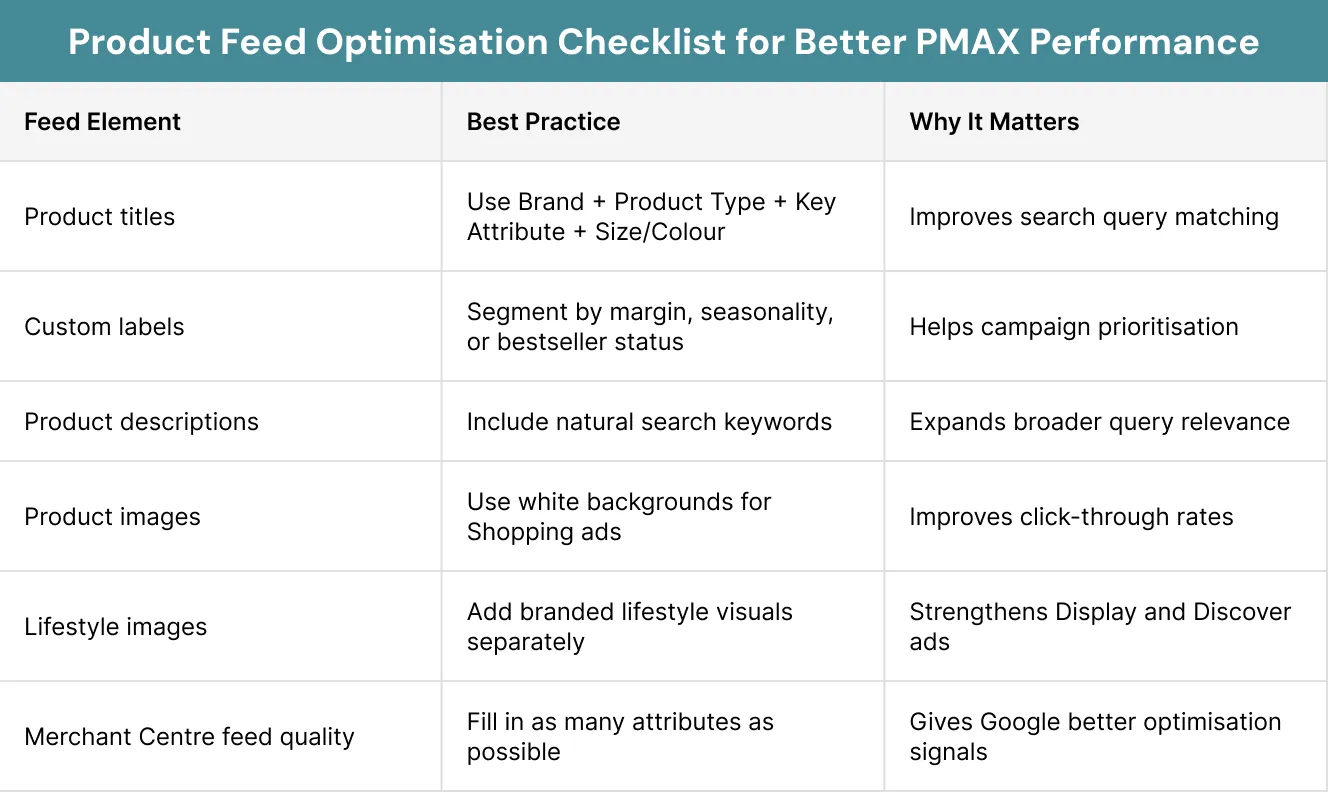
This cannot be overstated especially for ecommerce advertisers. Your product feed is the single most important input to a Google Performance Max campaign. The algorithm uses it to match products to search queries, build Shopping ads and inform dynamic creative.
The highest impact optimisations are:
1. Product titles
These are front-load searchable attributes. A solid pattern is: [Brand] + [Product Type] + [Key Attribute] + [Size/Colour]. Google treats the first keywords in a title as the most important.2. Custom labels
They are used to segment products by margin, best seller status, seasonality or price tier. This gives you control over which products go into which campaigns.3. Descriptions
It includes relevant search terms naturally. Google Performance Max uses these for broader query matching.4. Images
White background for shopping ads; lifestyle shots as additional images for display and discovery.
If your PMAX performance is underwhelming, start here before touching anything else in the campaign setup.
Which PMAX Features Are Actually Worth Using?
Before diving into the individual features, it is important to know that not all of them get equal attention from advertisers. Some of the most useful ones are the least talked about. Here is a breakdown of what is actually worth your time.1. Ad Assets (Extensions)
Ad assets sit below your ads and add useful information like sitelinks to specific pages, location details, phone numbers and more. They can improve your quality score and ad rank, which lowers your cost per click. Set them up under the Assets section of your campaign.2. The Insights Tab and Reporting
This is where Performance Max Google Ads gives you its best window into performance. After a few days of running, you will start to see Search Categories which tell you whether your campaign is focusing on branded or non branded queries. Audience Segments, which show you which Google audiences are driving your conversions. You can also view search terms, see competing domains in the auction insights report and build custom dashboards.3. Final URL Expansion
You have two options here. Leave it on and Google will automatically send traffic to the most relevant pages on your website. Turn it off and it will only use the URLs you have specified. If you want control over landing pages, turn it off. If your site has strong product pages and good structure, leaving it on is often worth testing.4. Diagnostic Insights Tool
PMAX includes a built-in diagnostics tool that flags issues within Performance Max campaigns automatically like billing problems, policy violations, low ad strength or budget issues. It also gives you recommendations on how to fix them. It is worth checking regularly, especially after launch.Does PMAX Work for Every Type of Business?
It is important to note that PMAX is not something that works for everyone. The way you use PMAX will be different depending on the type of business you are in.1. Ecommerce
For ecommerce, Google Performance Max is really good when you use it with a product feed that is optimised well. Many experienced advertisers are now running a hybrid setup. PMAX for core catalogue automation and cross channel reach. While standard shopping for new product launches, granular query control and search term data.2. Lead Generation
Lead generation, integrating CRM data to track offline conversions is the key to unlocking PMAX’s potential. Without it, the algorithm optimises towards easier conversions like newsletter signups rather than the high value leads you actually want.3. Nonprofits Using Google Ad Grants
Performance Max Google ad offers a specific advantage: it is exempt from the 5% click through rate compliance requirement that standard campaigns must meet. It also helps Ad Grant accounts spend more of their £10,000 monthly budget, since the average account only uses around $330 of it due to limited keyword search volume.4. Local Businesses
PMAX is the only campaign type that supports “Get Directions” as a conversion goal, this is a crucial feature for businesses that rely on foot traffic.Is Your PMAX Campaign Still on Track?
If you’re already running Performance Max campaigns, here are some warning signs to watch for:- More than 80% of spend concentrated in the top 20% of products or asset groups
- Any placement exceeding 15% of total spend
- Best performing assets are auto generated rather than uploaded by you
- Search campaign CPCs increased after launching PMAX
- Over 30% of conversions coming from branded terms despite exclusions
- Any asset group performing below good for more than 7 days
Real Life Example
ManyPets is a UK based pet insurance company that has grown rapidly since its founding. Like many businesses, their performance marketing team was managing a complex mix of manual Google Ads campaigns across multiple formats. The campaigns were working, but the level of hands-on management required was significant and it was eating into the team’s ability to focus on higher level strategy.
The team decided to run a proper test of fully automated Performance Max campaigns. They fed the system with their existing customer data using the Customer Match tool, building lookalike audiences from their policy holder base. Rather than trying to control every placement and keyword, they focused their energy on giving the Performance Max Google Ads algorithm the right signals. This includes quality audience data, clear conversion goals and strong first party inputs.
The results published by Think with Google were striking. Compared to their previous campaigns, ManyPets saw a 21% uplift in sales, a 20% improvement in cost per acquisition and a 13% increase in overall return on ad spend. Their head of performance marketing described the shift as night and day. The automation freed up the team to spend less time on routine bid management and more time on the strategic decisions that actually move the business forward. It is a straightforward example of what PMAX can do when it is set up with the right inputs and given the time to learn.
Conclusion
Google Performance Max is a very powerful tool in Google Ads today. Having a powerful tool means nothing if you do not use it correctly.
The businesses that get the results from Performance Max are not just setting it up and forgetting about it. They are:
- Putting in strong creative assets
- Optimising their product feeds
- Applying sensible audience signals
- Giving the algorithm enough time and data to learn
- Checking in regularly to make sure the campaign hasn’t drifted outside their intended guardrails
Xoom Plus understands that Performance Max is not just another campaign type to switch on and forget. It is a system that needs the right structure, the right inputs and the right strategy behind it to deliver real, lasting results. Contact us today to bring the expertise and hands on approach to make it work properly for your business.
Running Google Performance Max without a clear strategy?
Xoom Plus helped businesses set up, structure and optimise PMAX campaigns across the UK that actually deliver. Reach out to us today and let us build a Performance Max strategy that works for your business.
FAQs
What is Google's Performance Max?
Google Performance Max is a single, goal-based campaign type that runs ads across all of Google’s channels like Search, Shopping, YouTube, Display, Discover, Gmail and Maps from one campaign. It uses machine learning to automatically decide where to show your ads, who to show them to and how much to bid, based on the conversion goal you set.
What is PMax good for?
PMAX works best for ecommerce businesses with an optimised product feed, lead generation campaigns with CRM integration, local businesses targeting foot traffic and nonprofits using Google Ad Grants. It is particularly effective when you have clear conversion goals, strong creative assets and enough data, at least 20 to 30 conversions per month for the algorithm to learn from.
Is Google Performance Max worth it?
Yes, for most businesses with sufficient conversion volume and a well optimised feed, Google Performance Max is worth it. Real world results include a 47% increase in revenue for ecommerce, 55% lower cost per lead for lead generation and a 37% reduction in CPA for healthcare advertisers. However, it requires proper setup, clear conversion tracking and regular monitoring to deliver those results consistently.
What are the disadvantages of Performance Max?
The main disadvantages of Performance Max are limited visibility into how your budget is split across channels, reduced control over search terms and keyword targeting and the risk of brand cannibalism where PMAX claims credit for conversions that would have happened anyway. It also functions as a black box, you can see top level results but not always the granular data needed to understand exactly what is driving them.
Is PMax good for lead generation?
Focus on hyper-local SEO, clear symptom-based educational content, and robust patient-privacy compliance to build deep trust and authority.