- June 2, 2026
- Categories: Web Solutions
How to Use Icons to Improve Website Navigation
Did you ever leave a website because you could not quickly find what you wanted? This happens because poor website navigation and unclear icons confuse users within seconds.
The report shows that around 68.1 million people in the UK were using the internet till the end of 2025. This means a very large number of people were online. This data suggests that websites should have easy access that leads to a smooth user journey.
Today, a website should be easy to use because users want smooth actions and quick answers. If they find a website is difficult to use, they usually leave quickly. This is why good navigation icons matter so much.
Businesses can create a more navigable website through strategic icon use in shopping carts, search bars, menus and profile buttons. Even a small icon (design element) can help users navigate a website. Well-designed navigation icons help reduce confusion and support quick actions.
A website is now a complete brand experience, not just information pages. Every icon shapes how users feel about a business. A clean and effective navigation icon can improve readability. It helps users feel familiar with that icon. It also supports accessibility and increases conversions.
Some icons lead to a bad user experience because they create confusion. A bad icon for navigation may look good but the design fails if it is not easy to understand.
Key Takeaways
- A clear navigation icon helps users move faster and reduces confusion, making website navigation simple and easy to use
- Always use icons with text labels to improve understanding and create a more navigable website for all users
- Use familiar icons for common actions like search, cart and home to improve recognition and user confidence
- Follow accessibility rules by keeping good contrast, readable labels and the best icon size for website use, especially on mobile
- Test icons regularly using real user behaviour like heatmaps, A/B testing and usability testing instead of assumptions
- Place icons where users naturally look, based on scanning patterns, to improve visibility and interaction with icons for navigation
- Use consistent styles and consider free website navigation icons only when they match your brand and are easy to understand
Why Icons Matter in Navigation
Icons have been used in the digital world for many years. In the early days, they became popular because they made computers easier to use. At that time it was very difficult for a common person to understand the technology. That is why people find it easy to use simple icons as compared to typing difficult commands.Did you know?
Familiar icons help users find what they need faster.
A navigation icon can work well on a website because people understand images much faster than text. The human brain can recognise images almost instantly.
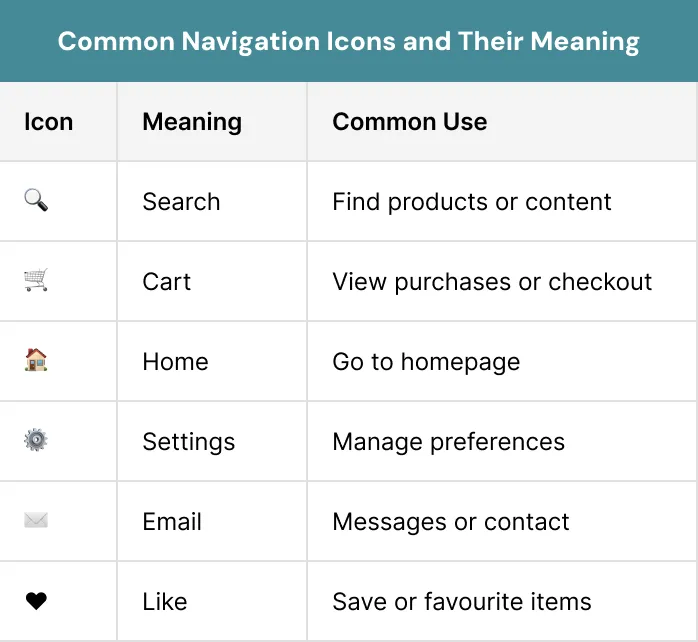
Users show less interest in websites with large blocks of text. They just scan pages quickly. They do not read full pages. Icons break the text and help users find actions and sections faster. Familiar symbols improve user experience. For example, users already know:
- A magnifying glass for search
- A shopping cart for purchases
- A house icon for home
- A padlock for security
- An envelope for messages or email
Universal Icons and Familiarity
Some icons are almost universal on the internet. They usually represent old physical objects that people hardly use anymore like a floppy disk save icon. New users have never used a real floppy disk but they still know the icon means save. Some familiar icons are:- Telephone receiver for calls
- Envelope for email
- Floppy disk for save
- Camera for photos
- Folder for files
How Icons Reduce Cognitive Load
Cognitive load means the mental effort users need to understand something. When a website is hard to use, users feel confused and may leave quickly.
A good navigation icon helps reduce mental effort because users can understand it without taking too much pressure. For example, when you see a shopping cart icon, you already know it leads to your basket or checkout page.
Consistency is important because when the same icons are used for the same actions across websites, users become familiar with them. Familiar icons help users navigate faster and they feel more comfortable. This is why they use the website with more confidence.
Design is not just what it looks like and feels like. Design is how it works. – Steve Jobs, Co-founder of Apple Inc
Good Icons vs Bad Icons
A good navigation icon is not only about style. A good icon clearly shows meaning. A bad icon confuses users and it does not show clear meaning. There are two main problems designers often create:- In the first problem users do not understand the meaning of an icon at all
- In the second problem, designers use a familiar icon in a way that users do not expect
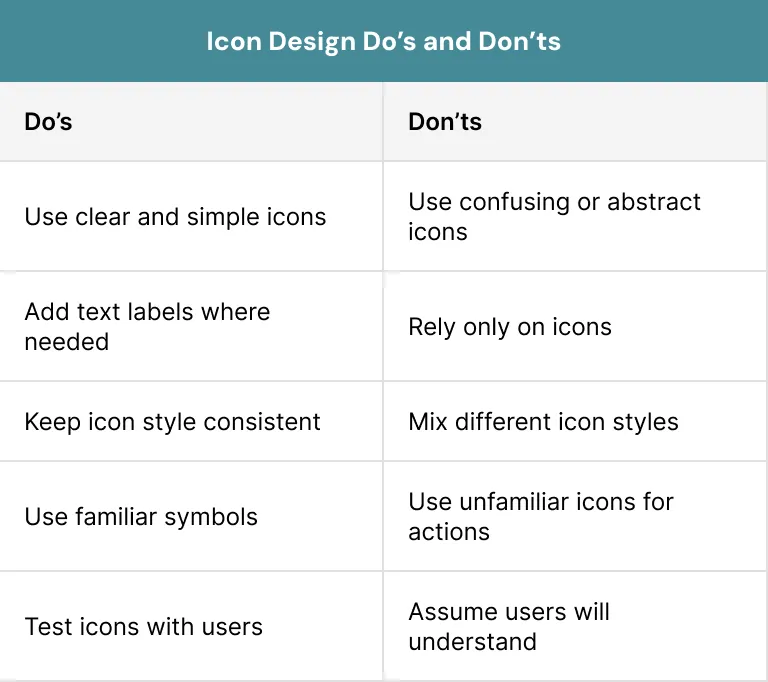
For example, a Wi-Fi icon is used for IT support. Most users are familiar with this as an icon for internet connection, not technical help. This type of navigation icon can confuse users. This also makes them think harder instead of reducing mental pressure.
Many web designers try to make websites look modern and simple but icon-only website designs are not always easy to use. They may look clean but users can struggle if the icons are not familiar or clear.
Should Navigation Use Icons Only
No, navigation should not use icons alone. Many websites use icon-only menus because they look simple and stylish. However, this approach can become risky as users may not understand what the icons mean.
For example, a logout icon may look like a back button and settings icon may look unclear. A custom navigation icon may feel completely unfamiliar.
Some websites explain icons with hover tooltips. This may work on desktop devices where users can hover with a mouse but the main issue is for mobile users. They cannot hover on touchscreens like desktop users.
This is where labels come into the picture. Using text together with icons improves clarity and helps users understand actions faster.
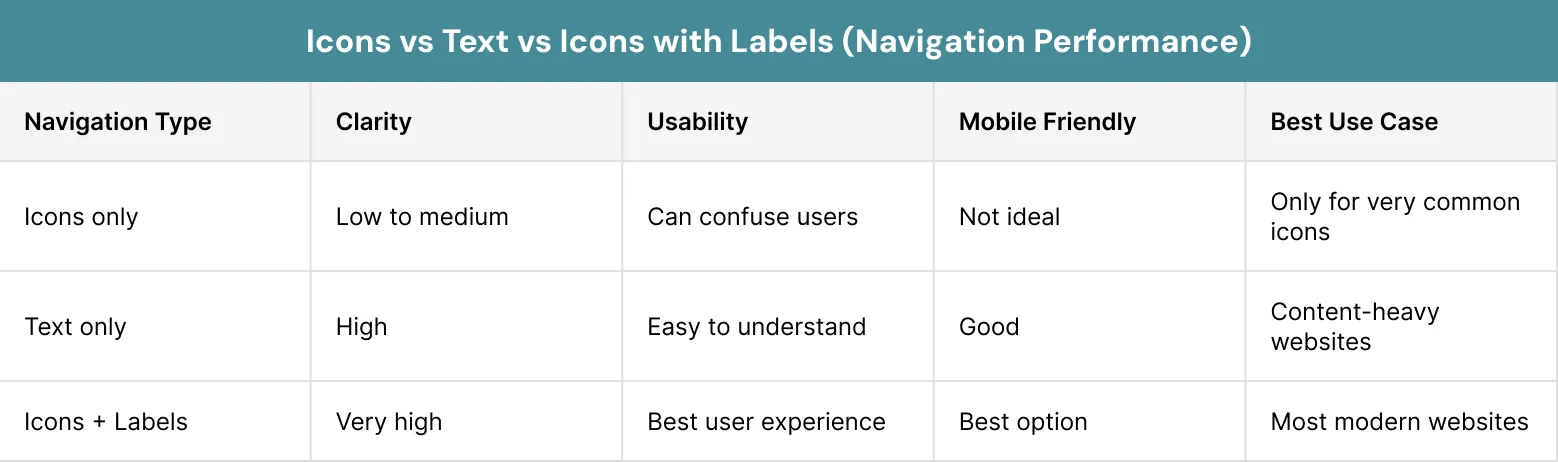
Many usability tests show that icons combined with labels perform better than icons alone. Google itself tested unclear icons in its translation application. Feature usage increased after redesigning the icon and adding labels. This shows when you are in doubt, use labels and icons together.
Why Labels Improve Navigation
Some users may not understand unclear icons. This can happen if they speak another language or do not use websites often.
A navigation icon with a text label is easier to understand. The icon shows the action, and the word explains it.
For example:
- Search icon + Search
- Cart icon + Checkout
- Heart icon + Like
- Menu icon + Menu
Icons and Accessibility
Accessibility should never be ignored when you are talking about website usability. A good navigable website is easy to understand and it must support users with different abilities and needs. Icons can improve accessibility when you use them correctly.
For example icons can really help users who struggle with language because these visual cues can communicate meaning quickly. Icons are very useful in this case.
However icons can also become a problem for accessibility if they are unclear or poorly designed. To make icons more accessible, follow these steps:
- Use text labels with the important icons
- Add proper aria-labels for screen readers
- Make sure your website maintain strong colour contrast
- Avoid making touch targets small
- Keep icons simple and easy to recognise
The WCAG (Web Content Accessibility Guidelines) recommend that websites should use contrast ratios for icons and graphics. This improves visibility for all users, especially users with visual impairments.
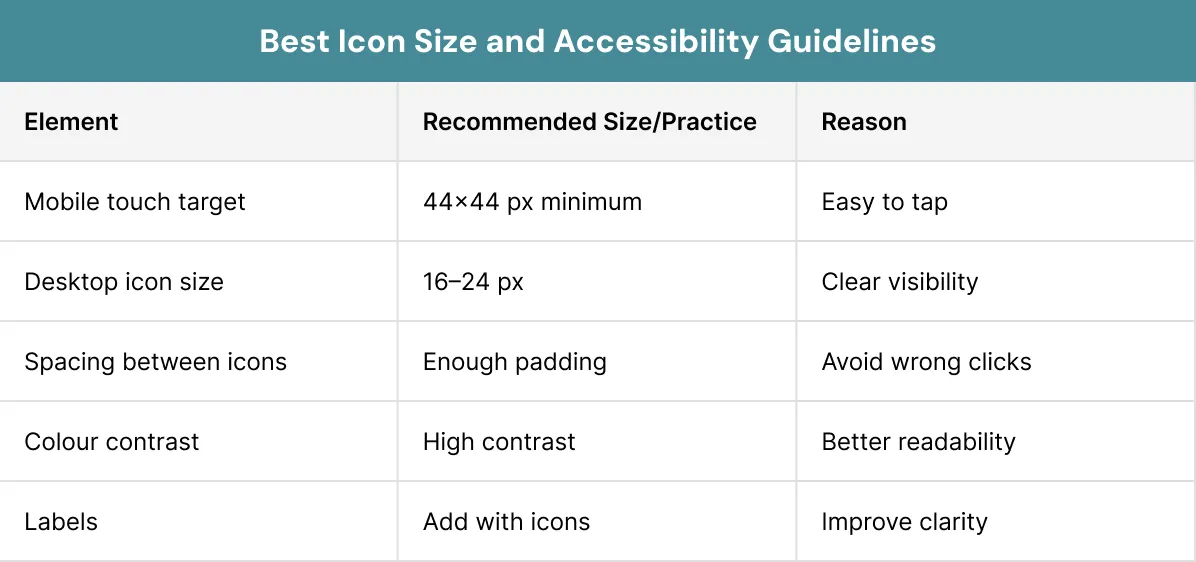
The size of mobile touch targets is also very important. Apple and Google both recommend minimum touch target sizes so users can tap icons comfortably. A tiny navigation icon may really frustrate users. It can also increase mistakes. Accessibility and icons are very important for website usability and accessibility.
Icons and Brand Identity
Icons are not only functional tools. They also support branding. A custom set of icons can strengthen visual identity and make a business more memorable. When icons share the same colour palette, stroke width, corner radius, illustration style and visual tone.
They create consistency. Consistency builds trust. For example, a playful e-commerce website may use rounded colourful icons, while a financial technology company may prefer sleek minimalist icons.
A cohesive icon system helps create a user friendly website that feels polished and professional. However, designers should avoid changing icon styles randomly across pages. Using three different home icons on one website creates confusion. Consistency is one of the strongest principles in UX design.
Strategic Places to Use Icons
Icons should not be placed everywhere without purpose. A navigation icon works best when it improves clarity or guides attention. The goal is clarity, not decoration. Common areas where icons improve navigation of a website include:
Navigation menus: Icons help users identify important sections quickly.
Call-to-action buttons: A navigation icon near a button can guide users toward key actions.
Forms: Progress icons can reduce anxiety during multi-step forms.
Product categories: Icons help users scan categories faster.
Pricing tables: Simple icons make comparisons easier to understand.
Error pages: Creative icons can reduce frustration on 404 pages.
Search and filters: A navigation icon can make filtering and searching easier to notice.
Placement and Scanning Patterns
Users do not read websites the same way they read books. Most people quickly scan webpages in a certain viewing pattern instead of reading every word carefully.
Users often follow an F-pattern in content-heavy pages. Users often follow a Z-pattern in simpler pages. Understanding these behaviours helps designers place icons more effectively. For example:
- Primary actions should use strong high-contrast icons
- Secondary actions should use softer supporting icons
- Important icons should appear in natural scanning areas
Icons and Mobile Navigation
Mobile design creates additional challenges. Small screens need good planning. A navigation icon assumes greater significance as there is limited screen space available to write text. However, complete reduction of text leads to confusion. That is why most successful mobile applications use both icons and text together.
Touch targets also matter. If icons for navigation are too small or too close together, users may accidentally tap the wrong action.
A website with good mobile navigation should feel effortless. Icons should support speed and clarity.
Custom Icons vs Universal Icons
Not every icon should be custom-designed. Universal icons are usually better for common actions such as home, search, settings, cart and profile.
Users already understand these symbols. Familiar icons receive much higher immediate recognition rates than completely new designs. However, custom icons still have value. They can strengthen branding and highlight unique website features. The key is balance.
A navigation icon should feel familiar enough for usability while still matching the brand identity.
Animation and Interaction
Small animations can make icons more helpful. For example, a moving download icon can show that a file is downloading. A small cart movement can show that a product was added.
Too much animation can take users’ attention away. It can also make the website harder to use. Animation should help users understand an action, not just make the website look fancy.
Icons and Conversion Rates
Icons directly influence user behaviour. A confusing website can reduce conversions even when the content is valuable. Research discussed several practical examples. One example involved healthcare registration forms.
Users abandoned long forms because they felt overwhelmed. Adding numbered progress icons with labels helped reduce uncertainty and improve completion rates. Another example involved shopping cart icons. An e-commerce website improved visibility by using:
- A high-contrast cart icon
- Persistent placement
- Subtle animation
- Clear visual feedback
Financial service websites often contain dense information. Adding category icons as visual anchors helps users process information faster. This reduces cognitive load and improves engagement.
A strong navigation icon can support conversions because users feel more confident while moving through the website.
Important:
One clear icon can make a website easier to use.
Measuring Icon Performance
Design decisions should not rely only on opinions. Icons should be tested with real users. Businesses can measure icon performance using:- Click-through rates
- Heatmaps
- Bounce rates
- User flow analysis
- Task completion time
- A/B testing
- Session recordings
The Importance of User Testing
One of the key lessons from UX research is that users might not understand the icons used by designers. Therefore, designers must test their sites.
A slight change to a site’s navigation icon can lead to better usability. Designers can sometimes become too familiar with their own websites. What seems clear to them may be confusing for users. Some useful testing techniques include:
- Usability testing
- A/B testing
- Heatmaps
- User interviews
- Screen reader testing
- Mobile testing
Common Icon Mistakes
Many websites use icons in the wrong way, which creates problems. Common problems include:- Using unclear custom symbols
- Relying only on icons without labels
- Changing icon styles across pages
- Placing icons in confusing positions
- Using familiar icons for unexpected actions
- Creating tiny hard-to-tap icons
- Overusing decorative icons
The Role of Simplicity
All the UX (user experience) research suggests the importance of simplicity because it improves usability. Users do not want to stop in the middle of searching to understand difficult symbols. The best navigation icon is easy to use and seems familiar.
Many successful digital platforms continue using standard icon systems for better navigation. Some designers try to invent new icons that are not familiar and clear to users. A clean and accessible website should feel simple and predictable for users. It should not be confusing for users.
How Icons Improve Website Navigation
For example, if a clothing website has checkout problems because users cannot move around the site easily. It can add clear icons with labels, such as shoes for footwear, a bag for accessories and a cart for checkout.
It can also use bigger icons so mobile users can tap them easily. The checkout steps can use simple icons for Cart, Shipping, Payment and Confirmation.
These icons make the website easier to use. Customers understand the checkout process better and complete their orders with less confusion.
Conclusion
When it comes to modern website navigation, icons are great tools when used the right way. They reduce mental effort, help users move faster and make pages easier to scan. They also support conversions. A navigation icon should be informative and helpful for users. It should not be used as an extra design feature.
The most effective icons are those when users see them, they find them accessible, familiar and consistent. Sometimes icons are paired with clear labels when needed. Most importantly users can easily understand them.
Good icons for navigation create a more navigable website. They improve engagement, increase feature discovery and support mobile usability. Poor icons can confuse users and reduce conversions.
Usability of icons should be the goal of web designing. They need to make sure each icon is tested and easy to understand. Icons should remain consistent throughout the website.
Some designers think making a website modern is important for successful website navigation. This is not the right approach. A good website helps users find what they need. This serves the true purpose of every navigation icon.
XoomPlus understands how clear icons improve website navigation. Contact us today and let our team help you create a website that feels simple, user-friendly and easy to navigate.
Struggling with confusing icons and poor website navigation?
We have helped businesses build websites that are simple, accessible, and easy to use.
Get in touch and let us help you create a website that is simple, clear, and easy for your users to navigate.
FAQs
What is a navigation icon in website design?
A navigation icon is a small symbol that helps users move around a website. It shows common actions like search, cart, menu or home and makes the website easier to use.
Should icons be used alone or with text labels?
Icons should usually be used with text labels. Labels make icons clearer, reduce confusion and help mobile users who cannot rely on hover tooltips.
What is the best icon size for a website?
The best icon size should be easy to see and tap. For mobile, many guidelines suggest a minimum touch target of around 44×44 pixels to reduce mistakes.
What are the disadvantages of Performance Max?
Familiar icons are easier to recognise because users have seen them before. They reduce mental effort and make navigation faster, smoother and more comfortable.
Can icons improve website conversions?
Yes, clear icons can improve conversions by helping users complete actions like signing up, adding to cart or checking out with less confusion.
Are free website navigation icons safe to use?
Yes, free website navigation icons can be used if they are clear, consistent, match your website style and are tested for easy understanding.