- October 23, 2025
- Categories: Digital Marketing
Essential Tips for Google My Business Optimisation
Local search is a big part of how people find your business. A study found that 84% of consumers had searched online for a local business in the previous three months. Google Search was the starting point for 52% of their most recent local business searches, while 9% started on Google Maps.
This makes an accurate and complete business profile important for businesses that rely on local customers. In this guide, we will cover practical GMB optimisation tips to help you improve your profile, provide better information to customers and build a stronger local presence on Google.
Key Takeaways
- Complete and verify your Google Business Profile with accurate business details, the right category, description, services and products.
- Keep your profile updated with current opening hours, contact details, photos, videos and business information.
- Build trust with genuine reviews by asking real customers for feedback and responding to both positive and negative reviews professionally.
- Use Google Business Profile features such as posts, products and customer contact options to keep people informed and engaged.
- Combine GMB optimisation tips with local SEO to improve your local visibility, attract nearby customers and make it easier for people to contact or visit your business.
What Is Google My Business?
Google My Business was the old name for “Google Business Profile”. Google changed the name to Google Business Profile in 2021. The profile lets businesses manage how they appear on Google Search and Google Maps. A well-managed profile can help people to find your business, learn about what you offer, check your opening hours, read reviews and contact you. For local businesses, these profiles are an important part of being visible online. They also give Google useful information about your business and location.Essential Tips for Google My Business Optimisation
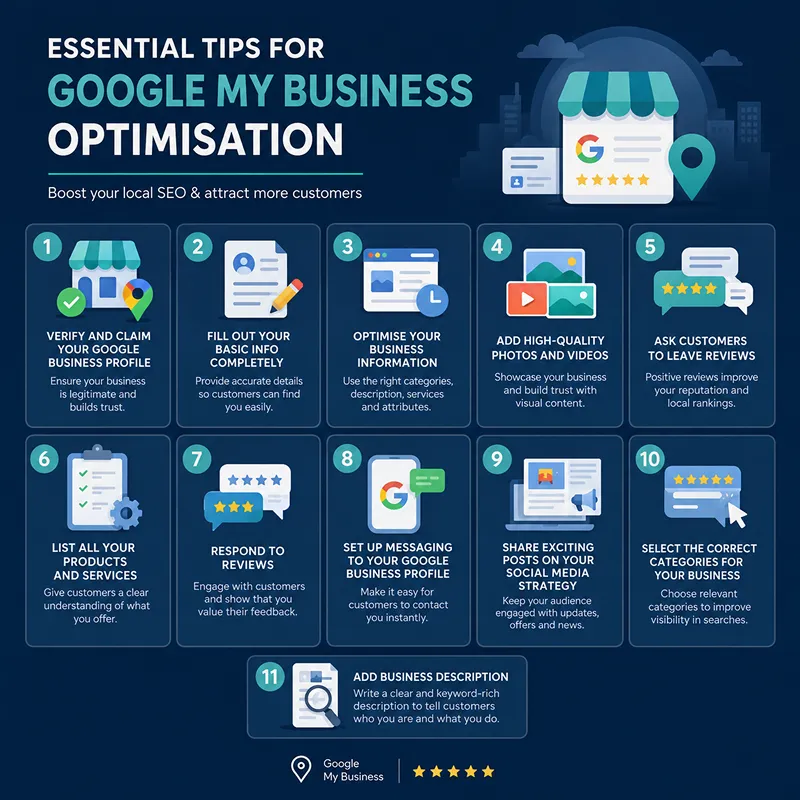
Good GMB optimisation tips focus on keeping your profile complete, correct and useful to customers. The aim is not to add keywords everywhere. It is to give Google and potential customers clear information about your business. Some GMB optimisation tips we mentioned below.1. Verify and Claim Your Google Business Profile
Start by claiming your profile and completing Google’s verification process. To claim and verify your Google Business Profile, sign in to your Google Account, search for your exact business name on Google Search or Maps, click ‘Claim this business’ or ‘Own this business’ then follow the on-screen steps to complete your verification. This process helps confirm that you are allowed to manage your business.
Once verified:
- Check that you have owner access.
- Make sure your business name is correct.
- Check your address and contact details.
- Review the profile on a regular basis for unwanted changes.
Pro tip:
Do not create several profiles for the same business location. Follow Google’s rules for representing your business.
2. Fill Out Every Section of Your Profile
This is one of the most useful GMB optimisation tips because customers often use a profile to decide whether to contact or visit a business. You should complete as many relevant fields as possible. Missing information can make it harder for customers to understand what your business does.
The best practice for this is to check your:
- Business name
- Address or service area
- Phone number
- Website
- Opening hours
- Special hours
- Business category
- Services
- Products
- Attributes
3. Keep Your Business Information Up-to-Date
Your profile should reflect current details of your business. Update it when something changes, such as:- Opening and closing hours
- Phone number
- Website
- Address
- Services
- Business hours during bank holidays
- Temporary closures
Pro tip:
Check your profile before bank holidays and other dates when your opening hours may change.
4. Select the Correct Category for Your Business
The primary category of your business tells Google what your business mainly does. You should choose the category that best describes your business and its activity. Do not choose a category simply because it has a popular search term. The correct category can help Google understand which searches may be relevant to your business. For example, a dental clinic should choose a category that accurately represents dental services rather than selecting a broad category such as health.
Remember, choosing the right category is one of the basic GMB optimisation tips that should be handled carefully.
5. Add Business Description
Your business description should explain what your business offers and what makes it useful to customers. So, keep it clear and natural. You get 750 characters before your description gets cut off. So, use the space wisely to share key information about your business. In this process, you can mention:- Your main services
- Products you sell
- Areas you serve
- How long you have been operating, where relevant
- What makes your business different
6. List All Your Products and Services
Add your products and services to your GMB profile that customers can actually buy from your business. For services, add the service name and its description. For products, provide the right information and suitable images.
This helps customers understand what you offer before they visit your website or contact you. Keep these sections updated and monitor them on a weekly basis. You must remove products or services that you no longer provide.
7. Add High-Quality Photos and Videos
Photos help customers understand what your business looks like and what you offer. Google recommends clear, well-lit photos that represent the real business. It recommends photos of areas such as your exterior, interior, products and work.
For example:
- A restaurant can show its food and dining area.
- A shop can show its products and shop front.
- A builder can show completed projects.
- A salon can show its interior and finished work.
8. Ask Customers to Leave Reviews
Reviews are important for your business because they give potential customers real feedback about your business. Google allows you to ask customers for genuine reviews. You can share a review link or QR code to make this process easier. Ask customers after a purchase or service. Do not offer money, discounts or gifts in exchange for reviews. Google says incentives for posting, changing or removing reviews are prohibited.
A simple request could be:
“Thank you for choosing us. If you were happy with our service, we would appreciate an honest Google review.”
This is a safe and natural approach to GMB optimisation tips.
9. Respond to Reviews
Do not only collect reviews also, you should respond to them. Thank customers for their positive feedback. If someone leaves a negative review, stay calm and professional. A useful response should:- Thank the customer.
- Address the main issue.
- Offer to discuss the problem privately where suitable.
‘Reviews are a huge part of local SEO.’
Joy Hawkins
10. Set Up Messaging via Your Google Business Profile
Google removed the old Business Profile chat feature on 31 July 2024. However, eligible businesses can still add WhatsApp or SMS as a contact option from their profile. If your business profile has this option, make sure the number or WhatsApp link works correctly.
Pro tip:
If you offer WhatsApp or SMS, check messages regularly. A contact option is only useful when customers receive a quick response.
11. Make Posting to Your Google Business Profile Part of Your Social Media Strategy
Regular posts can keep customers informed about your business. Google says posts older than six months are normally archived unless a date range is set. Google allows Business Profile posts for updates, offers and events. Posts can include text, photos, videos and suitable action buttons.
You can share:
- New services
- New products
- Business updates
- Events
- Offers
Pro tip:
Do not copy and paste every social media post without checking it first. Adapt the message for people searching on Google.
Case Study: How Do GMB Optimisation Tips Help To Stand Out In Local Search?
Salut! is a modern European restaurant in London. The restaurant wanted to stand out in local search and attract more customers who were searching for restaurants in London. To achieve this, the restaurant decided to work on local SEO. The SEO work focused on improving the restaurant’s Google Business Profile, local keyword targeting, building local citations and improving relevant content on the website. After these combined local SEO activities, the restaurant achieved:- 32% increase in Google Search business listings
- 23% increase in GMB Profile interactions
- 91% increase in phone calls
- 30% increase in website clicks
Conclusion
The GMB optimisation tips play a key role in any business. They help people understand your business and make it easier for them to contact or visit you. A strong business profile should be accurate, complete and useful. To complete this process, you should start by verifying your profile. After this, add the right business details, category, description, services, products, photos and videos. Ask genuine customers for reviews and respond to their feedback on time. Keep your details updated and use suitable features, such as Q&A, messaging and posts when available. At Xoom Plus, we help your business attract more customers by optimising your GMB profile, which makes your business more visible in local search.Not getting enough calls or website visits from Google?
Contact us and let our expert team create a local SEO strategy that supports your business goals.
FAQs
GMB optimisation is the process of improving your Google Business Profile to make it more accurate, complete and useful for customers. It helps your business improve its local visibility on Google Search and Google Maps.
Start with verification and complete business information. Then choose the correct category, add services and products, use genuine photos, collect honest reviews and keep the profile updated.
Update it whenever important information changes. You should also check your profile regularly for incorrect hours, phone numbers, services or other details.
No. Businesses must follow UK consumer protection rules and Google's review policies. The CMA published specific guidance on fake reviews in 2025, and Google has agreed to take stronger action against fake reviews affecting UK businesses.
One common mistake is leaving incorrect or incomplete information. A profile should match the real business, and its information should be accurate. Google specifically advises businesses to represent themselves accurately.