- July 29, 2026
- Categories: Web Solutions
Why WordPress Remains the Best CMS for Businesses
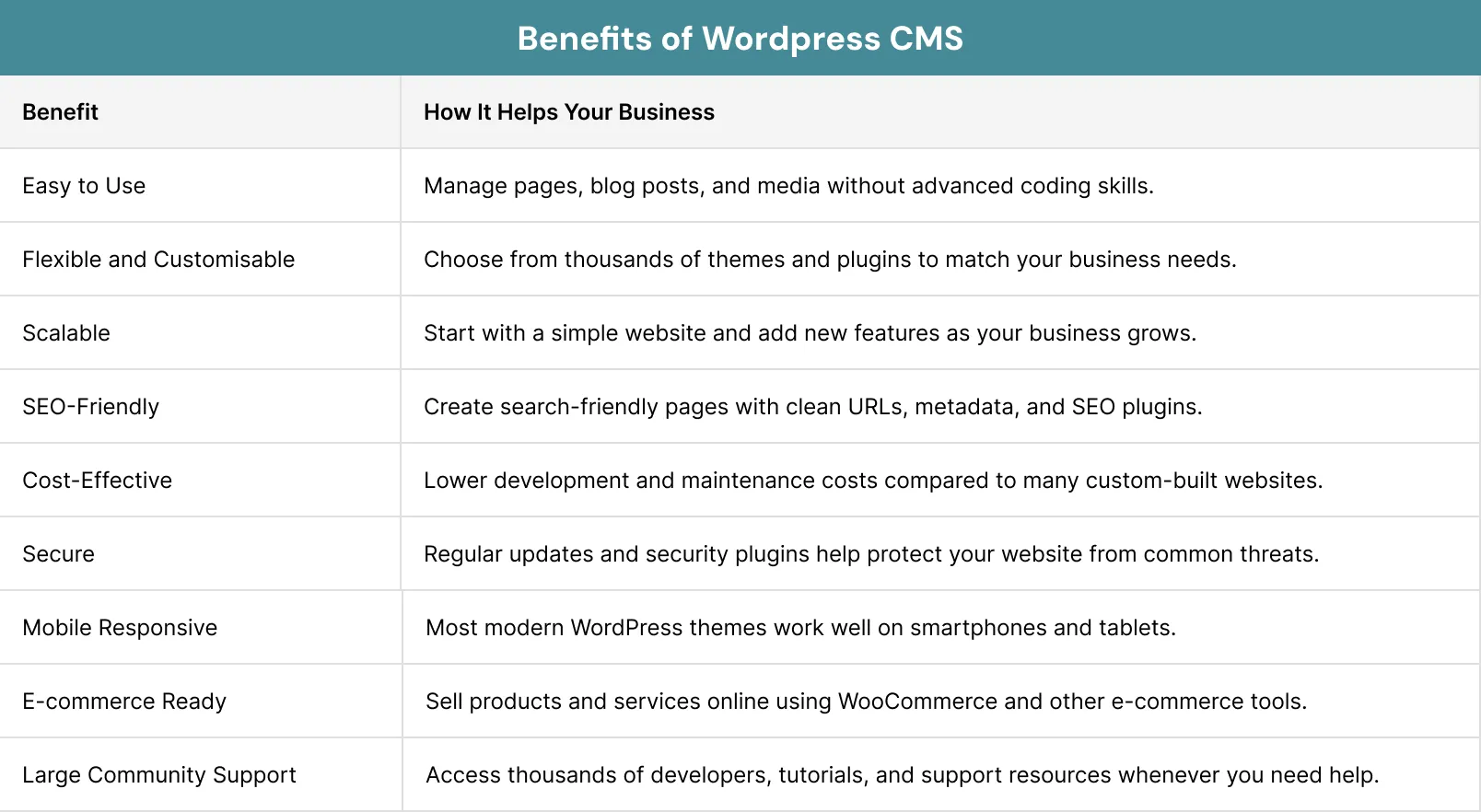
Did you know WordPress holds about 59% of the CMS market among websites that use a CMS? Companies choose WordPress because it is flexible, scalable and SEO-friendly. A Content Management System (CMS) lets you create, edit and manage website content without advanced coding skills.
That is why many businesses choose a WordPress CMS for business websites instead of building a site from scratch. A Content Management System (CMS) helps you to create, edit and manage the content of a website without needing advanced coding skills.
In this guide, you will learn why WordPress CMS for business websites remains the best and what are the benefits of the WordPress CMS.
Key Takeaways
- WordPress is a flexible CMS that suits businesses of all sizes. You can start with a simple website and add new features as your business grows.
- It gives you full ownership and control over your website, allowing you to choose your hosting provider, manage your data and avoid vendor lock-in.
- WordPress supports SEO and performance with clean URLs, metadata, schema support, SEO plugins and optimisation tools that help improve search visibility.
- It is cost-effective and scalable, offering thousands of themes and plugins that reduce development costs while supporting long-term business growth.
- WordPress is secure when properly maintained, with regular updates, backups and security plugins helping to protect your website from common online threats.
Did you know WordPress holds about 59% of the CMS market among websites that use a CMS? Companies choose WordPress because it is flexible, scalable and SEO-friendly. A Content Management System (CMS) lets you create, edit and manage website content without advanced coding skills.
That is why many businesses choose a WordPress CMS for business websites instead of building a site from scratch. A Content Management System (CMS) helps you to create, edit and manage the content of a website without needing advanced coding skills.
In this guide, you will learn why WordPress CMS for business websites remains the best and what are the benefits of the WordPress CMS.
Pro Tip:
Choose a lightweight theme from the beginning. It is easier to customise, loads faster and performs better as your business grows.
2. Full Ownership and Data Base Control
Unlike some website builders, WordPress gives you full ownership of your website. Your content, files and data belong to you. This gives you more freedom as your business grows. You can choose your own hosting company based on your needs, and migrate your website whenever you wish. You are not locked into one provider or forced to stay with a single service.
This level of control is one reason many companies prefer a WordPress CMS for business websites. It allows them to make decisions based on their needs rather than platform limits.
2.1 Social Media Ownership
WordPress gives you the complete ownership to connect your website with platforms such as Facebook, Instagram, Twitter (X), and LinkedIn. These platforms help increase brand exposure, improve engagement and drive more targeted traffic to your site.3. SEO-Friendly by Design
Search Engine Optimisation (SEO) helps people to find your website online. WordPress is SEO-friendly because it supports clean URLs, metadata, schema markup and powerful SEO plugins. These features make SEO easier to manage. That is why many businesses choose a WordPress CMS for business websites
WordPress gives you control over the page titles, headings, images and URLs. These elements help search engines understand your content. Good SEO is not only about rankings. It also helps you to attract visitors who are looking for your products or services. Google itself shares the tip to make your business work:
“Focus on the user and all else will follow.” Google
3.1. Clean URL Structure
WordPress lets you create short and meaningful website addresses. Clean URLs are easier for visitors to read and remember. They also help search engines understand the topic of each page. For example, a page called ‘/web-design-services’ is clearer than one filled with random numbers. A simple URL also improves both usability and SEO.
The best idea is to always include words that describe the page. This makes your website more organised and easier to navigate.
3.2. Metadata and Schema Support
Metadata includes page titles and descriptions that appear in search results. WordPress makes it simple to manage these details with the help of SEO tools. Schema markup provides extra details to search engines. It can help to display reviews, FAQs, products and other useful details in search results.
Many SEO plugins in WordPress make adding schema quick and easy. You do not need advanced technical knowledge to use them.
3.3. SEO Plugins
WordPress has a wide range of SEO plugins. These tools help you to improve content without making the process difficult. SEO plugins can check keyword use, headings, internal links and also readability. They also help to create XML sitemaps and manage metadata.
A WordPress CMS for business website becomes much easier to optimise when you use trusted SEO plugins.
4. A Powerful Ecosystem of Tools
WordPress is more than just a website builder. It offers you a large collection of tools that help you add new features whenever you need them. This makes a WordPress CMS for business website suitable for many different industries.
Whether you want to collect leads, sell products, accept bookings or connect with marketing software, WordPress gives you a solution. Its large community also means new tools are released regularly. You can continue improving your website as your needs change.
4.1. Plugin Library
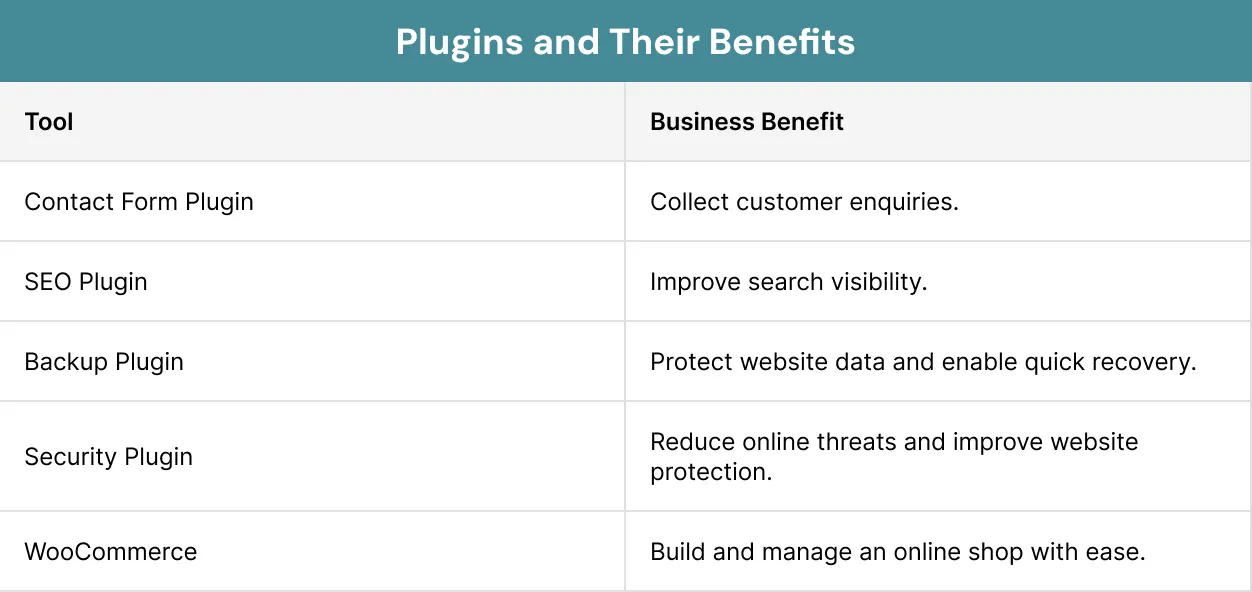
The plugin library of WordPress has thousands of free and premium plugins. These plugins allow you to add useful features in just a few clicks. Popular plugins include contact forms, security tools, backups and image optimisation. Each plugin helps to improve your website without changing its core system.
Pro Tip:
You must choose plugins from trusted developers and keep them updated.
4.2. WooCommerce
WooCommerce is the most popular e-commerce plugin of WordPress. It allows you to sell products and services directly from your website. You can manage products, payments, shipping and customer orders from one dashboard.
As your business grows, you can add more products and features without moving to another platform. This makes a WordPress CMS for business website a strong choice for businesses that plan to sell online.
5. Cost-Effective and Scalable
Building a website for business can be expensive, but WordPress helps to keep costs under control. You can start with a simple website and add more features as your business grows. This means you only pay for what you need.
WordPress lets you use themes and plugins that are free or available at a low cost. This flexibility makes WordPress CMS for business website a practical choice for businesses of all sizes. The price is low compared to the cost of it. This is summed up well by Warren Buffet himself:
‘Price is what you pay. Value is what you get.’
Warren Buffett
5.1. Lower Development and Maintenance Costs
A custom-built website often requires a large budget. But WordPress reduces these costs by providing ready-made themes. This allows you to launch your website more quickly. Many website updates can be handled without hiring a developer. You can edit pages, publish blog posts and upload images through the WordPress dashboard. This helps to reduce ongoing maintenance costs.
You also benefit from the large WordPress community. If you ever need help, it is easy to find developers, designers and support services at competitive prices.
5.2. Flexible for Different Budgets
Every business has different financial goals. WordPress allows you to choose the tools and services that match your budget. You can begin with the basics and upgrade later if needed. You can build a professional website without spending a lot of money. This flexibility helps you plan for future growth.6. Security
Website security is the key to success for every business. Customers expect their details to be protected when they visit your website. WordPress provides you a secure foundation when it is properly maintained.
WordPress offers trusted security plugins to help keep your website safe. Regular updates and good security practices also help you reduce the risk of threats. Most security issues occur when websites are protected regularly. You should treat website security as an ongoing task. A few simple habits can help keep a website safe and reliable.
6.1. Regular Updates
The WordPress team releases updates on a regular basis to improve security. Plugin and theme developers also publish updates to fix bugs. Installing these updates helps to protect your website from known security risks. It also keeps your website running smoothly. Before making major updates, the best idea is to create a backup of your website. This gives you a safe copy in case something goes wrong.6.2. Backups and Security Plugins
Regular backups are one of the best ways to protect your website. If a problem occurs, you can quickly restore your content. Security plugins add another layer of protection on your website. They can block harmful traffic, scan for malware and alert you to unusual activity.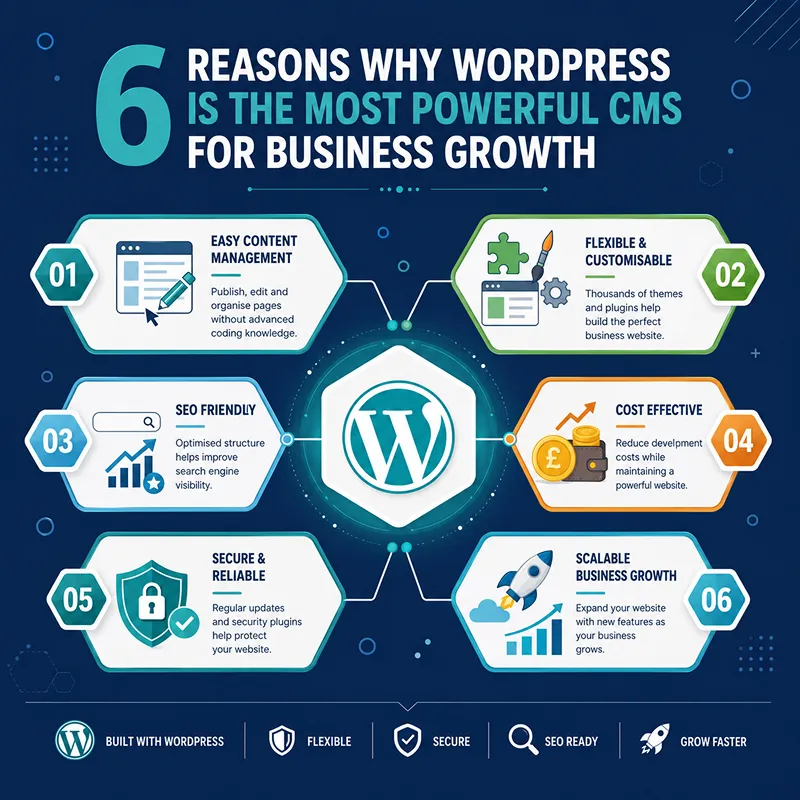
Pro Tip:
Schedule automatic backups and updates whenever possible. This helps keep your website secure without adding extra work to your daily routine.
Scaling A Struggling Venture: Case Study
The LoLa Art Crawl, an annual neighbourhood art event, covered over 100 artists. They wanted to list all the arts in one place, but they had a website with few static pages.
They faced challenges like:
- List each artist with a profile page of text and art
- Work on mobile devices during the event in the field
- Provide geo-mapping to sites on smart phones.
- Provide news updates and social media integration
Conclusion
Choosing the right CMS is an important decision for any business. Your website should be easy to manage, flexible enough to grow and able to support your long-term goals. A WordPress CMS for business website largely meets these needs.
Throughout this guide, we have explored why WordPress remains one of the most trusted CMS platforms. It offers you strong options for customisation, full ownership, good SEO features, reliable security and a large ecosystem of themes and plugins.
These strengths make a WordPress CMS for business website suitable for many different industries. At Xoom Plus, we design a WordPress CMS for business website that helps you attract more customers.
Looking for a website that is tailored to your business and helps it grow?
Our expert team will guide you through the process from start to finish, and ensure a seamless website to get those results. Contact us today and begin right away.
FAQs
What is WordPress CMS?
WordPress CMS is a content management system that allows you to create, manage and update a website without needing advanced coding skills. It offers an easy-to-use dashboard, thousands of themes and plugins and flexible features for blogs, business websites, online stores and more.
Why do businesses choose WordPress?
Businesses choose WordPress because it is easy to use, flexible, cost-effective and scalable. It also offers thousands of themes and plugins that allow websites to grow as business needs change.
Is WordPress good for SEO?
Yes. WordPress includes SEO-friendly features such as clean URLs, custom metadata, mobile-friendly themes and support for SEO plugins that help improve search visibility.
Is WordPress secure?
WordPress is secure when it is properly maintained. Keeping the core software, themes and plugins updated, using strong passwords, installing security plugins and creating regular backups all help protect your website.
Do I need coding skills to use WordPress?
No. Most day-to-day tasks, such as creating pages, writing blog posts, uploading images, and updating content, can be done through the WordPress dashboard without coding knowledge. If you need advanced custom features, you can work with a developer.