- June 24, 2026
- Categories: Web Solutions
Website Security Best Practices for Small Businesses
Your website might be the smallest part of your business. But it is the easiest way for a hacker to affect your business.
Every website has valuable info. This includes customer details, payment records, contact forms or business data. As these are sensitive details, they become prone to attacks by cyber criminals.
Research shows that 44% of small businesses have experienced a cyberattack and 61% of those lost more than £10,000.
That is why website security should be a priority for every business owner.
Website security is no longer just an IT concern. It is a business necessity that protects customer trust, company reputation and revenue.
— Troy Hunt, Cybersecurity Expert
Key Takeaways
- Strong website security is no longer optional; it is essential for protecting business data, customers, and brand reputation. Small businesses are now one of the most targeted groups for cyberattacks.
- Most cyberattacks happen due to basic weaknesses like weak passwords, outdated software, and poor access control, showing that good website security for small business starts with simple improvements.
- SSL certificates, HTTPS, and encryption are fundamental tools that protect data in transit and build trust with website visitors.
- Web Application Firewalls (WAF), malware scanners, and security tools provide an extra protective layer by blocking harmful traffic and detecting threats early.
- Human error remains one of the biggest risks in website security, making employee training and phishing awareness critical for reducing breaches.
- Regular software updates, plugin management, and patching are essential because outdated systems are one of the easiest ways for hackers to gain access.
- Two-factor authentication (2FA) significantly reduces unauthorised access even if passwords are stolen or leaked.
- Daily backups and disaster recovery planning ensure businesses can quickly restore their websites after hacking, malware attacks, or system failures.
- Continuous monitoring, security audits, and penetration testing help identify vulnerabilities before attackers exploit them.
- Proper access control and role-based permissions reduce internal risks and strengthen overall website security for small business operations.
- Protecting customer data and complying with regulations like GDPR and PCI DSS is not only a legal requirement but also essential for trust and business survival.
- A strong website security strategy combines technology, processes, and human awareness to create a complete defence system.
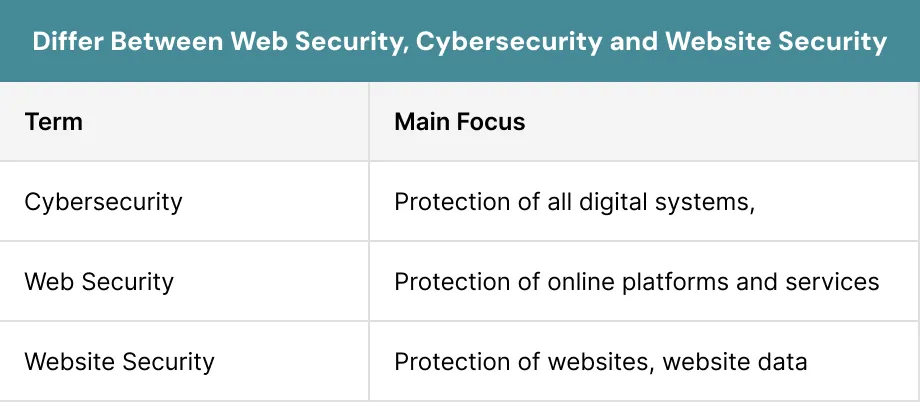
What Is Website Security?
Website security refers to the practices and tools which are used to protect your sites from cyber threats. It helps you to prevent unauthorised access and data theft.
Good website security ensures that you and visitors are able to use a website in a safe way.
A secure website helps you to protect sensitive info. Whether you run an online shop or service based website, strong website security helps you to keep your digital assets protected from cyber threats.
Why Website Security Matters for Small Businesses?
Your website is often the first interaction for customers with your business. If visitors see warnings or suspicious activity then you lose the trust of your visitors.
Strong website security helps you to protect the info of customers.
Did You know:
Search engines also prefer secure websites, which means better visibility and stronger SEO performance.
What Are the Best Practices for Website Security?
Here are some best practices for website security, which help you to secure your website from threads. By applying best practices you also protect your sensitive data. This helps you to run your business in a safe way.1. SSL Certificates and HTTPS Security
A secure connection is one of the key parts of website security. When a visitor enters their info on your website, then data travels between their browser and your server.
This is where SSL and HTTPS come in. They encrypt data and help you to build trust with customers.
For effective website security for small businesses, SSL should be one of the first security measures implemented.
What SSL Certificates Do?
SSL certificate creates an encrypted connection between your website and its visitors. This means sensitive info such as passwords, contact details and payment data cannot be easily read.
When your website has SSL, the web address changes from HTTP to HTTPS. Visitors also see a lock symbol in the address bar.
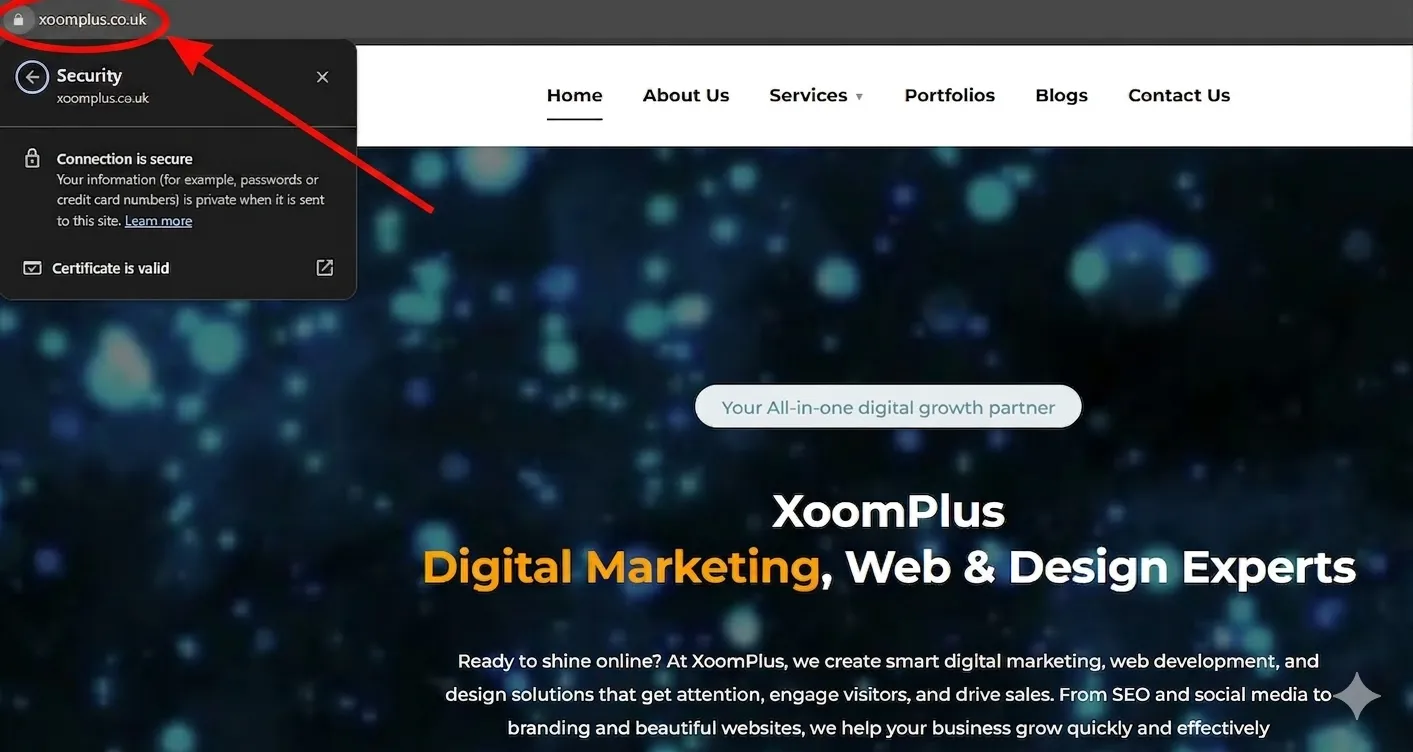
It helps to protect the info of a customer and reduce the risk of data theft. It is considered a basic requirement for website security for small businesses.
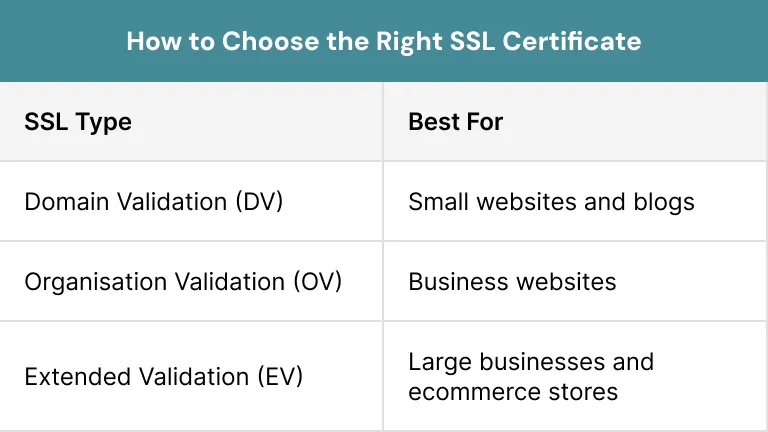
How to Choose the Right SSL Certificate?
Now different SSL certificates are available. But they depend on the needs of your business. Small websites may only require a basic SSL, while larger businesses may need advanced options.
The most important factor is taking a SSL from a trusted provider. Choosing the right SSL certificate gives strength to your website and helps visitors to feel confident when using your site.
2. Strong Password Policies
Strong passwords remain one of the best practices for security of your website. Many cybercriminals now use automated tools to guess passwords.
Strong password policies reduce this risk and help to protect your website from unauthorised access.
What Include in Strong Passwords
A strong password must be difficult to guess. It should include a mix of letters, special characters and numbers.
Avoid using names, birthdays or simple words that hackers can easily predict.
Strong passwords form an essential part of website security for small businesses.
Pro Tip:
Longer passwords generally provide better protection.
Checklist of Strong Password
- Use at least 12–16 characters
- Include upper and lower case letters
- Add numbers and symbols
- Avoid personal info
Password Rotation
You should review your passwords on a daily basis and update them when needed. It is important after you change your business staff.
This process supports long-term security and creates better protection for business.
3. Enable Two-Factor Authentication (2FA)
Passwords alone are no longer enough to protect your site. In some cases, even strong passwords can be stolen easily.
2FA helps to add an extra layer of website security by requiring additional verification before users can log in.
How 2FA Works?
After entering a password, users must have to provide a second verification factor. This may be a code sent to a mobile phone or a security key.
Even if attackers stole a password, they still need the second verification method. This makes access to accounts much more difficult.
Best 2FA Tools
Some tools make 2FA easy to implement. Many of them offer free versions which are suitable for small businesses.
Popular tools include:
- Google Authenticator
- Authy
- Duo Security
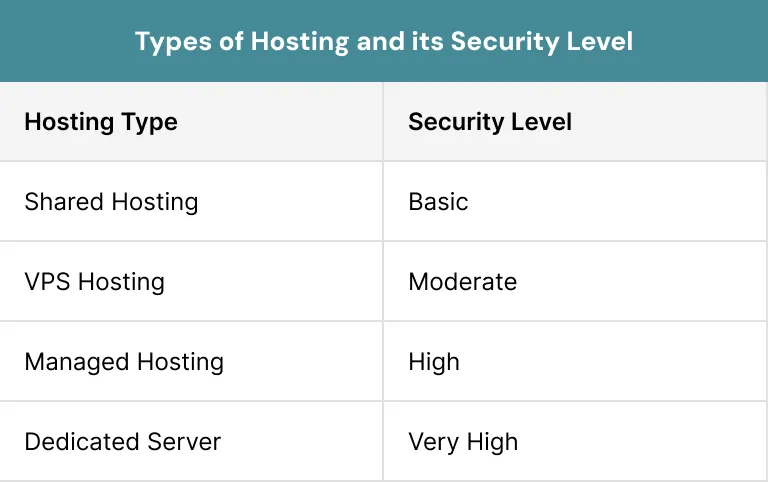
4. Secure Website Hosting and Server Protection
Choosing the right hosting provider plays a key role in overall security of a website.
Many attacks target the weak servers rather than the website itself. That’s why, a secure hosting can play a key role in securing your site .
Managed vs Shared Hosting
Shared hosting, places more than one website on the same server.
Managed hosting offers you stronger controls, dedicated support and also better monitoring. This often results in improved site security.
5. Keep Your Website Software Updated
Outdated software is one of the most common causes of web security. Attackers often search for sites that run old versions of software.
Regular updates are essential for a strong web security.
Why Updates Are Critical?
Software developers release the updates regularly. They fix bugs and patch security weaknesses. Many attacks become successful because businesses ignore the available updates.
On time updates help you to maintain website security and protect data of your website.
Updating CMS Platforms
CMS platforms like WordPress, Joomla and Drupal must require regular maintenance.
Core updates often include security improvements that protect websites from new threats.
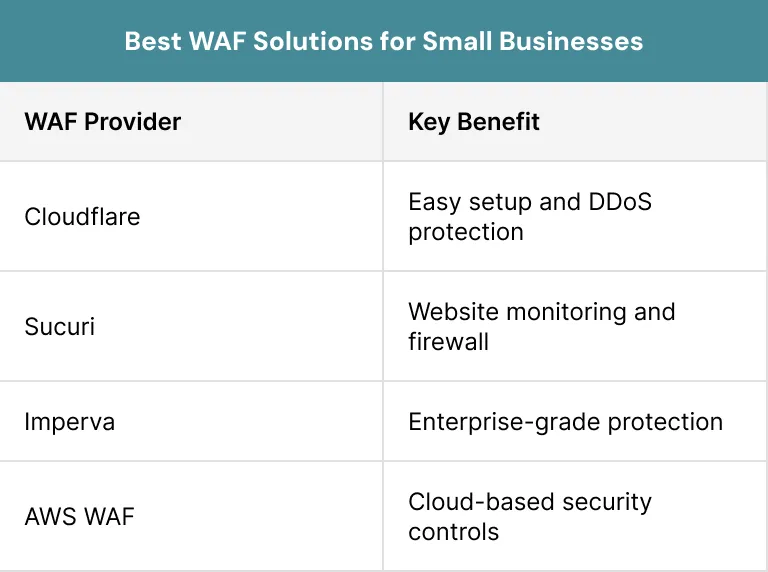
6. Web App Firewalls
A Web App Firewall (WAF) acts as a protective barrier between your website and incoming traffic. It filters the requests before they reach your site.
It plays a major role in modern web security by blocking harmful traffic.
What a WAF Does?
a A WAF monitors the traffic and identifies the suspicious behaviour. It blocks the attack patterns before they reach web apps.
It helps to stop many threats without affecting the real visitors. WAF helps to increase the website security and improves overall protection.
Attacks Prevented by WAFs
Web App Firewalls help to prevent:- SQL injection attacks
- Cross-site scripting attacks
- Brute force login attempts
- Bot attacks
- Malicious traffic
Popular options include:
7. Malware and Website Scanning
Malware can silently damage your website, steal info and affect customer trust. You often do not realise that there is an issue until serious problems appear.
Regular scanning is a crucial thing for effective web security.
What Malware Can Do for Your Website?
It can redirect your visitors, steal login info or inject spam content.
Some malware creates hidden access points. These allow attackers to return again even after you fix the initial problems.
Website Security Scanners
Some tools help you to identify the malware and security weaknesses.
Popular scanning tools include:
- Wordfence
- Sucuri Scanner
- SiteLock
- MalCare
8. Risk and Security Audits
Even secure websites can face issues over time. Regular assessments help you to identify the risks before attackers discover them.
Security audits are also an important part of long-term security of a website.
What Is a Risk Scan?
A risk scan checks websites, apps and servers for known weaknesses. These scans help to identify the outdated software and potential entry points for attackers.
Routine scanning gives strength to web security and provides valuable insights for improvement.
Security Audit Checklist
Businesses should regularly review:- User access permissions
- Password policies
- SSL certificate status
- Plugin and software updates
- Backup systems
- Malware scan results
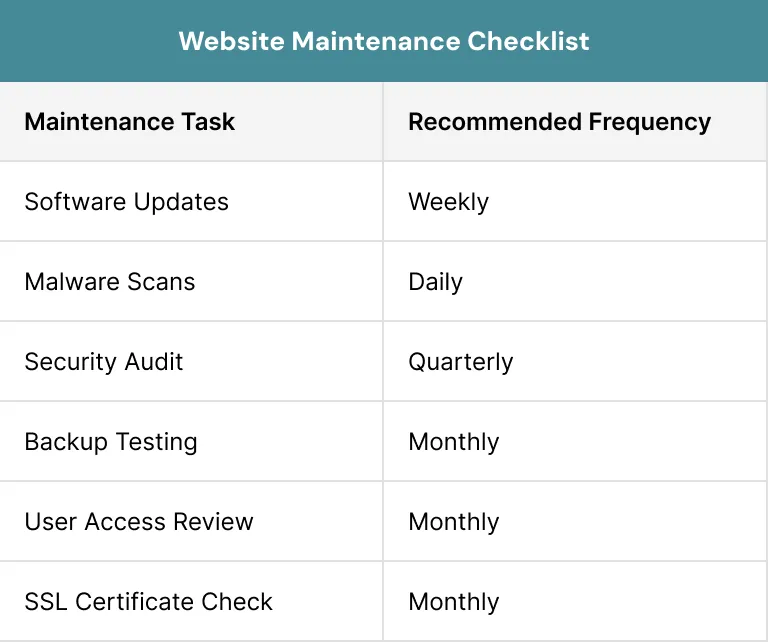
Website Maintenance Checklist
Here is the checklist for website maintenance.
What to Do If Your Website Gets Hacked?
Even websites with good security can experience cyberattacks. When an incident occurs, the key is to respond quickly.
Giving a prompt response to the attack helps you to improve web security.
1. Stay Calm and Assess the Situation
The first step after knowing about a breach is to remain calm. Panic can lead to big mistakes that make the situation difficult to handle.
You must find the area of the attack and identify which systems have been affected. Understanding the problem helps to guide the recovery process.
2. Change Passwords
If your website has been hacked, all passwords should be changed immediately. This includes admin accounts, hosting accounts, databases and related services.
Changing credentials helps you to prevent attackers from access to the system.
3. Contact Your Hosting Provider
Hosting providers often have security teams. Many hosting companies also provide backup data services and server-level security support. They help you to recover your website as soon as possible.
Pro Tip:
Working with your hosting provider helps restore website security more quickly.
4. Run a Malware Scan
A malware scan should be performed to identify the malicious files. In this process, security tools can help you to locate the infected files and remove harmful code from the website.5. Restore from a Clean Backup
If malware cannot be safely removed then restoring a clean backup may be the fastest solution. Backups allow you to return your website to a secure state.
Reliable backups are one of the strongest parts in web security.
6. Investigate the Root Cause
After recovery, you should find out how the attack occurred. Understanding the cause helps you to prevent future attacks.
Common causes include weak passwords, insecure plugins and outdated software.
Case Study: How a Small Online Store Recovered from a Cyberattack
A small online clothing store noticed strange activity on its website. Customers reported being redirected to a different site. The store owner quickly realised that this was a security breach.
The team acted fast and changed all the passwords right away. They also contacted their hosting provider for help. A malware scan helps them to find hidden malicious files on the site.
The store restored a clean backup from before the attack. They also added SSL, strong passwords and a firewall. Within a week, the site was secure and trusted again.
Conclusion
Website security for small businesses is key for every business that wants to protect its visitors and their data as well. Even a small security weakness can lead to loss of customer trust.
The good news is that most security risks can be reduced by the help of following best practices:
- Using SSL certificates
- Applying strong passwords
- Using two-factor authentication
- Making regular updates
- Creating backups
- Using malware scanning.
Whether you need help installing an SSL certificate, setting up a firewall or recovering from an issue, we are here to help. Contact us today for security of your digital assets.
FAQs
What is website security and why is it important?
Website security refers to the processes, tools, and practices used to protect websites from cyber threats. It helps safeguard customer data, prevent attacks, maintain website availability, and protect business reputation.
How can small businesses improve website security?
Businesses can improve website security for small business websites by using SSL certificates, enabling two-factor authentication, updating software regularly, installing a web application firewall, and conducting regular backups.
What are the most common website security threats?
Common threats include SQL injection attacks, cross-site scripting (XSS), malware infections, phishing attacks, password breaches, data breaches, and DDoS attacks.
How do you know if a website is secure?
Look for a URL starting with “https://” and a lock icon in the browser address bar, which indicates the connection is encrypted.
What should I do immediately if my website is hacked?
You should change all passwords, contact your hosting provider, run a malware scan, restore from a clean backup if necessary, and investigate how the attack occurred to strengthen future website security measures.