- August 11, 2026
- Categories: Web Solutions
How to Improve Product Page Design for Ecommerce Conversions
Many online shoppers decide within a few seconds whether to buy a product or skip. This means every part of your product page design matters. A good product page does more than just show a product. It answers questions and builds trust.
A well-planned ecommerce product page design helps customers to find the details they need quickly. This leads to more sales and happier customers.
According to research, nearly all online shoppers visit a product page before making a purchase decision. In this guide, you will learn how product page design affects ecommerce conversions. You will also discover simple ways to improve your product page.“Design is not just what it looks like and feels like. Design is how it works.”
— Steve Jobs
Why Product Pages Are Critical for E-commerce Success?
Product pages are where customers decide whether to buy or leave. They provide all the details shoppers need before making a purchase.
Many people compare the products before choosing one. They look at images, prices, features, reviews and delivery details. A clear product page design makes this process easier and faster.
A good ecommerce product page design helps to build trust. It also helps to increase sales and reduce bounce rates.
Did you know?
A weak page can lose a customer, even if the product is excellent.
How Product Pages Influence the Customer Journey?
Every customer follows a journey before buying a product. It starts with searching online. Then they compare products, read reviews and finally decide where to buy. A strong product page design supports every step of this journey.
When customers first land on your product page, they want quick answers. They want to know what the product does and how much it costs. If your page is confusing, they may leave immediately.
A good ecommerce product page design helps to remove uncertainty. Clear images, simple descriptions and visible prices help customers to understand the product without extra effort.
The customer journey on a product page
- Discover the product.
- View images and price.
- Read the description.
- Check reviews and ratings.
- Compare delivery and return options.
- Click the CTA button.
- Complete the purchase.
How to Improve Product Page Design for Ecommerce Conversions
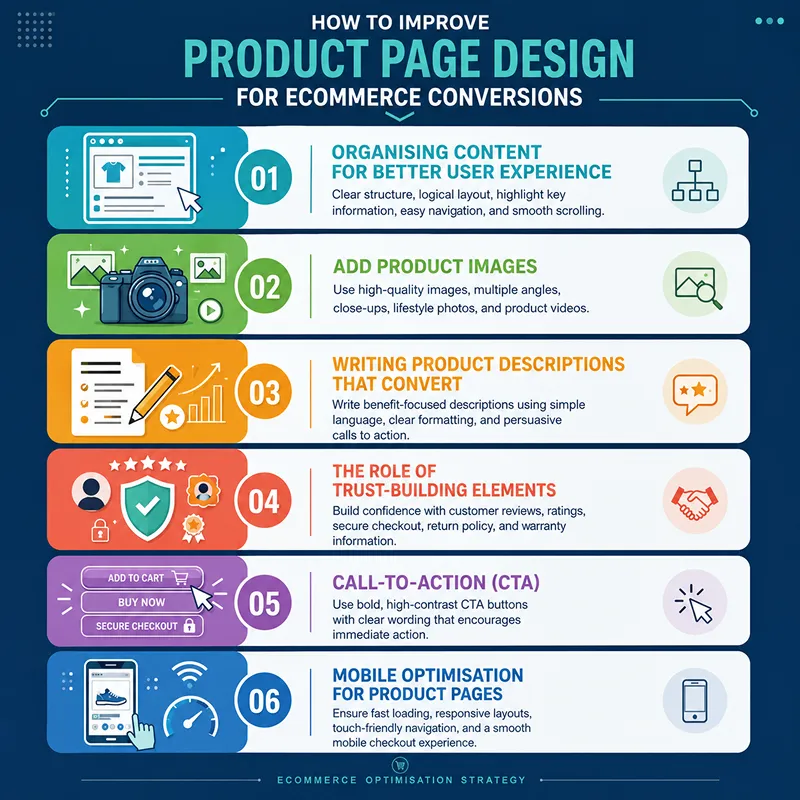
Here are some ways to improve product page design for the success of e-commerce stores.1. Organising Content for Better User Experience
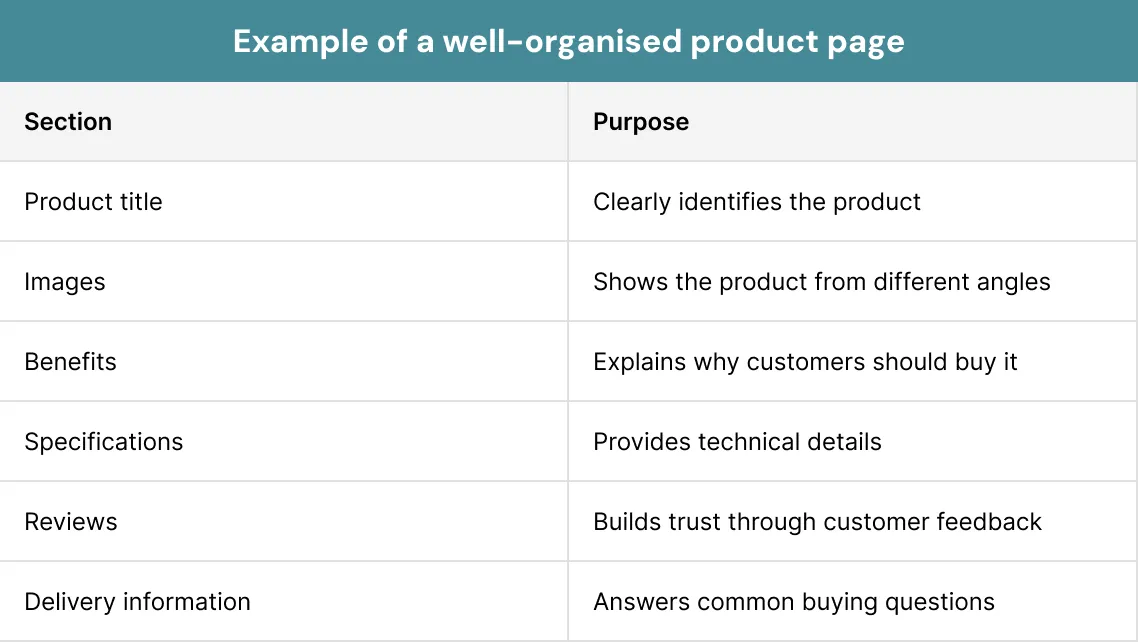
People do not read every word on a page. Most visitors scan the page to find the details they need. That is why content should be organised in a clear and logical way.
A good product page design places the key details at the top. Customers should quickly see the product name, price, images and call-to-action button. This saves time and increases conversion rate.
An effective ecommerce product page design also uses headings, short paragraphs and bullet points. These make the page easier to read on both desktop and mobile devices.
A Simple Content Order For Product Pages
- Product name
- Product images
- Price
- Key benefits
- Call-to-action button
- Product description
- Customer reviews
- Delivery and returns
2. Add Product Images
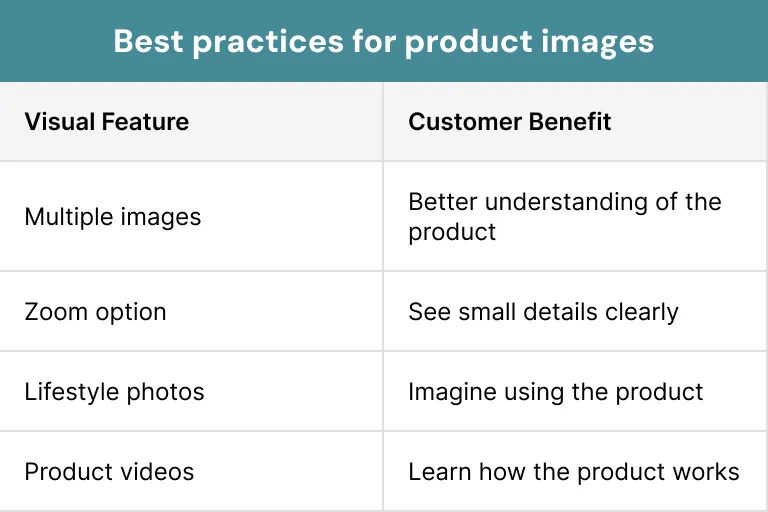
Images are often the first thing customers notice on a product page. Before reading the description, they usually look at the product photos. High-quality images create a strong first impression and help them to understand what they are buying.
A good product page design should include clear images. Customers want to see the product from different angles.
A strong ecommerce product page design can also include lifestyle images. These show the product being used in real life. This helps shoppers to imagine owning the product and makes it feel more valuable.
3. Writing Product Descriptions That Convert
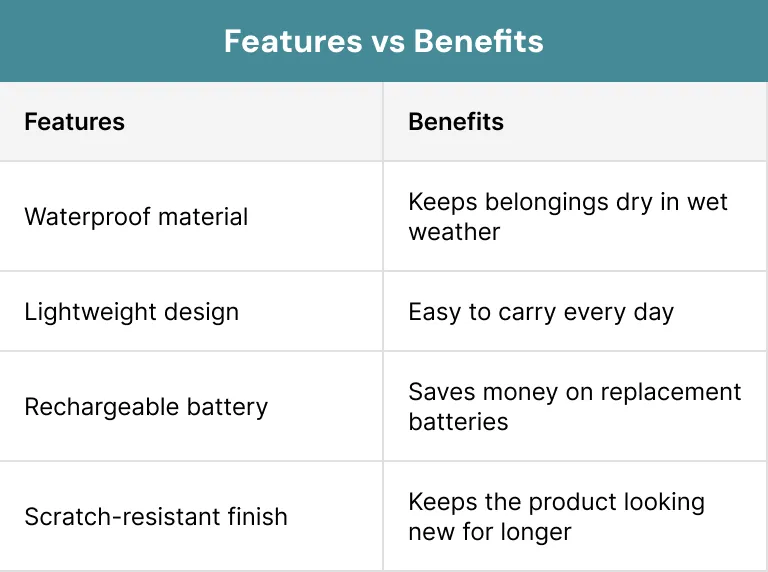
A product description should do more than just explain what a product is. It should tell customers why the product is useful and how it can solve their problem. A clear product page design makes these descriptions easy to read.
Many shoppers do not have time to read long blocks of text. They prefer short paragraphs and simple bullet points. This helps them to understand your product quickly and make a buying decision with confidence.
A strong ecommerce product page design also focuses on benefits instead of only features. Features tell customers what a product has, while benefits explain how those features solve their issues.
Pro Tip:
Always be honest and accurate. Do not promise something the product cannot deliver. Clear and truthful descriptions build trust and reduce the chances of returns.
4. The Role of Trust-Building Elements
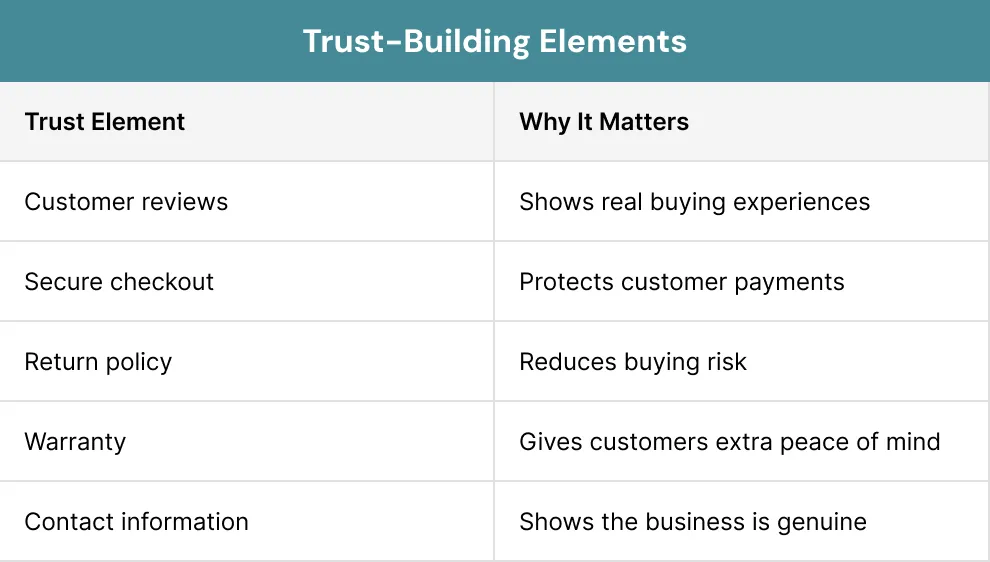
Trust plays a key role in online shopping. Customers cannot touch or test your product before buying it. They must rely on the details shown on the page.
Reviews and ratings are among the strongest trust signals. They show that other people have bought and used your product. Positive feedback gives new customers more confidence to place an order.
A reliable ecommerce product page design should also include secure payment icons, return policies and delivery details.
Trust Elements Every Product Page Should Include
- Customer reviews
- Star ratings
- Secure payment badges
- Money-back guarantee
- Clear return policy
- Contact details
- Stock availability
5. Call-to-Action (CTA) Buttons
A call-to-action button tells your customers what to do next. It may say “Add to Cart,” “Buy Now” or “Order Now.” Without a clear CTA, customers may leave your page without taking any action.
The CTA button should be easy to find. It should stand out from the rest of the page without looking distracting. A well-designed product page design places the button where customers naturally expect to see it.
A good ecommerce product page design keeps the CTA close to the key details such as the product price, availability and key benefits. This helps your customers to make quick decisions.
Simple words work best on CTA buttons. Clear messages encourage users to click because they know exactly what will happen next.
Pro Tip:
Avoid placing too many buttons on one page. One clear primary CTA usually performs better than several competing options.
6. Mobile Optimisation for Product Pages
More people now shop by using their phones than ever before. That is why every product page design should work well on smaller screens. A mobile-friendly page makes shopping easier and faster.
Customers should be able to browse your products without zooming in or scrolling sideways. Large buttons, readable text and clear images improve the mobile shopping experience.
Mobile users are often in a hurry. Fast-loading pages and simple navigation help them to complete their purchases.
How to Measure Product Page Design Performance?
Good design should always be measured. You need to know what is working best and what needs improvement. Tracking the right numbers helps you to improve every product page design over time.
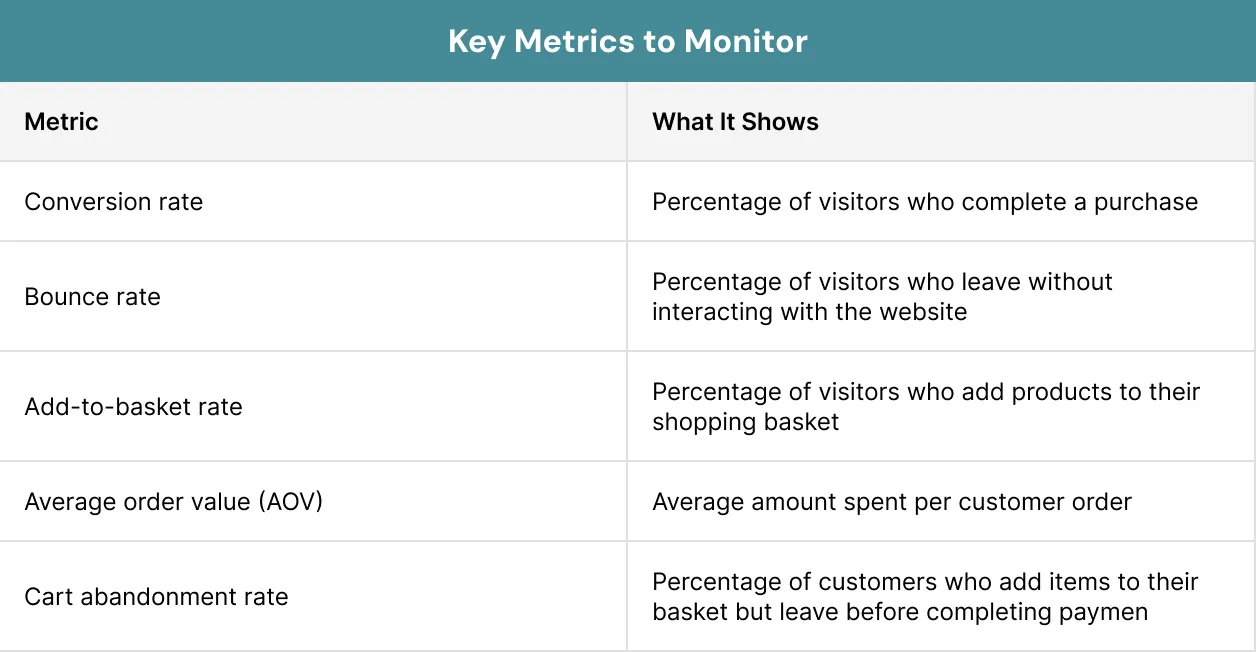
One of the key metrics is the conversion rate. It shows how many visitors become customers. A higher conversion rate often means the product page is meeting the customer needs.
Another useful measure is the bounce rate. If visitors leave your page without taking any action, there may be problems with the page layout, content or loading speed. An effective ecommerce product page design encourages people to stay longer.
Did you know?
Small changes based on real results often lead to better performance and higher sales.
Key Metrics to Monitor
- Conversion rate
- Bounce rate
- Add-to-cart rate
- Average order value
- Time spent on page
- Cart abandonment rate
Case Study
A good example is ASOS, one of the UK’s biggest online fashion stores. ASOS has worked hard to improve its product page design so shopping is simple and easy.
Each product page has clear photos, videos and views from different angles. Customers can also use a size guide and read product details before buying. This helps people to choose the right item with more confidence.
ASOS also makes sure its pages work well on mobile phones. Many people shop using their phones, so the website is easy to use on smaller screens. It also offers tools like Fit Assistant to help customers choose the right size.
This example shows that a good ecommerce product page design can make shopping easier. When customers can quickly find the details they need, they are more likely to trust your website and complete their purchase.
Conclusion
A successful product page design is much more than an attractive layout. It helps customers to understand your product, builds trust and guides them towards making a purchase. Every section on your page should make shopping easier. From clear images to fast-loading pages and mobile-friendly layouts, each design element plays a key role.
Improving product pages should be an ongoing process. Regular testing, customer feedback and performance tracking will help you to create pages that continue to deliver better results over time. At Xoom Plus we deliver you the desired results, so whether you are launching a new online store or improving an existing one, our team is here to help.
Are your customers leaving without making a purchase?
Feel free to contact us today and let our experts optimise your product pages to increase conversions and grow your online business.
FAQs
What is product page design?
Product page design is the way a product page is organised and displayed. It includes images, descriptions, prices, reviews, buttons and other elements that help customers understand a product and decide whether to buy it.
Why is product page design important for e-commerce?
A good product page design improves the shopping experience, builds trust and helps customers make buying decisions more easily.
How to design product pages for conversions?
To design product pages for conversions, focus on making the buying process simple and trustworthy. Use high-quality product images, write clear and benefit-focused descriptions, display customer reviews, place a visible call-to-action (CTA) button and ensure the page loads quickly on all devices.
How do product images improve conversions?
Clear images allow customers to see product details before buying. Multiple photos, zoom features and videos reduce uncertainty and help shoppers feel more confident.
How can I improve my product page performance?
You can improve your product pages by:
- Speeding up page loading times.
- Using better product images.
- Writing simple product descriptions.
- Adding customer reviews.
- Making the page mobile-friendly.
- Testing different CTA button designs.