- August 6, 2026
- Categories: Web Solutions
How to Optimise a WordPress Website for Speed
Did you know that 53% of mobile users will leave your website if it doesn’t load within three seconds? That is how essential the speed of a WordPress website is, as it ensures that visitors stay engaged on the website for a long time.
This shows that the speed of your website helps users to easily find relevant information. It also provides a great browsing experience. On the other hand, a slow website annoys visitors and makes them leave.
So, the speed of your website may affect SEO and overall performance. This is the reason why most companies choose to optimise WordPress website speed.
Key Takeaways
- WordPress website speed affects user experience, SEO, and visitor engagement.
- Choosing reliable hosting can significantly improve website performance.
- Optimising images and enabling caching can help reduce loading times.
- Regular database maintenance and plugin reviews help keep websites running efficiently.
- A CDN and lazy loading can further optimise WordPress website speed and improve page delivery.
What Is WordPress Website Speed?
WordPress website speed is the time it takes for a WordPress website to load, display its content and become fully usable for visitors. When a website opens very fast, users get a good experience, but if it takes too much time to load, users might leave the website. That is why most companies try to optimise WordPress website speed and keep loading times as low as possible.The website should be fast because people expect it to be fast. Speed is a feature that users value.
Ilya Grigorik
Why Does Website Speed Matter?
The website speed impacts both visitors and search engines. Users want pages to load fast and will be inclined to move away if the page is not loaded quickly. Website speed is also an important aspect of SEO, because search engines like websites that give a good user experience. Optimising WordPress website speed can help you get more visitors and retain them.
Did you know?
A slow website can frustrate visitors and increase bounce rates. Faster websites often provide a better user experience, support SEO efforts, and encourage users to stay on your pages for longer.
What Affects WordPress Website Speed?
Many factors can have an effect on the loading speed of your WordPress website. It is important to understand them in order to make changes to the website where required. By knowing these factors, you can easily optimise WordPress website speed.
The main factors include:
1. Web Hosting
Your web hosting service plays an important role in the efficiency of your website. Overloaded or slow servers can affect the loading time of your site. Getting good hosting is usually the first solution to speeding up your website.2. Images and Media Files
It is recommended that you do not use large images and videos on your website. This will ensure that your website loads effectively. This will also improve the visitor experience.3. Plugins and Themes
Plugins and themes can give you more power and design options, but the use of too many plugins can negatively impact the speed of your website. Badly written plugins or very resource-intensive themes could increase load time.4. Caching
Caching saves a temporary copy of your pages to load quickly for users. Rather than constructing the page again and again each time, the saved copy loads. This may be useful to increase your WordPress website speed.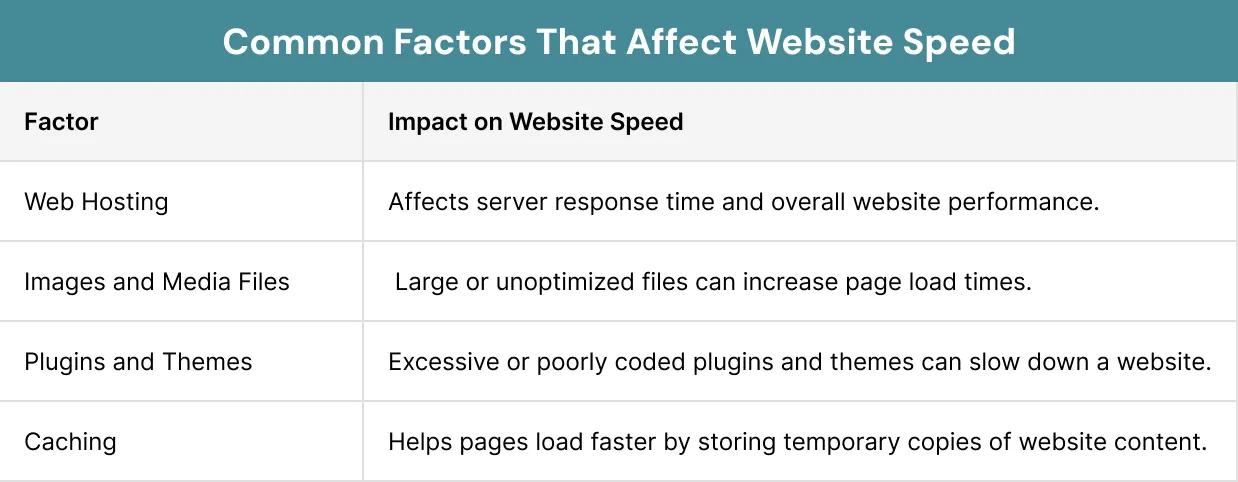
How to Optimise a WordPress Website for Speed?
There are various options that can be used to boost your site’s performance and speed. The right set of techniques will allow you to optimise WordPress website speed.
The following are some of the most efficient techniques for optimising WordPress website performance:
1. Choose Fast WordPress Hosting
A website’s hosting is essential for its performance. With great WordPress website hosting, you can enjoy faster server speeds. Due to this, it also increases WordPress website speed.2. Optimise and Compress Images
Large image files will make your website load slowly. Compression of images and use of formats like WebP can help shrink page sizes while retaining quality.3. Enable Caching
A cache is used to store temporary copies of your web pages. As a result, the web pages load quickly and the workload on the server is reduced.4. Use a Content Delivery Network (CDN)
A CDN keeps several copies of your website on different servers around the world. Content is delivered to visitors from the nearest server.5. Remove Unused Plugins and Themes
Unused plugins and themes can waste resources and cause poor performance. It is important to review your files and delete the ones that you do not need anymore.6. Minify CSS, JavaScript, and HTML Files
The process of minification reduces the spaces and characters in code files. Small files load more quickly and improve WordPress website speed and performance.7. Optimise the WordPress Database
However, there comes a time when the database collects unwanted data, such as changes, spam comments and other transient data. The process of database cleaning can help optimise WordPress website speed and ensure its smooth operation.8. Enable Lazy Loading
In lazy loading, an image or video only loads when required. This reduces the amount of content loaded when a webpage opens, helping improve the WordPress website speed.
Quick Speed Improvement Checklist:
✔ Compress images before uploading
✔ Enable caching
✔ Remove unused plugins
✔ Optimise your database
✔ Use a CDN
✔ Choose reliable hosting
✔ Enable lazy loading
How to Measure WordPress Website Performance?
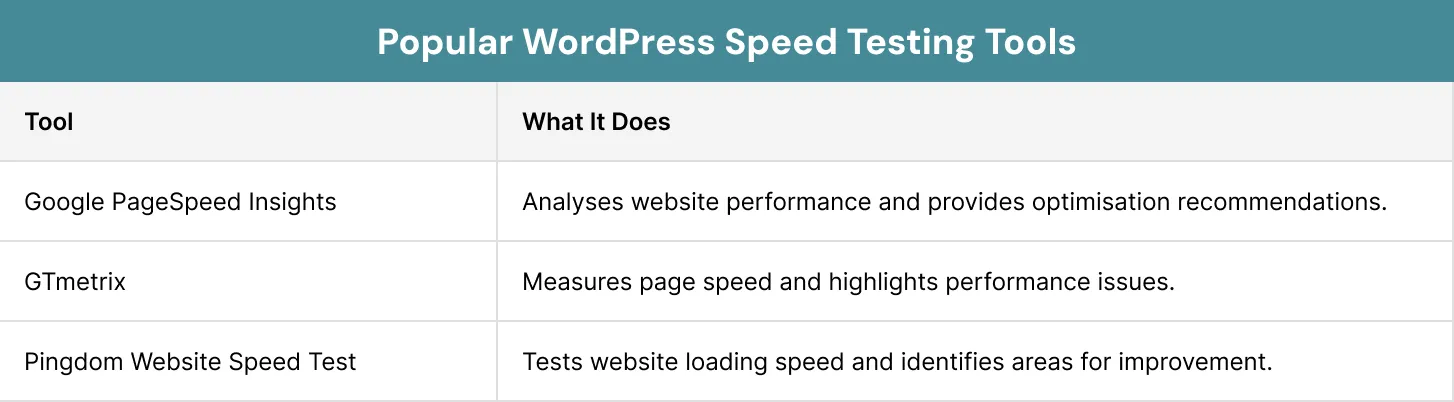
Before making any adjustments, you should learn how well your website works. To detect problems that can influence your site’s loading speed, you can use various speed test tools. There are many tools that allow you to analyse your website and see its weak points.
Here are some of the most popular ones:
1. Google PageSpeed Insights
Google’s PageSpeed Insights tool analyses the performance of your site on both desktop and mobile devices. It gives you a speed score as well as suggestions for improvement.2. GTmetrix
GTmetrix is the tool that gives you valuable information about your website’s performance. This includes loading speed, page size and issues with the performance. This tool will help you to understand what makes your website slow.3. Pingdom Website Speed Test
Pingdom Website Speed Test calculates the time it takes for your web pages to load and gives you information about what influences this process. Moreover, it offers some tips to speed up your website.
The use of such tools may help you detect problems and see progress made in improving them. Testing allows you to optimise WordPress website speed easily.
Case Study
Press Forge carried out an audit to enhance the performance and speed of a WordPress website. They compressed images, removed any unused JavaScript and optimised caching. They also applied a CDN to efficiently serve content.
They also decreased the size of images by 2.8 MB and deferred loading of about 400 KB of JavaScript. All these resulted in a score of 100 in PageSpeed.
From the above case study, it is clear that optimisation of images, caching and code can help optimise WordPress website speed.
Conclusion
The speed of the website is important. With a faster website, people find it easy to navigate and spend more time on your website. In addition, speed plays a critical role in ensuring that your website ranks well in the search engine results pages. This can be achieved by simply ensuring your website is up-to-date and implementing other techniques. This can help optimise WordPress website speed and improve overall performance.
At Xoom Plus, we help businesses improve their website performance with optimisation techniques tailored to their needs. Reach out to us today to find out how we can help you make your WordPress site faster and more efficient.
Is your WordPress website loading slower than it should?
Our experts can help you optimise WordPress website speed with practical performance improvements that enhance user experience and search visibility. Contact us today to discuss your website and discover how we can help it load faster and perform better.
FAQs
How do I increase WordPress website speed without changing my hosting provider?
You can improve website performance by compressing images, enabling caching, removing unused plugins, optimising your database, and using a content delivery network (CDN). These changes can help increase website speed without requiring a hosting upgrade.
What is the best way to optimise WordPress website speed?
There is no single solution, but combining fast hosting, image optimisation, caching, database clean-up, and a lightweight theme often delivers the best results. Using multiple optimisation techniques together typically provides the greatest improvement.
How to increase WordPress website speed for better SEO?
Search engines favour websites that load quickly. To increase WordPress website speed, optimise images, reduce unnecessary code, enable caching, and minimise the use of resource-heavy plugins. Faster-loading pages can contribute to better search visibility.
How to increase website speed WordPress users can benefit from most?
One of the most effective methods is image optimisation because large image files often slow down websites significantly. Pairing image compression with caching and a CDN can deliver noticeable performance improvements.
Do plugins affect WordPress website speed?
Yes. While plugins add useful functionality, having too many plugins or using poorly coded ones can slow down your website. Regularly reviewing and removing unnecessary plugins can help maintain faster page loading times