- June 4, 2026
- Categories: Web Solutions
Signs of a Business Website Not Converting Your Customers: How to Fix It?
Many business owners think their website is working well because it looks nice.
The real problem starts when the website is not converting visitors into leads or sales. People visit your website because they expect proper answers and an easy experience. But if the site feels slow or outdated, they leave your site within seconds.
This is why a website not converting customers often loses opportunities every single day.
A website usually has hidden issues. This includes weak copy, poor mobile design or unclear call-to-action buttons.
According to the research of Google, 53% of mobile users leave a website because it takes more than 3 seconds to load.
Fixing these problems can help your business to gain more visitors’ trust, enquiries and also sales.
Key Takeaways
- Most websites do not fail because of traffic, they fail because of poor clarity, trust, and user experience, leading to a website not converting visitors into customers.
- Small issues like slow loading speed, unclear messaging, and weak calls to action can silently cause a website not converting customers, even when traffic looks good.
- Visitors decide within seconds whether to stay or leave, so unclear headlines or confusing layouts quickly increase bounce rates and reduce conversions.
- Mobile performance is critical, as more than half of users browse on phones, and poor mobile design is a major reason for a website not converting effectively.
- Lack of trust signals such as reviews, testimonials, and real business proof can stop visitors from taking action, even if your offer is strong.
- A website that talks too much about the business instead of customer problems often leads to a website not converting customers because users do not feel understood.
- Weak or hidden calls to action create confusion, making visitors unsure what step to take next, which directly reduces leads and sales.
- Poor navigation and cluttered structure increase frustration, causing users to leave before exploring services or making enquiries.
- Outdated design and inconsistent branding reduce credibility and make users doubt the professionalism of the business.
- Many businesses lose customers daily without realising it, because a website not converting issue is usually caused by multiple small problems working together, not one big fault.
- Improving conversions is not about redesigning everything; it is about removing friction, improving clarity, and guiding users smoothly toward action.
Why Most Business Websites Quietly Fail?
Most business websites fail to achieve goals because they do not turn visitors into real customers. A website not converting, loses visitors due to slow pages or unclear messaging. Visitors land on the site but they do not understand your offer and leave without taking any action.
Another reason is those issues that build up over time. These include weak copy, poor mobile design, slow speed and missing reviews or case studies.
Each issue may feel small at first. But together they can create big issues for your business. These issues make visitors hesitate, and hesitation usually leads to loss of leads or sales.
In most cases, a website not converting is not about lack of traffic but it’s all about lack of clarity and trust. Businesses often focus on design or ads but they forget the user experience.
When a website does not guide the visitors in a proper way or does not answer their questions then it quietly fails to convert even interested users.
What is The Difference Between Traffic and Conversions?
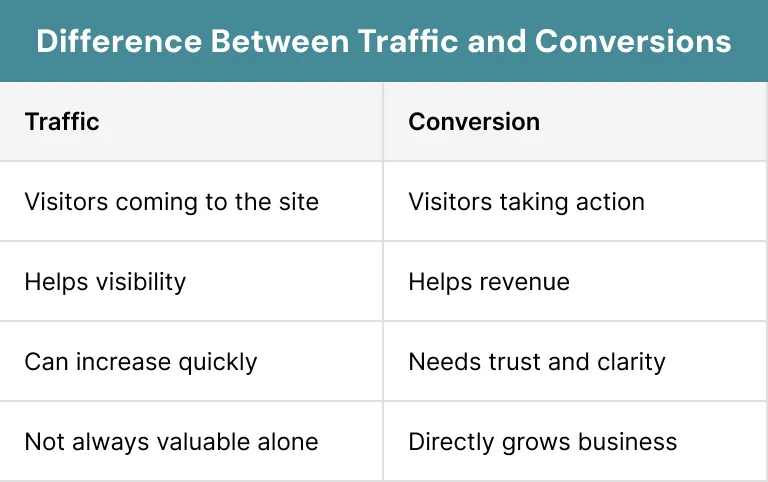
Traffic simply means people visiting your website. Conversions happen when visitors take any action like filling a form, booking a call or buying a product. A website not converting, may still get thousands of visitors each month.
Many businesses spend money on ads, but they ignore things like what happens after someone lands on the site. That’s why even a good looking website can become a waste of money.
Here is the difference:
Read more: Conversion Rate Optimisation (CRO): The Missing Growth Lever
Why Small Website Mistakes Cause Big Revenue Losses?
Small mistakes can often create big problems, like a website not converting. Things like unclear buttons, weak copy or poor mobile design may look harmless, but they reduce trust of the visitor.
Now visitors decide quickly when they find anything online. If your website feels slow or difficult to use, visitors leave the site in a few seconds.
Think about it like, there is a shop with messy shelves and no staff around. Customers walk in, feel confused and walk out again. Websites work exactly in the same way.
Here are the signs which cause website not converting you customers:
Sign #1: Visitors Do Not Understand What You Do
One major reason for a website not converting is unclear messaging or poor copy. Visitors should instantly know what your business offers. If they have to guess then they will leave your site.
Many websites try to sound clever instead of simple. Fancy words may look good, but they often confuse the visitors. A good and easy to understand tone always works better.
A good homepage should explain these things following:
- What you do
- Who you help
- Why someone chooses you
Why Confusing Messaging Pushes Customers Away?
Wrong headlines cause the visitor to lose interest. A website not converting, often uses bad phrases like “creative solutions” or “modern innovation” without explaining anything properly.
In this era, people are busy online. They scan pages very quickly. If they cannot understand your business in seconds then they move on to another website.
Good messaging should feel simple to visitors. They should never need to spend time to understand your service.
How to Create a Strong Value Message?
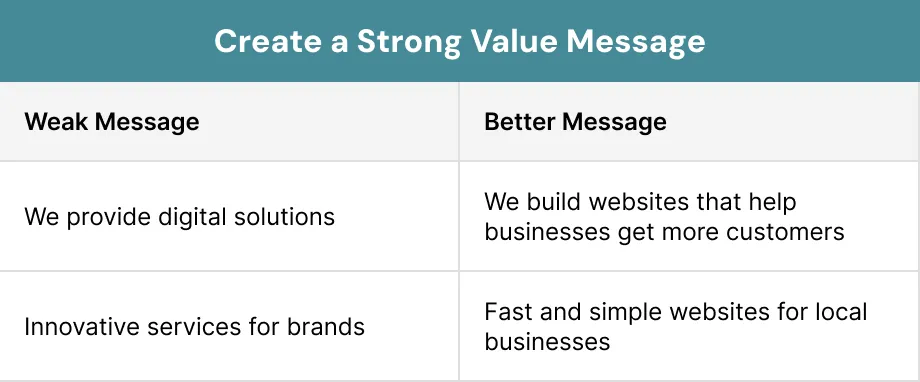
A strong value message helps to fix a website not converting problems. Your homepage should explain the benefit in a clear way. You should use easy- to- understand words.
Here is a simple example:
Sign #2: Your Website Looks Fine but Feels Boring
Some websites look fine and clean but still fail because they feel boring. A website not converting may not leave any strong impression on visitors.
If your site looks exactly like every competitor, people forget it quickly. You should come with a unique idea. Strong branding helps customers to remember your business in future.
Your website should feel human and real. Visitors connect better with businesses that show friendly.
The Importance of Brand Personality
Stock photos, difficult wording and wrong layouts make visitors feel disconnected. People trust businesses that feel honest and approachable. Real photos, friendly tone and a clear voice make a big difference.
You do not need flashy designs. You just need a website that feels genuine and easy to trust.
How Design Impacts Trust?
The design of your website can affect your business. A website not converting customers, may look outdated, cluttered or difficult to use.
Visitors often connect the quality of the website with the quality of business. If your website looks messy, they may think the business is unprofessional too.
Good design should include these:
- Clear spacing
- Easy-to-read text
- Consistent colours
- Simple navigation
- Fast loading pages
Sign #3: Your Website Loads Too Slowly
Speed plays a key role in conversions. A website not converting customers is often too slow, especially on mobile phones.
People expect websites to load quickly. If pages take too long to load, visitors lose patience and leave before reading anything.
Slow websites also affect Google rankings. This means fewer visitors and fewer chances to get customers.
How Slow Speed Hurts SEO and Conversions?
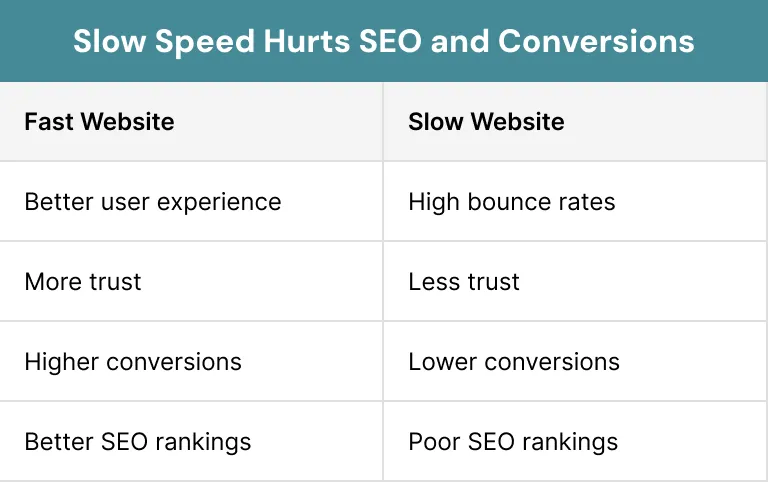
A slow site creates frustration for visitors. Visitors may think the business is not reliable. If the website takes time to load properly, visitors leave the site immediately.
Google also prefers fast websites. Slow speed can lower your rankings and also reduce traffic over time.
Here is how speed affects websites:
How to Improve Website Speed?
There are many simple ways to improve the speed of a website. Some useful fixes include:- Compressing images
- Removing extra plugins
- Choosing better hosting
- Reducing large videos
- Using caching tools
Did you know?
Even small speed improvements can help visitors to stay longer and take action.
Sign #4: Your Mobile Experience Is Frustrating
In the present era, most people now visit websites using mobile phones. A website not converting often performs badly on mobile devices. Tiny buttons, slow loading pages and difficult forms create issues. Visitors quickly leave the site when they feel it is hard to use. Your website should work smoothly and perfectly on every screen size. Mobile users should not need to zoom the content or any part of the website.Why Mobile Users Leave Quickly?
Mobile visitors have less patience. A website may force users to scroll too much or fill long forms on small screens. People want fast answers when they are browsing on phones. If the website feels awkward, they move to another website immediately.Did you know?
Poor mobile design quietly loses customers every single day.
What are the Best Practices for Mobile Optimisation?
A mobile-friendly website should feel clean and easy to use. Large buttons and short forms can help to improve the conversions.
Here are some good practices:
- Use bigger buttons
- Keep text readable
- Avoid pop-ups
- Shorten forms
- Improve page speed
Sign #5: Your Website Talks Too Much About You
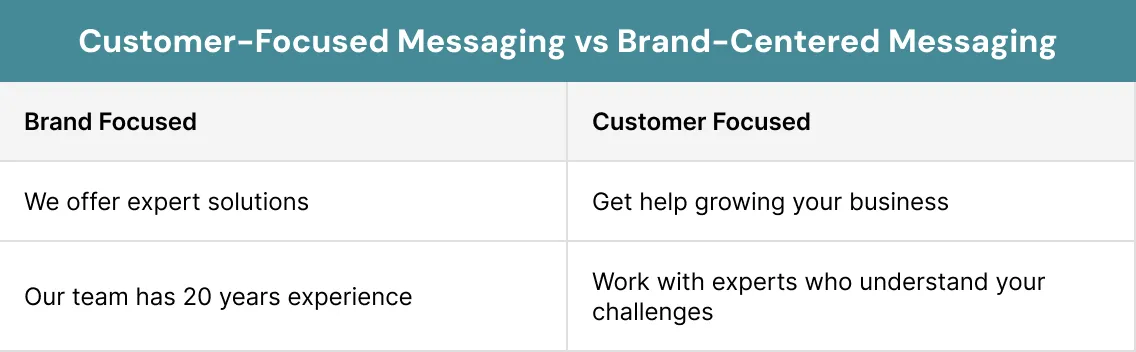
Many businesses make the mistake of focusing only on themselves. A website not converting often talks more about the company than the customer. Visitors care about their own problems first. They want to know how your business can help them in a proper and easy way.Customer-Focused Messaging vs Brand-Centered Messaging
Customer-focused content can help to solve problems of visitors. Many websites usually use “we” too much as compared to “you”.
Compare these examples:
How to Write a Website Copy That Converts?
Good copy helps to fix a website not converting issues. Clear writing can build trust and keep visitors interested.
Simple website copy should:
- Use short sentences
- Focus on benefits
- Explain problems clearly
- Avoid confusing words
- Guide visitors towards action
Did you know?
Easy words can improve readability and make visitors feel comfortable.
Sign #6 of Website Not Converting: No Clear Call to Action
Visitors need guidance. Even a perfect website often fails, because visitors do not know what to do next. If your pages lack clear buttons or instructions, visitors will leave without taking any action. Every page should lead visitors towards one simple next step.Why Do Visitors Need the Right Direction?
People do not like confusion when scrolling your website. A perfect website may offer too many choices, which overwhelms visitors. Simple actions can work best. Tell visitors exactly what to do and what happens next.
Examples include:
- Book a Free Call
- Get a Quote
- Start Today
- Contact Our Team
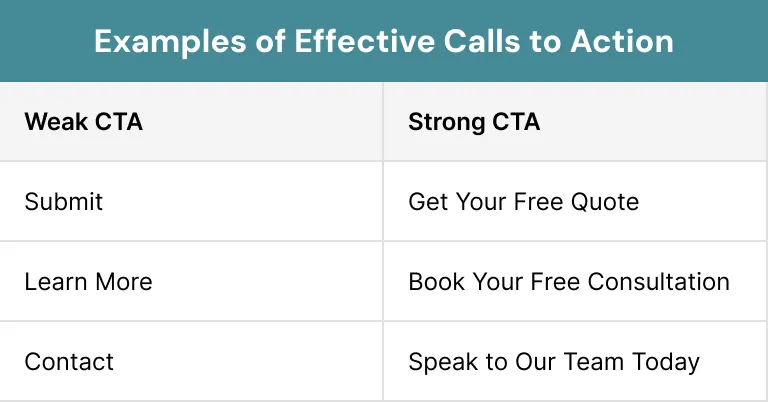
Examples of Effective Calls to Action
Clear action buttons can help to improve conversions. A website not converting customers often hides contact options or uses weak sentences.
Here are better CTA examples:
Sign #7: Your Website Lacks Trust Signals
Review matters in any business. A website not converting usually has a lack of reviews that shows the reliability of business. Visitors want reviews before spending money or sending enquiries to your business. Without authentic reviews, they can feel hesitant.
Pro Tip:
Trust should appear across the whole website, not only on one page.
Why Reviews Matters in Websites?
People trust customers more than ads. Many websites often do not add the reviews of their customers in a proper way. Good reviews can help visitors to feel comfortable about your business or services. They also help to reduce doubt about your business.Trust Elements Every Website Needs
A trustworthy website should have to include these elements:- Customer reviews
- Testimonials
- Real business photos
- Contact details
- Case studies
- Security badges
- Google reviews
Sign #8: Your Navigation Confuses Visitors
Navigation of your website should feel simple and natural. A website not converting customers often has confusing menus and too many options. Visitors should quickly find what they need. Complex menus also create frustration among the visitors. Simple navigation helps to keep visitors engaged and also increases conversions. A clear website menu should include only important pages. Good navigation usually includes:- Home
- About
- Services
- Pricing
- Contact
Too Many Menu Options Can Push Visitors Away
When visitors open your website, they should easily understand where to click next. Too many menus and dropdowns can make the website look messy and difficult to use.
A simple and organised menu can help to improve the user experience and visitors to stay longer on your site.
Sign #9: Your Website Feels Outdated
An outdated website can damage the trust of visitors. Many websites may still use outdated designs and old fonts. Visitors now judge businesses within seconds. If the website looks outdated, they may think the business itself is outdated too.
Outdated websites also struggle on mobile devices. This creates extra stress for visitors. That’s why your websites should feel fresh, simple and easy to use.
Updating your design regularly can help your business to stay competitive and trustworthy.
Modern Website Design Builds Trust
A modern website can help visitors to feel confident about your business. Clean layouts, readable fonts and updated images make your website look more professional.
When people trust your website, they are more likely to contact your business or buy your services.
Sign #10: Your Website Is Not Supporting Business Growth
Your website must be able to help your business in its growth process. A website not converting becomes such a big problem for your business, because it did not increase the sales.
A strong website helps to guide in a proper and easy way. You should think like your website is a part of your sales team, not just an online visiting card.
A good website should give these results:
- Generate leads
- Build trust
- Improve SEO
- Support marketing campaigns
- Increase sales enquiries
A Growth-Focused Website Helps Your Business Succeed
Your website should help visitors to take action, such as making enquiries, booking services or contacting your team. A strong website works like a full-time sales tool.
When your website supports the marketing and SEO properly then it becomes easier to attract new customers.
A clear website also builds trust and helps your business to grow faster.
Conclusion
A website not converting, can affect your business. Visitors can leave your website in seconds because of slow speed, poor mobile design or weak call to action of your website.
The good news for you is that you can solve these small issues, once you spot them. Even small changes may help to increase the conversions.
Your website should be able to guide visitors, build trust and make them feel comfortable when they take any action.
When you understand these signs, your website becomes one of the main sources for your business growth. At Xoom Plus, we help to improve conversions of your website, so you can achieve your results easily.
If your traffic is growing but your revenue is flat, it’s time to take action.
Contact us today for a key strategy to improve your user experience.
FAQs
What does website not converting mean?
A website not converting means visitors come to the site but do not take action like buying, booking, or contacting the business.
Why is my website not converting customers?
Common reasons include unclear messaging, slow speed, poor mobile design, weak trust signals and confusing calls to action.
Can slow speed cause a website not converting issue?
Yes. Slow loading pages frustrate users and increase bounce rates, which reduces conversions.
Why is mobile design important for website conversions?
Most visitors browse on phones. If the mobile experience feels difficult, users quickly leave and choose competitors instead.
Why Is My Website Not Converting Leads?
Your website may not be converting leads because visitors feel confused, distracted, or unsure about taking action.